


 Casinos
 Bonuses


 Thank you for voting
Couldn't find what you were looking for?
Contact our Support Team at support@chipy.com. We would be happy to help you.


 Updated on May 19, 2026
On this page, we will show you the step-by-step process of claiming the real money items from the Shop.
What will you find on this page:
Without further ado, let’s get started.
Recommendation
Want to learn more? Check out our dedicated Chipy Shop guide to find out what it is all about.
Claiming items from the Shop is quick and easy. Here is how you can do it, step-by-step:
First, you will need to log in your Chipy account and access the Real Money Shop.
On this page, you will find all the Real Money items available at the moment.
Please Note
Alternatively, you can navigate to the Real Money items by pressing the “Shop” button located in the header, and from there, select “Real Money”.
From the Shop, select the Real Money item that you want to redeem and press the green “Buy Now” button to initiate the purchase.
Remember
To successfully purchase a real money item from the Shop, you will need to have enough Chipy Coins in your balance, meet the minimum level requirements, and ensure you did not buy another Real Money item in the last 14 days.
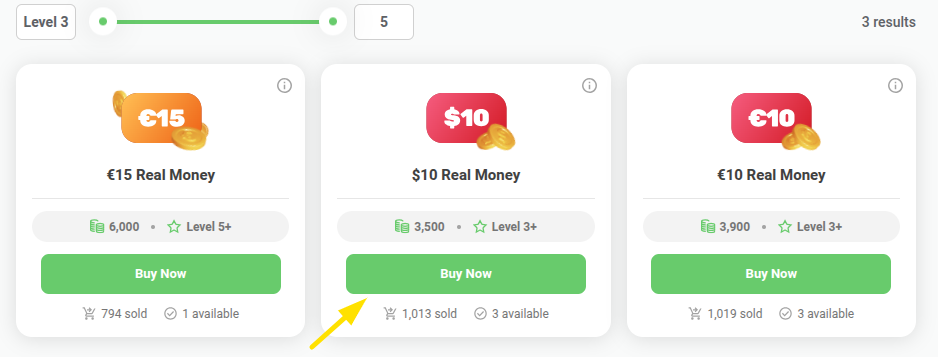
Only users who have a valid payment option set up can claim Real Money items from the Shop.
Already have a payment method added on Chipy? Then, you can skip to step 4.
If you don’t have a payment method set up yet, you can do that from the User Settings page. Learn more from our guide on how to add your payment details on Chipy.
In case you don’t have your banking details set up correctly, you will be prompted to add or edit them when you press the “Buy Now” button, as shown in the screenshot below.
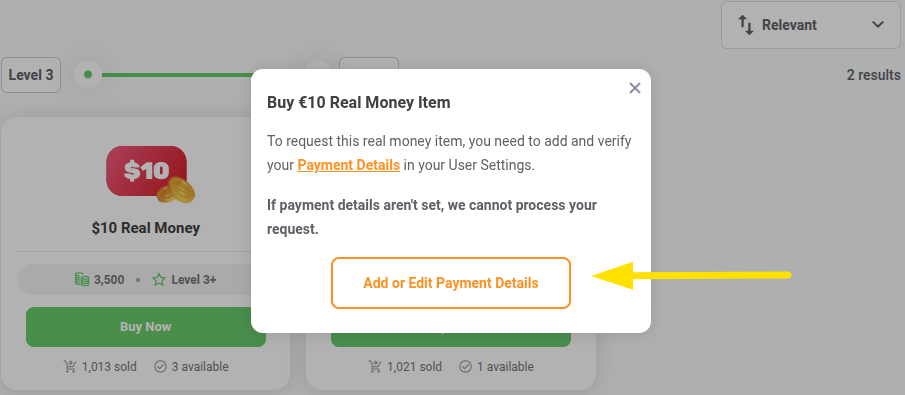
Once you have a valid payment method added to your Chipy account, you just need to confirm your purchase.
Simply press the “Yes, send My Real Money” button, and you’re done.
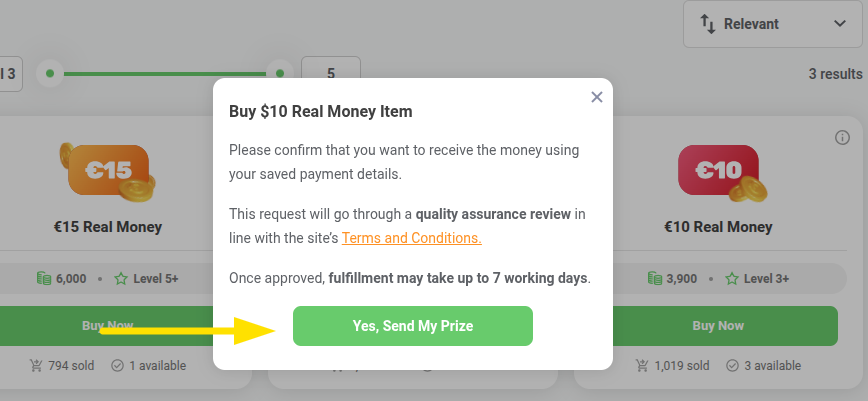
That’s it! Once your purchase is approved by the QA team, the Real Money amount will be transferred to your preferred payment method within 7 business days.
Since the transaction won’t be processed instantly, you may want to check its status.
You can easily do that from the User Homepage, the Chipy Notifications, or your email address.
There are 3 different types of statuses for any Real Money transaction:
You will receive notifications and updates during each step of the process, so you will never miss out on the status of your Real Money purchase.
Users who had a spammy behavior on the website with the sole intention of gaining experience points & coins will have their shop requests denied and their account will be suspended, as this goes against our website’s T&C's.
*As we promote an honest community and wish to reward users who have a genuine activity, we unfortunately have to place any blocked or recently unblocked accounts under supervision for a certain period of time, in which they will be unable to issue shop requests.
Need more help?
If you still have questions or you run into any trouble during the redemption process, you can always contact our Support Team at support@chipy.com.
We are more than happy to help you!
Couldn't find what you were looking for?
Contact our Support Team at support@chipy.com. We would be happy to help you.
