 Level
Level 


 Casinos
 Bonuses


Get the Chipy App Experience


iOS Installation Steps
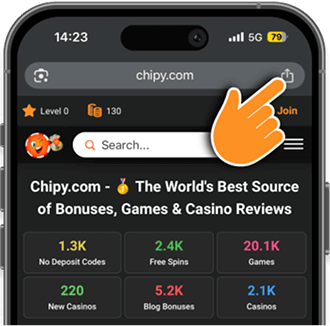
Step 1: Tap the “Share” icon.
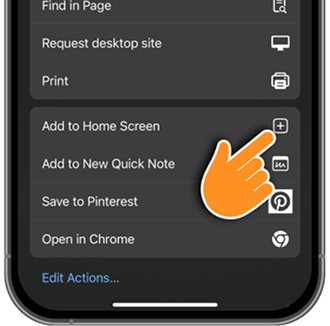
Step 2: Tap the “Add to Home Screen” button.
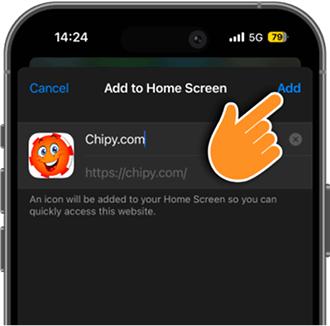
Step 3: Tap the “Add” button and that’s it.
Android Installation Steps
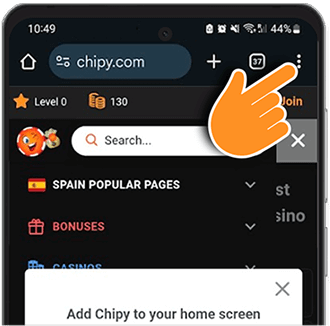
Step 1: Tap the “Options” menu.
Step 2: Tap the “Add to Home Screen” option.
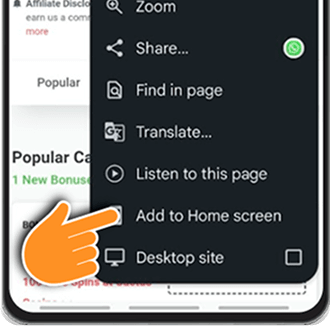
Step 3: Press the “Install” icon.
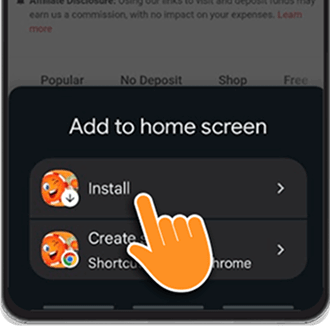
Step 4: Confirm by pressing the “Install” button.
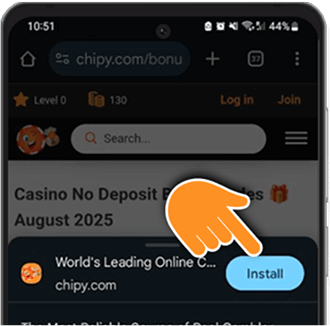
Why Use the Chipy App Instead of the Mobile Site?
1. Instant Access to Bonuses & Games
Save Chipy to your home screen and jump straight into the latest casino bonuses, free spins, and games — no need to search or type the URL.
2. Faster Loading for Big Wins
The PWA loads lightning-fast, even on weak Wi-Fi. Get to your no-deposit codes, reviews, and sweepstakes instantly without waiting.
3. Works Offline for Browsing
Check saved bonuses, reviews, and your sweepstakes entries even without an internet connection — perfect for when you’re on the move.
4. Get Push Notifications for Hot Offers
Be the first to know when exclusive bonuses drop, new casinos join Chipy, or when sweepstakes are about to close.
5. App-Like Feel Without the App Store
Enjoy a smooth, native-app experience — fast navigation, clean design, and easy scrolling — without downloading from Google Play or Apple.
6. Always Updated
The PWA automatically updates in the background, so you’ll always have the latest promotions, casino reviews, and news.

