


 Casinos
 Bonuses


Poker Texas Hold Em

 hot
hot


Poker Texas Hold Em Details

Software
Vibra Gaming
Release date
Jul 30, 2024
Game type
Texas Hold'Em

Times Played
 No
No
3D animation
No
Technology
HTML5
Play Poker Texas Hold Em Slot for Real Money




Load More Casinos (+10)
How to Play Poker Texas Hold Em Slot: Mastering the Basics
1
PICK A POKER CHIP.
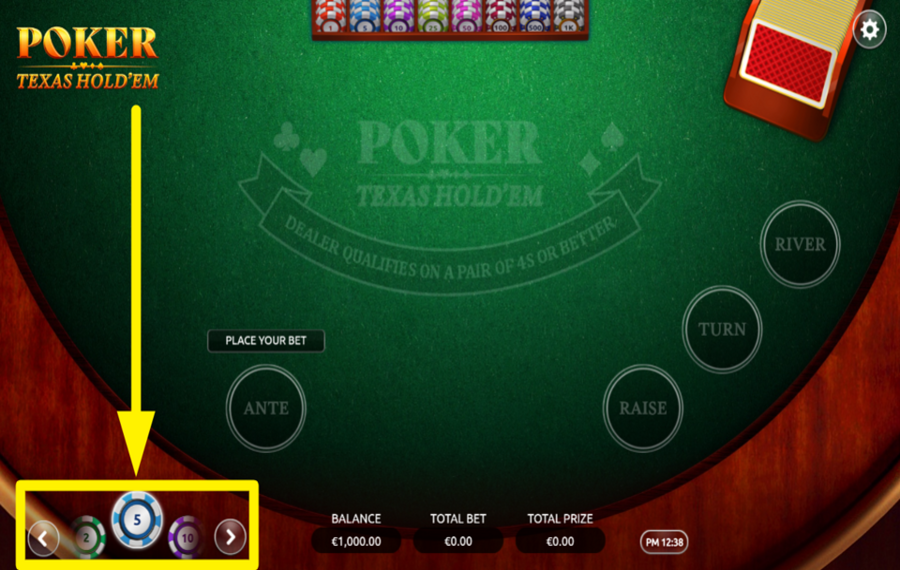
Begin by selecting the amount you want to wager. Use the poker chips displayed at the bottom-left of the screen. Navigate through the available chip values by clicking the arrows next to them. The chip you select will determine your "bet" for the round.
2
PLACE THE ANTE BET.
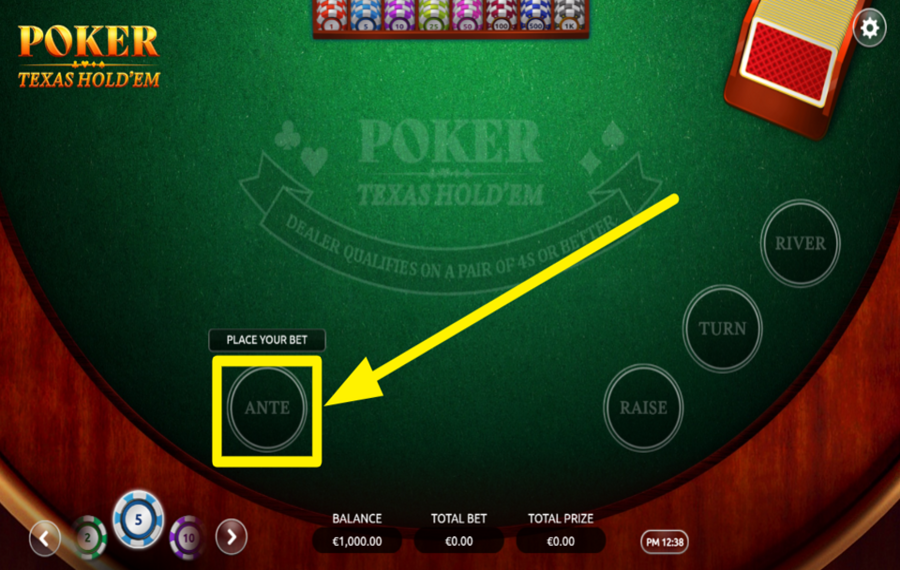
After placing your "Ante bet", click the "Deal" button at the bottom-right corner of the screen. Two face-up cards will be dealt to you, while the dealer receives two face-down cards. At this stage, the community cards are not yet dealt.
3
DEAL THE CARDS.
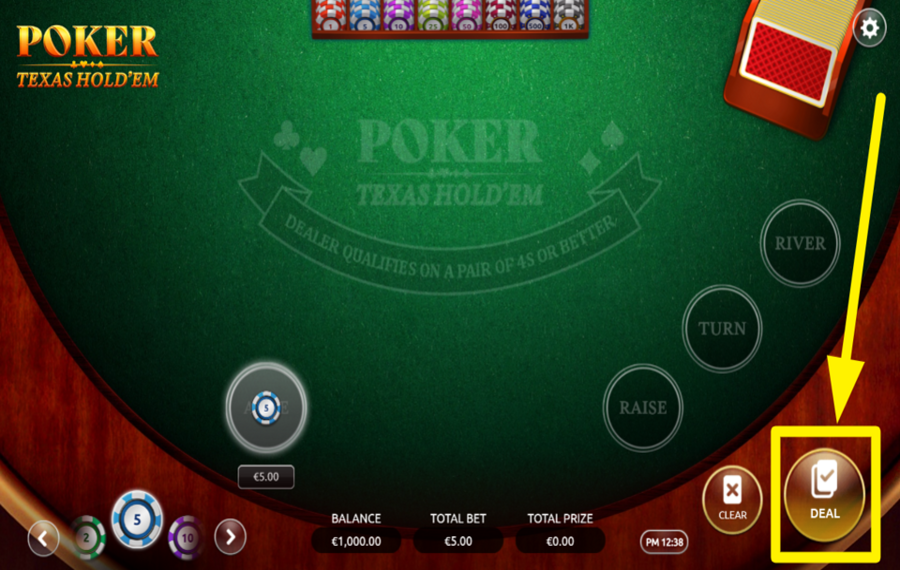
After placing your "Ante bet", click the "Deal" button at the bottom-right corner of the screen. Two face-up cards will be dealt to you, while the dealer receives two face-down cards. At this stage, the community cards are not yet dealt.
4
DECIDE TO FOLD OR RAISE.
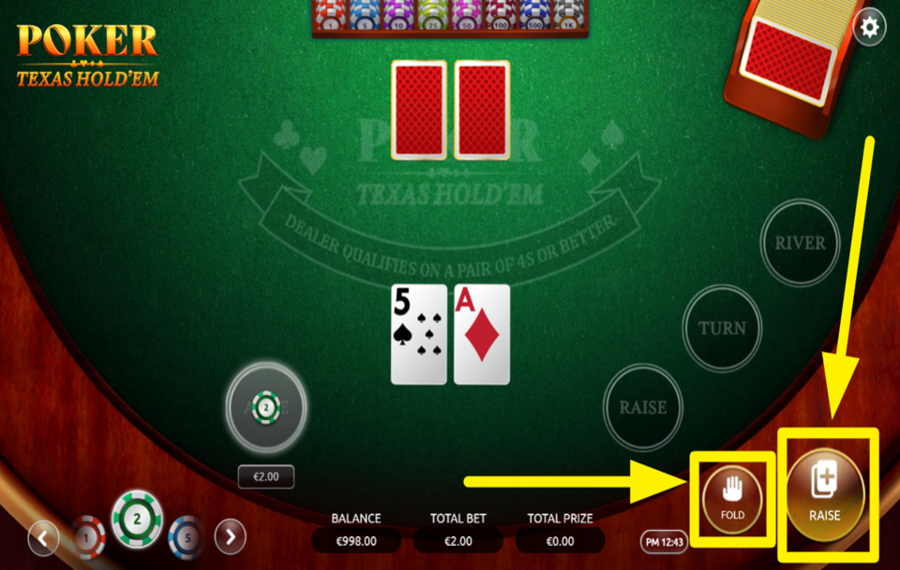
Once your initial two cards are dealt, you must assess their strength and decide your next move. Click the "Fold" button at the bottom-right corner if you wish to end the round and forfeit your "Ante bet". Alternatively, click the "Raise" button to double your "Ante bet" and continue playing. If you choose "Raise", the first three community cards will be revealed. After all community cards are dealt, the dealer’s cards are revealed. The best five-card hand is determined using your two cards and the five community cards. Winnings are calculated based on the poker hand rankings and displayed under the "Total Prize" section.
5
REBET OR CLEAR YOUR BET.
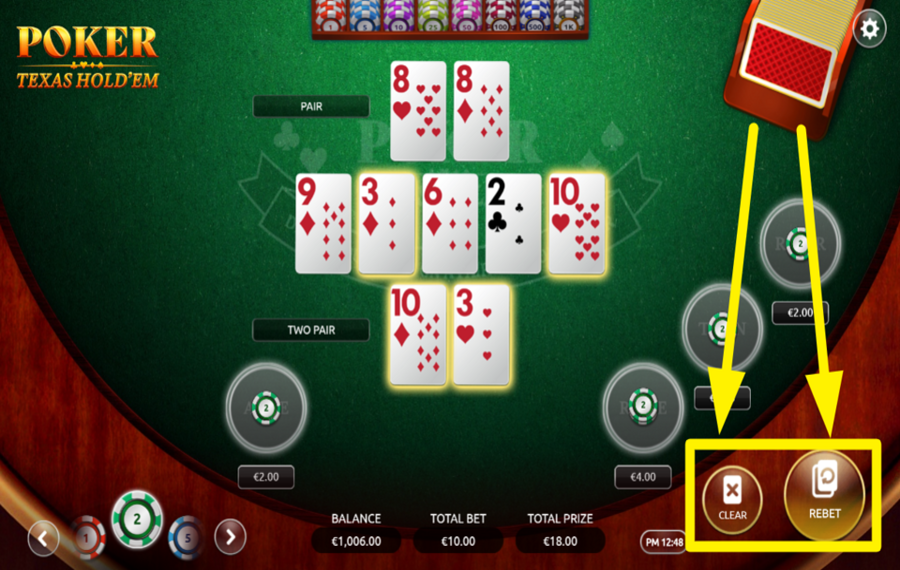
After completing a round, you can either repeat your previous wager or reset it. If you wish to continue with the same "bet", click the "Rebet" button located at the bottom-right corner. If you prefer to start fresh with a new "bet" amount, click the "Clear" button to reset your wager.
6
CHOOSE THE TURN BET OPTION.
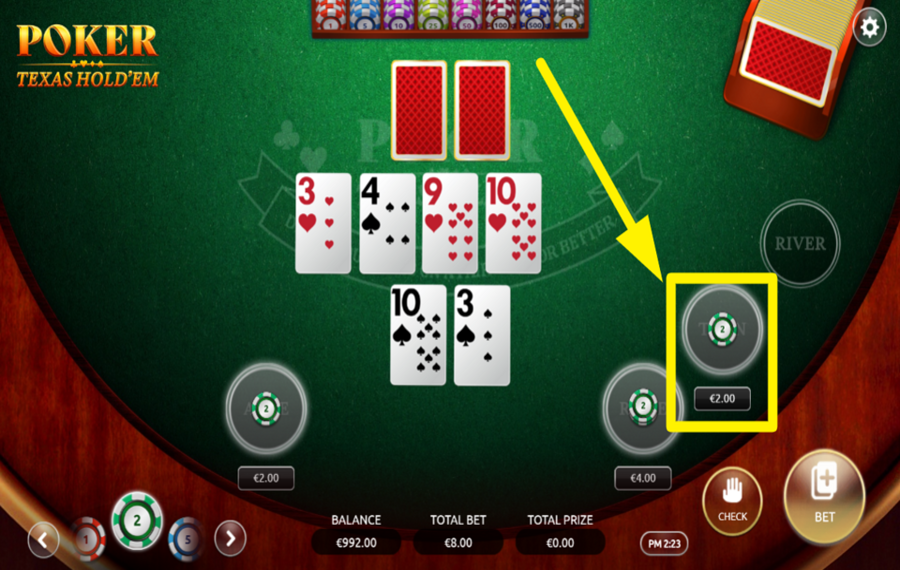
After the first three cards are revealed, reevaluate your hand and decide whether to proceed. If you wish to place an additional wager, click the "Turn" button located on the right side of the table. This will deal the fourth community card. If no further wager is required, you can continue by using the "Check" option when available.
7
OPT FOR THE RIVER BET.
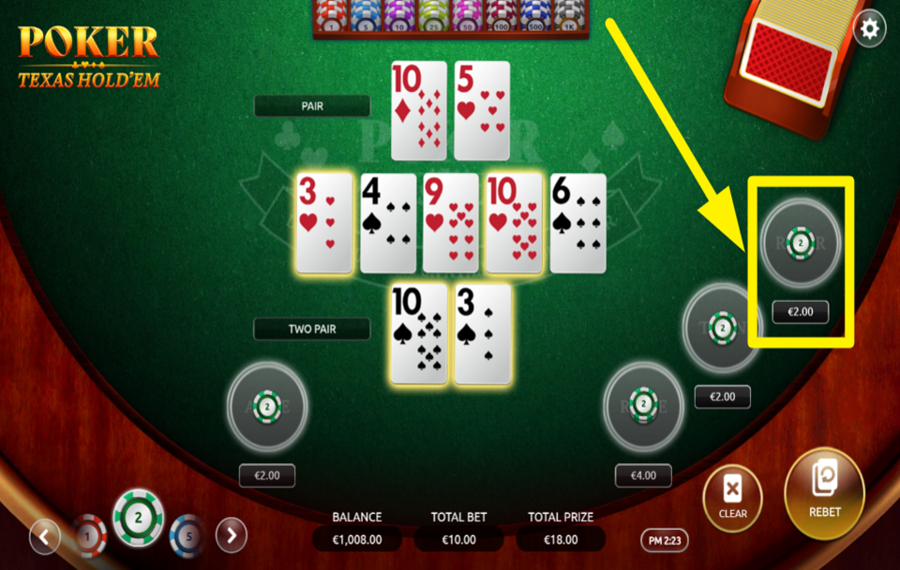
Finally, decide your action before the last card is dealt. To place your final wager, click the "River" button on the right side of the table. This action will reveal the fifth and final community card. If no additional wager is needed, use the "Check" option to proceed.
Poker Texas Hold Em Ratings & Reviews
Our community rated Poker Texas Hold Em as Very Good with a score of 4.2 out of 5 based on 21 votes.




roulie07Level 7France


McukCoinLevel 4New Zealand

AriezuilenLevel 10

GoenndyrLevel 8Germany
1996KlestilLevel 1Czech Republic


KPAULS960311Level 1
Zouharhalllll![account-cancel]() Suspended
Suspended
 Suspended
uztrewert![account-cancel]() Suspended
Suspended
SuspendedJeroMaatjeLevel 6



Nikole7979![account-cancel]() Suspended
Suspended
SuspendedZouharhall![account-cancel]() Suspended
Suspended
SuspendedTelevizorius![account-cancel]() Suspended
Suspended
Suspendedbizz43Level 5
Radzik![account-cancel]() Suspended
Suspended
Suspended

FiFiPL![account-cancel]() Suspended
Suspended
SuspendedShow 6 more
Rate and Review Poker Texas Hold Em
When writing a Game Review, remember to share your personal experience in detail - whether it's positive or negative. For more tips on writing game reviews, check out our dedicated Help Page.
How to Write a Game ReviewPoker Texas Hold Em Q&As
Got questions about Poker Texas Hold Em?
Ask a QuestionCompare Poker Texas Hold Em to Other Games
+![Mascot Games Casino Holdem]()

Mascot Games Casino Holdem
RTP: 96.4%
+![Playtech Casino Holdem]()

Playtech Casino Holdem
RTP: 97.84%
+![TaDa Games Ultimate Texas Holdem]()

TaDa Games Ultimate Texas Holdem
RTP: 96.5%
+![Live Casino Holdem]()

Live Casino Holdem
RTP: 97.84%
+![Platipus Texas Holdem]()

Platipus Texas Holdem
RTP: 98.75%
+![Platipus Casino Holdem]()

Platipus Casino Holdem
RTP: 97.84%
+![Casino Holdem A]()

Casino Holdem A
RTP: 99.18%
+![Texas Holdem Bonus]()

Texas Holdem Bonus
RTP: 99.37%
+![Evolution Ultimate Texas Holdem]()

Evolution Ultimate Texas Holdem
RTP: 99.47%
+![Vivo Gaming Casino Holdem]()

Vivo Gaming Casino Holdem
RTP: Undisclosed
RatingSoftwareYearRTP

Poker Texas Hold Em
Vibra Gaming
2024
98.75%



Show more![arrow_down]()


Other Games by Vibra Gaming








Load More Vibra Gaming Games

Mihai Enculescu
Senior Game Expert
- Over 2 years of experience in the iGaming industry.
- Uploaded & maintained data for 3,000+ casino games.
- Strong grasp of casino game mechanics, especially slots.
- Reviewed and fact-checked over 3,500+ casino games.

