


 Casinos
 Bonuses


Platipus Gaming Top Card Trumps


Platipus Gaming Top Card Trumps Details

Software
Platipus Gaming
Release date
Sep 18, 2025
Game type
Table Games

Times Played
 No
No
3D animation
No
Technology
HTML5
Play Platipus Gaming Top Card Trumps Slot for Real Money




Load More Casinos (+10)
How to Play Platipus Gaming Top Card Trumps Slot: Mastering the Basics
1
PICK A BET AMOUNT.
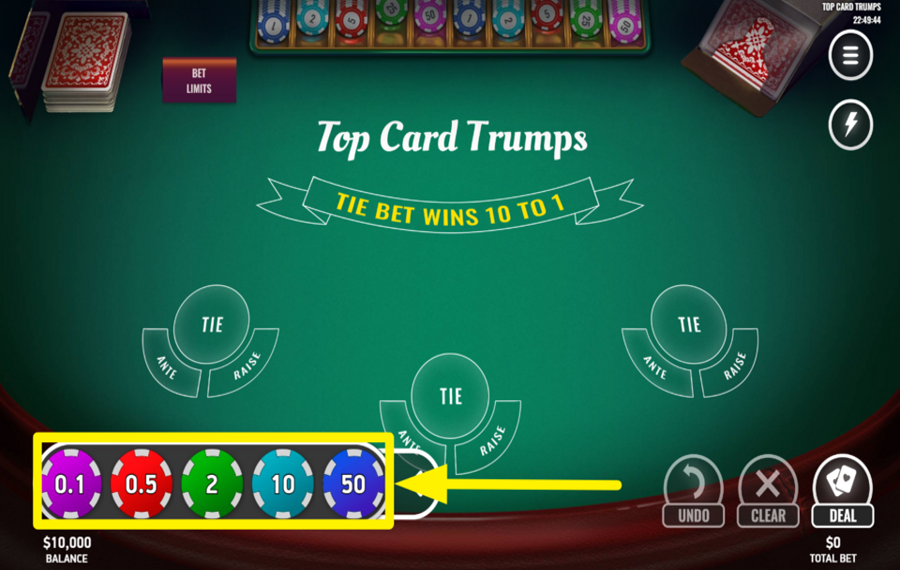
Tap the casino chip icon in the bottom left corner of the screen to expand the full list. Then, select your “Ante bet“ by tapping a chip value. Click on your “Ante“ area at the center bottom of the virtual game table. You can choose different chip values as long as you stay within the max limit of $50.
2
ADJUST OR RESET YOUR BET SELECTION.

Before dealing the cards, you can change your betting strategy by using the two buttons positioned at the bottom right of the interface. Press “Undo” to remove the most recently placed chip, or “Clear” to remove all placed “bets“ at once and reset the table.
3
DEAL THE CARDS!
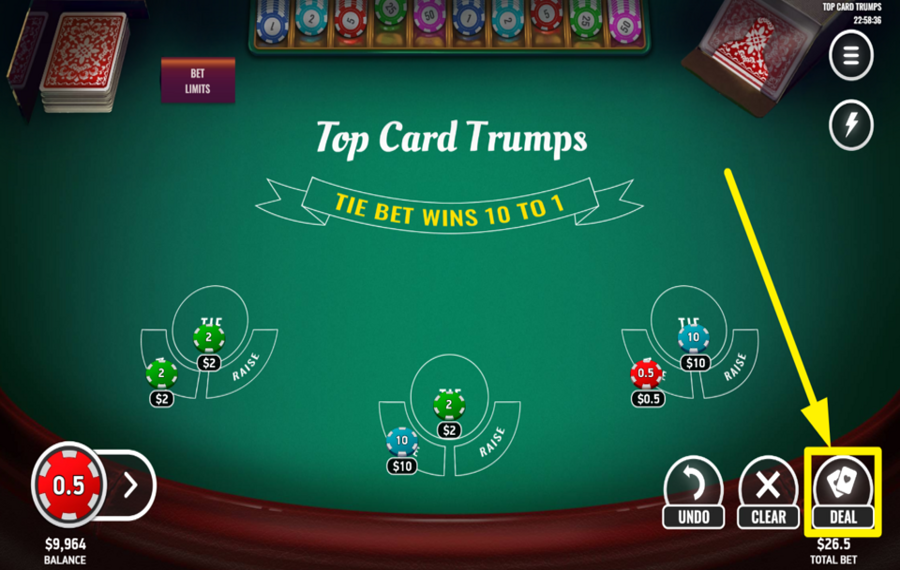
Begin by placing your required “Ante” wager on the table, as no optional bets can be added without an active “Ante.” Once the base “bet” is locked in, press the “Deal” button at the bottom right to start the round. One card is dealt face up to your hand, and one to the dealer, and the higher card determines the initial outcome.
4
FOLD OR DECLARE WAR.
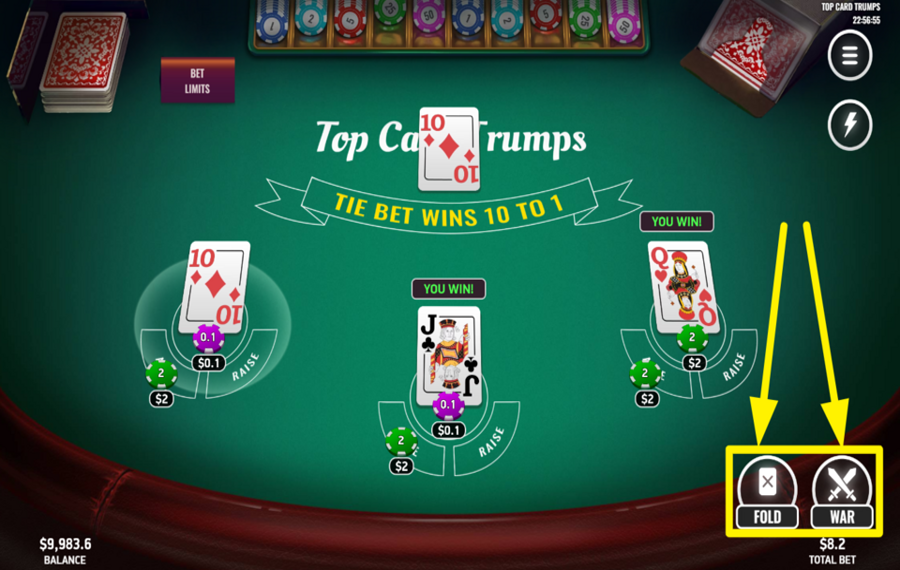
If both cards are equal in rank, the round enters a tie state, and you must choose how to proceed. Press “Fold” to end the round immediately and surrender half of your “Ante.” Alternatively, select “War” to continue by placing a “Raise” equal to your original “Ante,” which allows new cards to be drawn to break the tie and decide the winner.
5
CLEAR THE TABLE OR REBET.
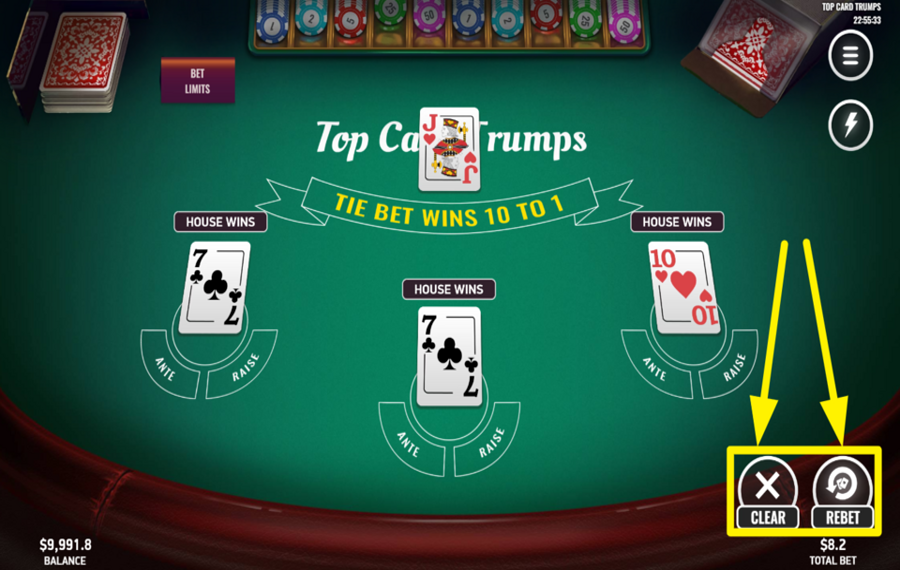
At the end of a completed round, new options appear at the bottom right. Press “Rebet” to place the same “Ante“ amount as the previous round and deal instantly. Press “Clear” if you want to remove all “bets“ and start fresh with a new chip selection and strategy.
6
CHANGE THE SPEED.
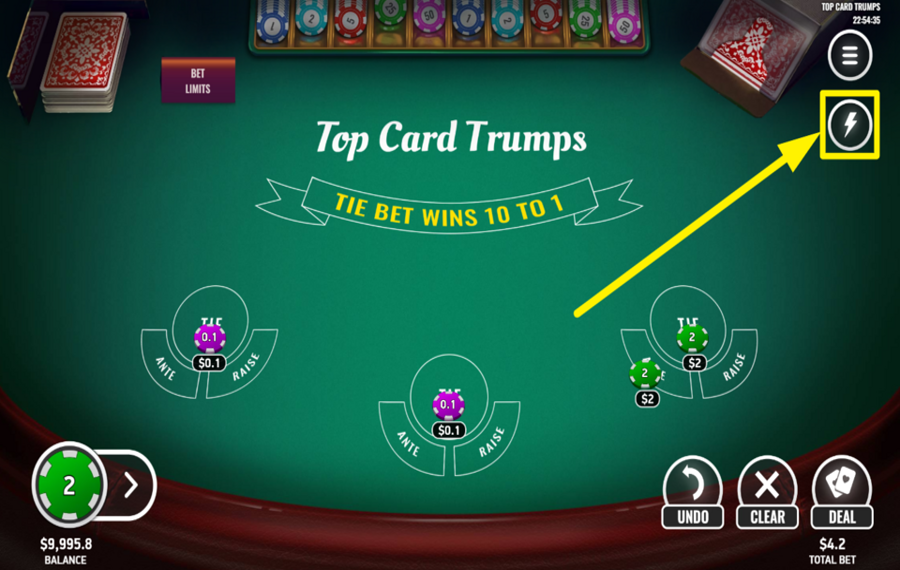
If you prefer faster gameplay, activate “Turbo“ mode by clicking the lightning-bolt icon located along the right edge of the screen.
Platipus Gaming Top Card Trumps Ratings & Reviews
Our community rated Platipus Gaming Top Card Trumps as Very Good with a score of 4 out of 5 based on 1 vote.




pingvinasLevel 39


Rate and Review Platipus Gaming Top Card Trumps
When writing a Game Review, remember to share your personal experience in detail - whether it's positive or negative. For more tips on writing game reviews, check out our dedicated Help Page.
How to Write a Game ReviewPlatipus Gaming Top Card Trumps Q&As
Got questions about Platipus Gaming Top Card Trumps?
Ask a QuestionCompare Platipus Gaming Top Card Trumps to Other Games
+![7 Up Down]()

7 Up Down
RTP: 97%
+![KA Gaming Pok Deng]()

KA Gaming Pok Deng
RTP: 96%
+![Classic Fish Prawn Crab]()

Classic Fish Prawn Crab
RTP: 97.22%
+![KA Gaming Dragon Tiger]()

KA Gaming Dragon Tiger
RTP: Undisclosed
+![Andar Bahar Extra]()

Andar Bahar Extra
RTP: 95.28%
+![Titan Dice]()

Titan Dice
RTP: 97.33%
+![RTG Andar Bahar]()

RTG Andar Bahar
RTP: Undisclosed
+![Under 7 Over 7]()

Under 7 Over 7
RTP: 96.2%
+![Mille Due Mille]()

Mille Due Mille
RTP: 96.2%
+![Casino War Multihand]()

Casino War Multihand
RTP: 97.83%
RatingSoftwareYearRTP

Platipus Gaming Top Card Trumps
Platipus Gaming
2025
97.32%



Show more![arrow_down]()


Other Games by Platipus Gaming








Load More Platipus Gaming Games

Mihai Enculescu
Senior Game Expert
- Over 2 years of experience in the iGaming industry.
- Uploaded & maintained data for 3,000+ casino games.
- Strong grasp of casino game mechanics, especially slots.
- Reviewed and fact-checked over 3,500+ casino games.

