 Level
Level 


 Casinos
 Bonuses


Fruity Cubes

 Refresh
 Full Screen
 Report
Fruity Cubes Details

Software
NeoGames
Release date
-
Game type
Other

Times Played
 No
No
3D animation
No
Technology
HTML5
How to Play Fruity Cubes Slot: Mastering the Basics
1
SELECT THE NUMBER OF TICKETS.
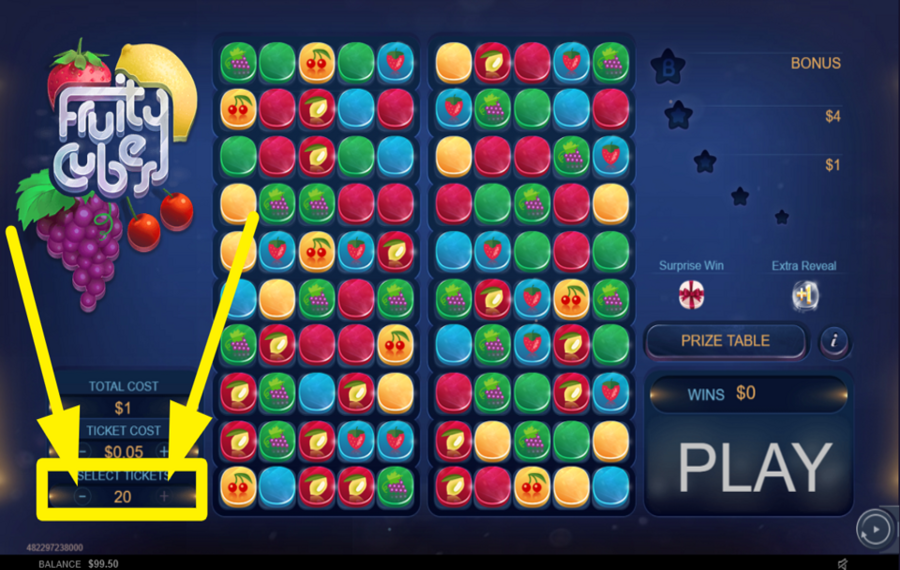
Find the "+" and "-" symbols at the bottom left of the screen. Use them to select either 10 or 20 tickets. Choosing 10 reveals symbols on one part or 5 columns of the play area. Selecting 20 tickets reveals symbols across both parts or all 10 columns.
2
CHOOSE THE COST PER TICKET.
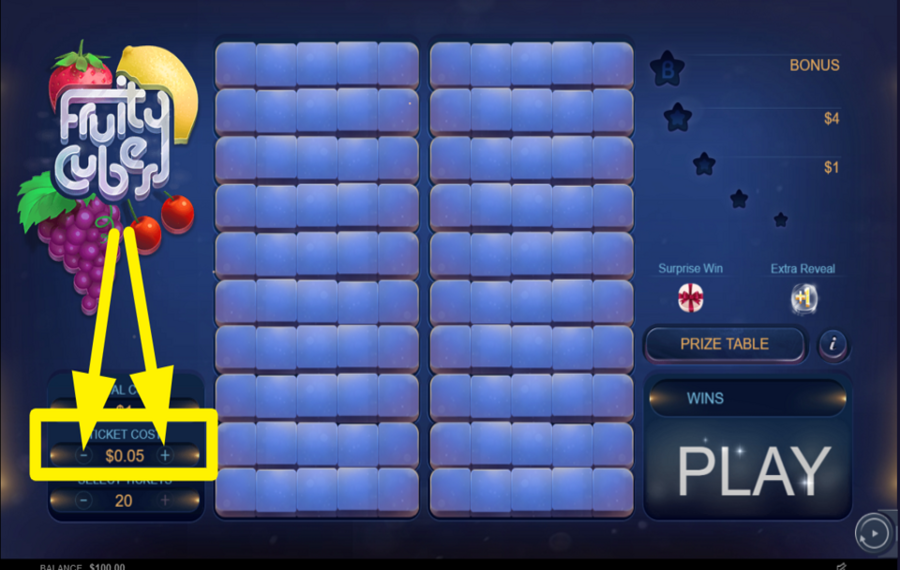
Look above the "Select Tickets" panel for the "Cost Per Ticket" option. The price starts at $0.05 per ticket. Here, use the "+" and "-" symbols to set a price per ticket. Your total "bet" is calculated by multiplying the ticket price by the number of tickets.
3
EMBARK ON YOUR GAME.
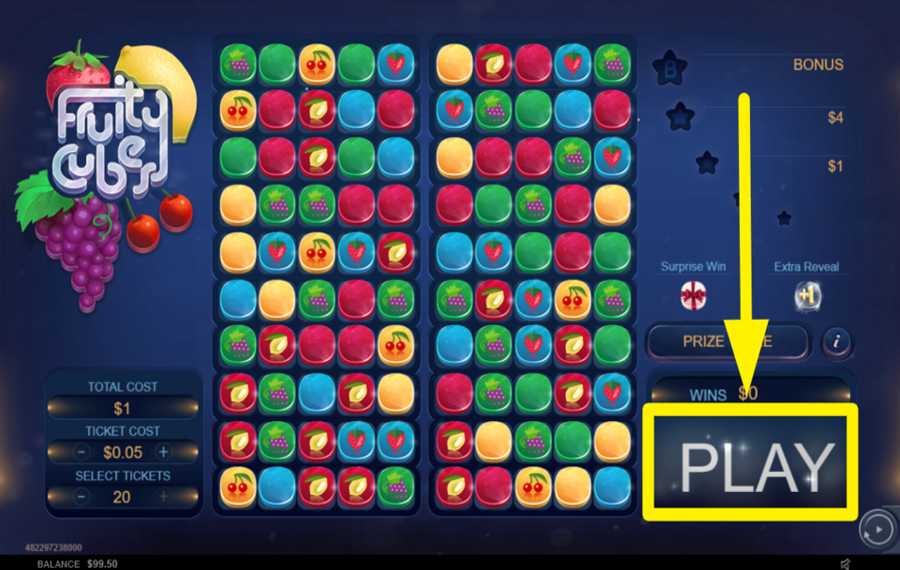
Locate the big "PLAY" button at the bottom right corner. It is rectangular in shape. Click it to start the game and see the reel movements.
4
TRIGGER AUTOMATIC PLAY.
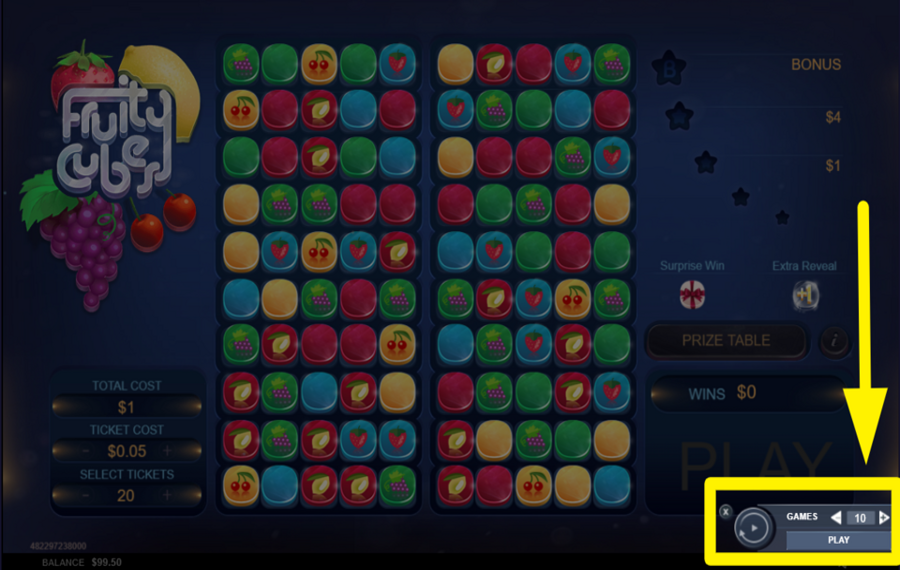
The "Autoplay" button is in the bottom right corner, symbolized by a play icon surrounded by two arrows. Click it to open a panel, then select the number of automatic spins before hitting the "Play" option within this panel.
Fruity Cubes Ratings & Reviews
Our community rated Fruity Cubes as Very Good with a score of 4.3 out of 5 based on 23 votes.




14.04Level 8


nadrazni0000![account-cancel]() Suspended
Suspended
 Suspended



AaabbLevel 7




pingvinasLevel 38



Raquelin40![account-cancel]() Suspended
Suspended
Suspended


verichipy![account-cancel]() Suspended
Suspended
Suspended
longleggsLevel 21
Katie1888![account-cancel]() Suspended
Suspended
Suspended


HostmarioLevel 7
Kate1809![account-cancel]() Suspended
Suspended
SuspendedCarowojt![account-cancel]() Suspended
Suspended
Suspendedsampie![account-cancel]() Suspended
Suspended
Suspended



Armando01![account-cancel]() Suspended
Suspended
SuspendedAlansim77Level 11Malaysia
rjdgridgiedidgeLevel 10Australia
Show 8 more
Rate and Review Fruity Cubes
When writing a Game Review, remember to share your personal experience in detail - whether it's positive or negative. For more tips on writing game reviews, check out our dedicated Help Page.
How to Write a Game ReviewFruity Cubes Q&As
Got questions about Fruity Cubes?
Ask a QuestionCompare Fruity Cubes to Other Games
+![Moody Fruits]()
Moody Fruits
RTP: 99.91%
+![Golden Apple]()

Golden Apple
RTP: 0%
+![Lucky Streak Tap Cards]()

Lucky Streak Tap Cards
RTP: 92.42%
+![Quarter Million Fruit]()

Quarter Million Fruit
RTP: 96%
+![Midnight Madness]()

Midnight Madness
RTP: 96%
+![Candy Bar]()

Candy Bar
RTP: 95.79%
+![Spin X]()

Spin X
RTP: 97.7%
+![Happy Hour Fruit Slot]()
Happy Hour Fruit Slot
RTP: 96.8%
+![Fruit X]()

Fruit X
RTP: 97.16%
+![Multi Hot Wheel]()
Multi Hot Wheel
RTP: 96%
RatingSoftwareYearRTP

Fruity Cubes
NeoGames
n/a
Undisclosed


Show more![arrow_down]()


Other Games by NeoGames








- Over 2 years of experience in the gambling industry.
- Researched and uploaded over 2.000 casino games to the website;
- Assessed the accuracy of more than 5.000 casino games;
- Coordinated and documented over 20,000 data updates across casino games, guides, and land-based casino information.
- Oversaw and maintained large-scale project tracking to ensure timely and accurate content delivery.
- Has a Bachelor's Degree in Psychology from Spiru Haret University.

