


 Casinos
 Bonuses


On Demand Roulette


On Demand Roulette Details


Times Played
 No
No
3D animation
No
Technology
HTML5
Play On Demand Roulette Slot for Real Money




Load More Casinos (+10)
How to Play On Demand Roulette Slot: Mastering the Basics
1
CHOOSE YOUR BET.
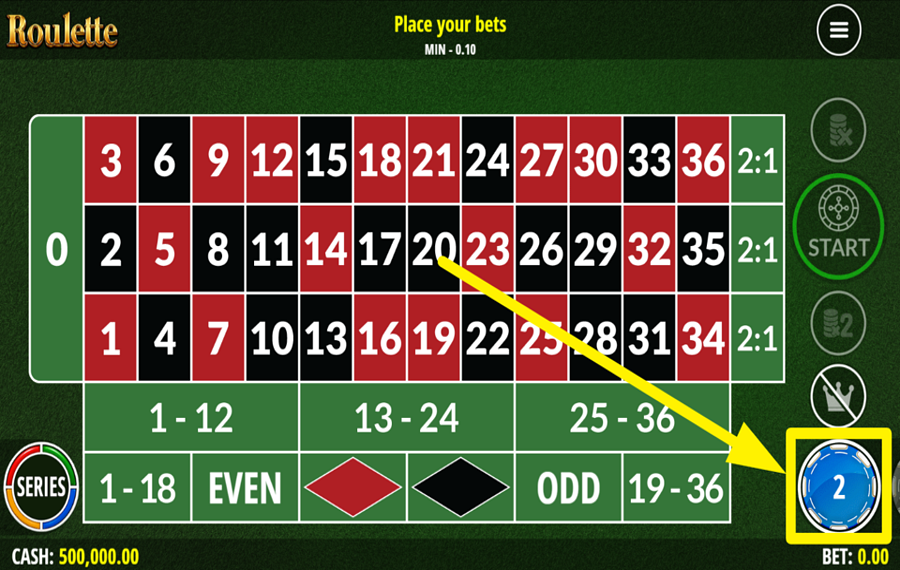
Press the casino chip icon in the bottom-right corner to view the available chip values, which extend to the left of the selected chip. Tap the chip you want to use. This value determines how much you place each time you tap an area of the roulette table.
2
PLACE YOUR BET.
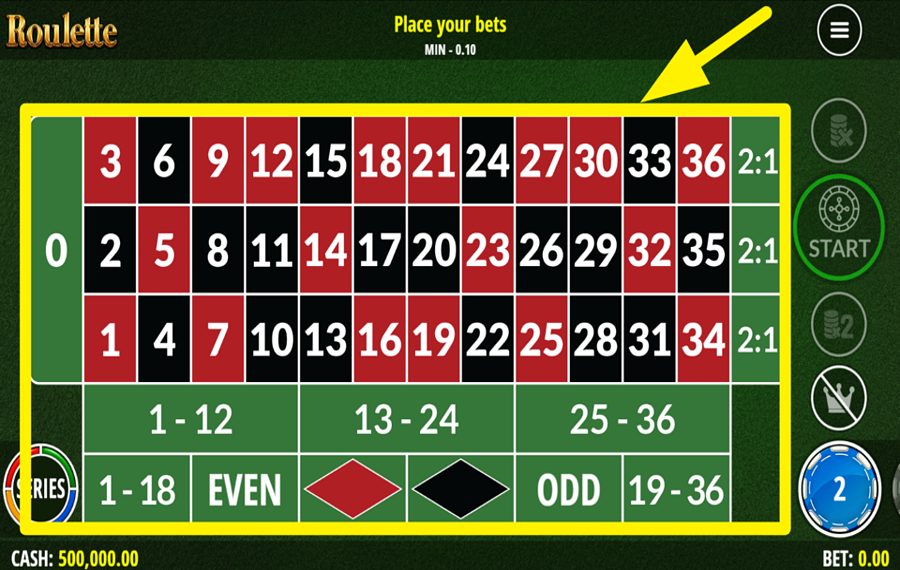
Tap a number or another betting area on the table to place your selected chip. Choose a single number for a straight-up “bet,” tap a dividing line or corner to cover multiple adjoining numbers, or use the green sections for broader options such as red or black, odd or even, low numbers from 1–18, high numbers from 19–36, columns, or dozens. You can place chips on more than one area before starting the round. For special combinations, press the “Series” button in the bottom-left corner and select an available series “bet”.
3
OPT FOR A SERIES.
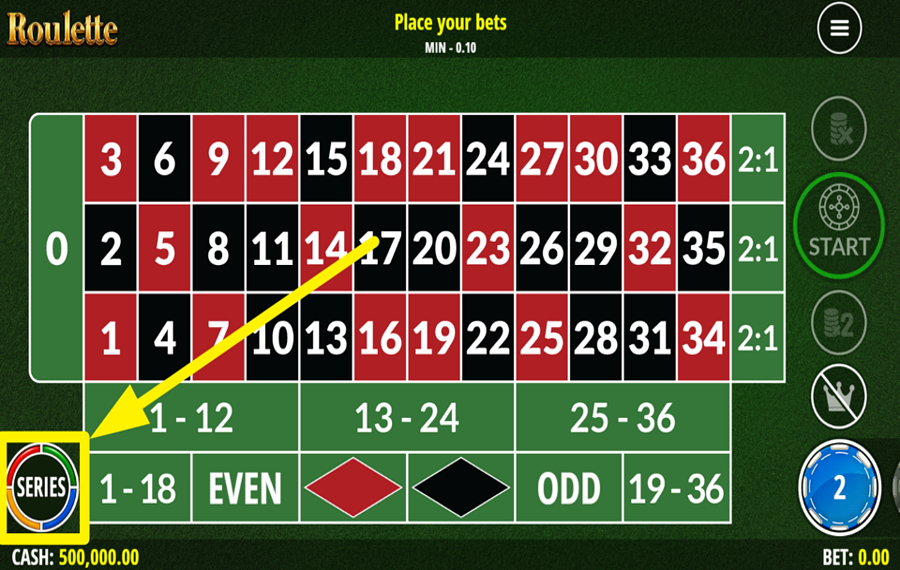
Press the “Series” button in the bottom-left corner to open the special betting options. Choose “Big Series” to place nine chips across its covered numbers, “Orphans” for five chips, “5/8 Series” for six chips, or “Zero Series” for four chips. You can also select “Crown,” then choose a number to place a “bet” on that number and the surrounding fields.
4
CANCEL YOUR SELECTED WAGER.
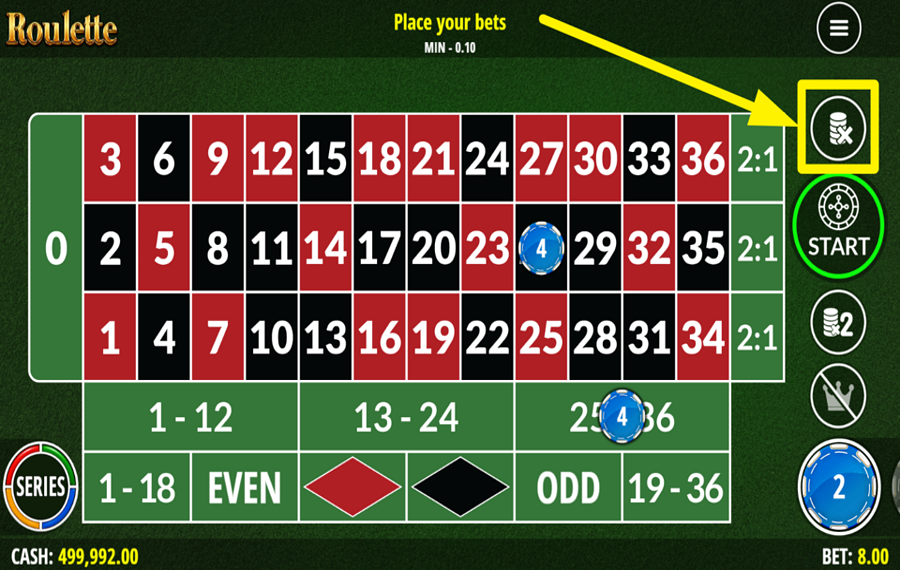
Press the crossed-chip button at the top of the vertical control panel on the right to remove the last chip you placed. Tap it repeatedly if you need to undo several placements, or press and hold it to clear every chip from the table and start over.
5
DOUBLE YOUR STAKES.
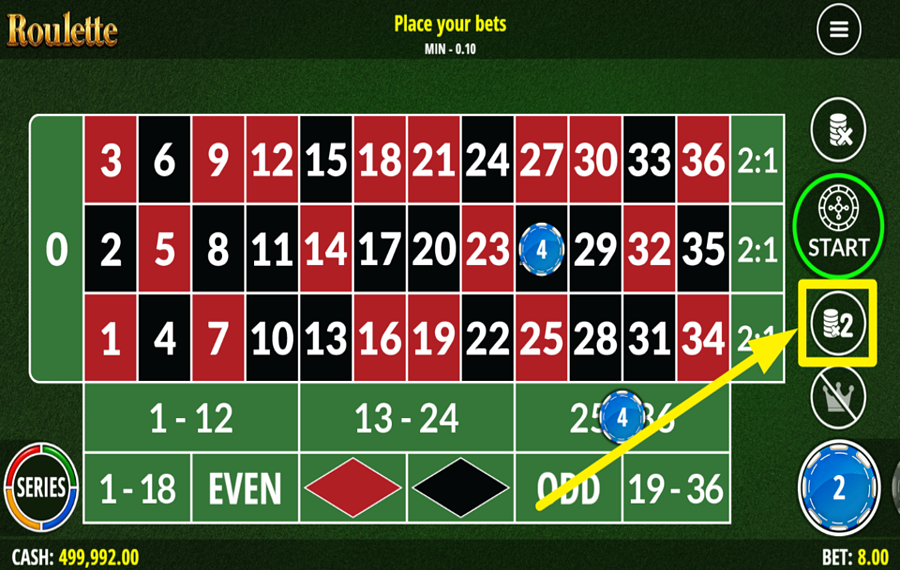
Press the chip-stack button marked “×2” on the right-hand control panel to double all chips currently placed on the table. Check the total “bet” displayed along the bottom before continuing. You can also use the matching “×2” button after entering the wheel screen if you decide to double the same selections before spinning.
6
ENTER THE ACTION!
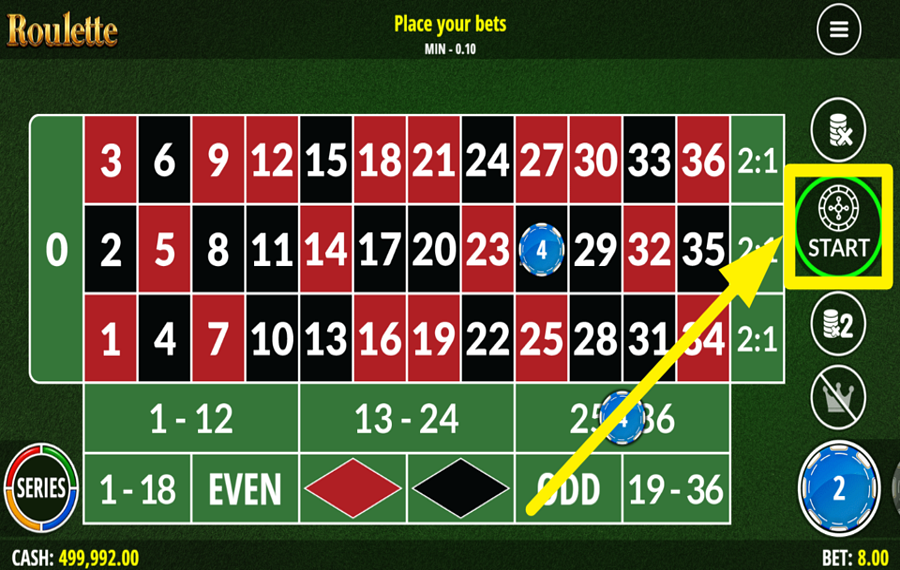
Press the round “Start” button midway down the right side once you are satisfied with your selections. The game then moves from the full betting table to the roulette-wheel screen. Your chosen numbers and chip positions remain visible on the smaller table to the left, allowing you to review them before spinning or double the “bet” with the “×2” button below it.
7
SPIN THE WHEEL.
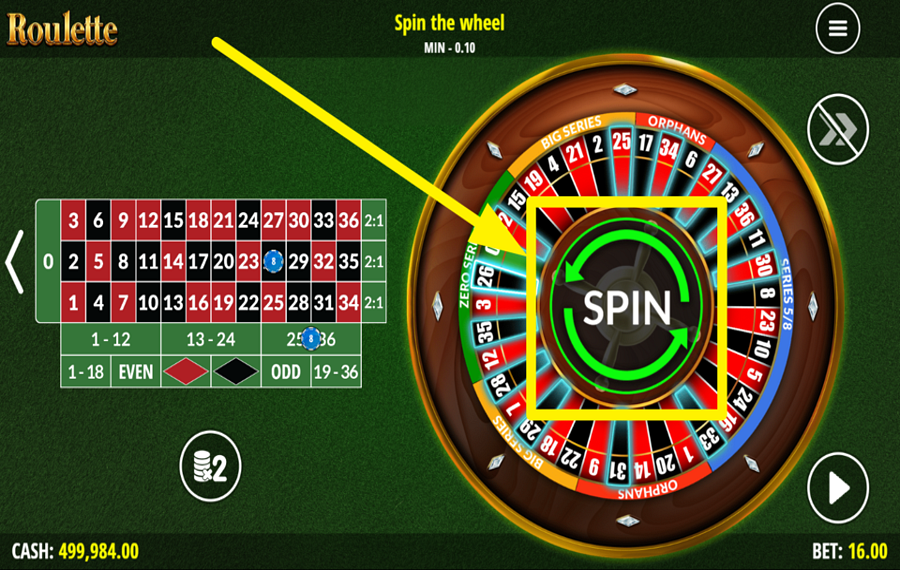
Press the large “Spin” button in the center of the roulette wheel to begin the round. The wheel turns and selects one winning number. Your result depends on whether that number matches any straight, split, square, street, six-line, series, or side “bet” you placed and on the payout assigned to that type of selection.
8
REPEAT YOUR LAST BET.
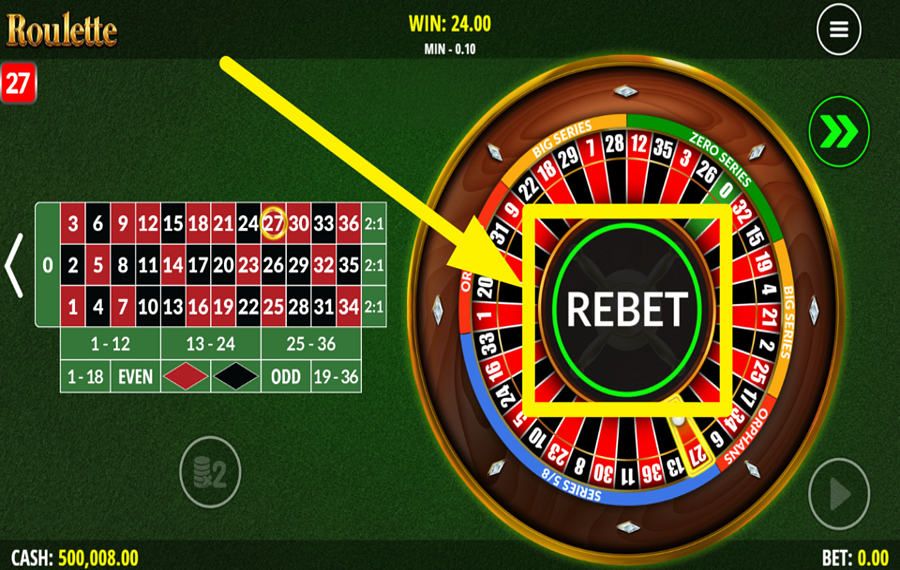
Press the large “Rebet” button in the center of the wheel after a round ends to place the same chips on the same table positions again. This lets you repeat your previous “bet” without rebuilding it manually.
9
USE THE AUTOPLAY FEATURE.
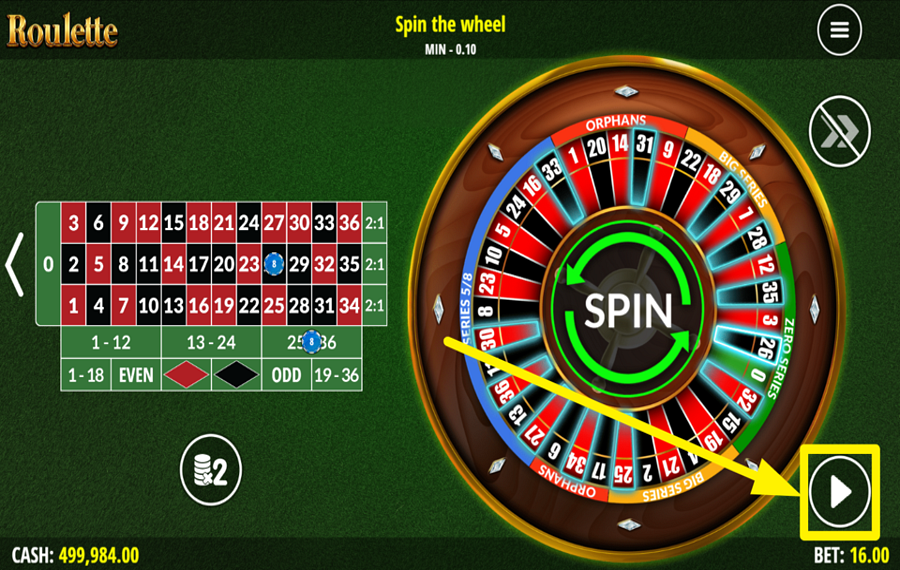
Press the circular button with the play-triangle icon in the bottom-right corner of the wheel screen to open the “Autoplay” panel. Review the displayed “Bet Per Round,” then choose 5, 10, or 25 rounds.
10
ACTIVATE TURBO MODE.
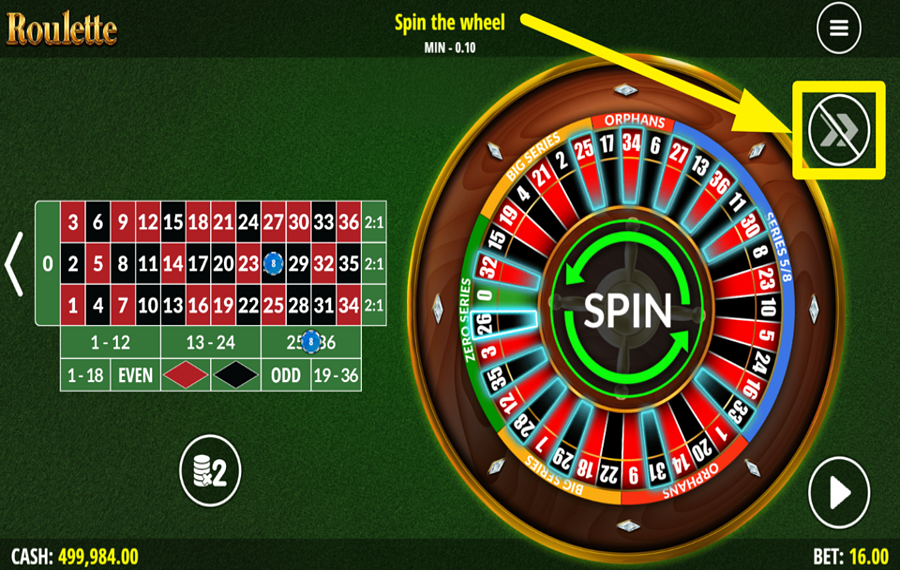
Press the double-arrow “Turbo” button in the upper-right corner of the wheel screen to speed up the action. With “Turbo” enabled, the game completes roulette rounds more quickly.
On Demand Roulette Ratings & Reviews
Our community rated On Demand Roulette as Very Good with a score of 4 out of 5 based on 1 vote.




pingvinasLevel 39


Rate and Review On Demand Roulette
When writing a Game Review, remember to share your personal experience in detail - whether it's positive or negative. For more tips on writing game reviews, check out our dedicated Help Page.
How to Write a Game ReviewOn Demand Roulette Q&As
Got questions about On Demand Roulette?
Ask a QuestionCompare On Demand Roulette to Other Games
+![Evolution VIP Roulette]()

Evolution VIP Roulette
RTP: Undisclosed
+![Mascot Gaming European Roulette]()

Mascot Gaming European Roulette
RTP: 97.3%
+![EGT Digital European Roulette]()

EGT Digital European Roulette
RTP: 97.3%
+![European Roulette Announced Bets]()

European Roulette Announced Bets
RTP: 97.3%
+![Who Wants To Be A Millionaire Roulette]()

Who Wants To Be A Millionaire Roulette
RTP: 96.63%
+![Blazing Roulette]()

Blazing Roulette
RTP: 97.3%
+![First Person Roulette]()

First Person Roulette
RTP: 97.3%
+![Platipus Gaming American Roulette]()

Platipus Gaming American Roulette
RTP: 94.47%
+![Royal Roulette 500X]()

Royal Roulette 500X
RTP: 97.3%
+![Lucky Ball Roulette Live]()

Lucky Ball Roulette Live
RTP: 97%
RatingSoftwareYearRTP



Show more![arrow_down]()


Other Games by FAZI
All 176 FAZI Games









Mihai Enculescu
Senior Game Expert
- Over 2 years of experience in the iGaming industry.
- Uploaded & maintained data for 3,000+ casino games.
- Strong grasp of casino game mechanics, especially slots.
- Reviewed and fact-checked over 3,500+ casino games.

