 Level
Level 


 Casinos
 Bonuses


Turbo Keno 10


Turbo Keno 10 Details

Software
Astriona
Release date
Apr 08, 2026
Game type
Keno

Times Played
 No
No
3D animation
No
Technology
HTML5
Play Turbo Keno 10 Slot for Real Money

How to Play Turbo Keno 10 Slot: Mastering the Basics
1
CHOOSE YOUR BET.
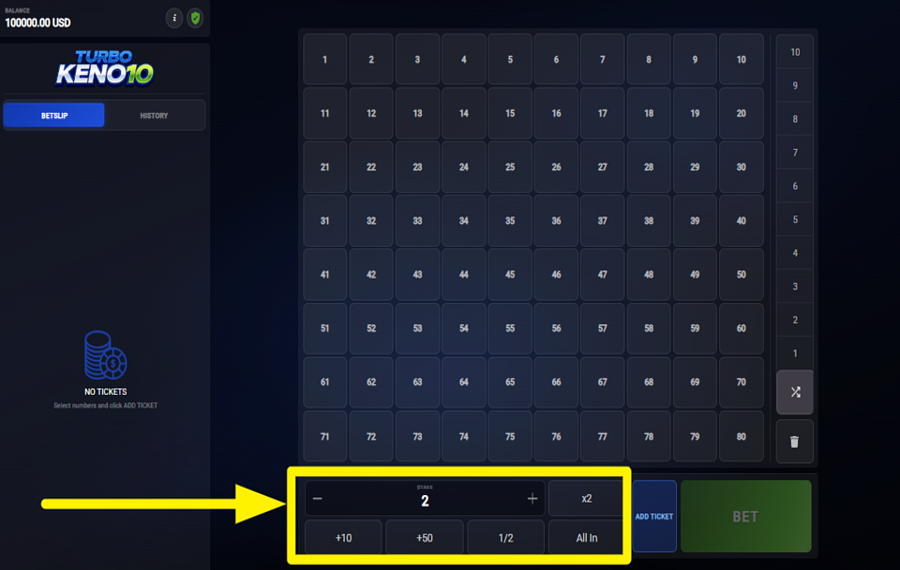
To set your stake, use the betting panel along the bottom of the screen. Press the “+” or “-” buttons beside the “Stake” value to raise or lower the amount, or use the quick controls such as “+10,” “+50,” “1/2,” “x2,” and “All In” to adjust it faster. Once the stake is ready, choose your numbers from the main 80-number Keno grid. Selected numbers light up on the board, and you can pick up to 10 numbers for one ticket before placing the draw.
2
DELETE ALL SELECTIONS.
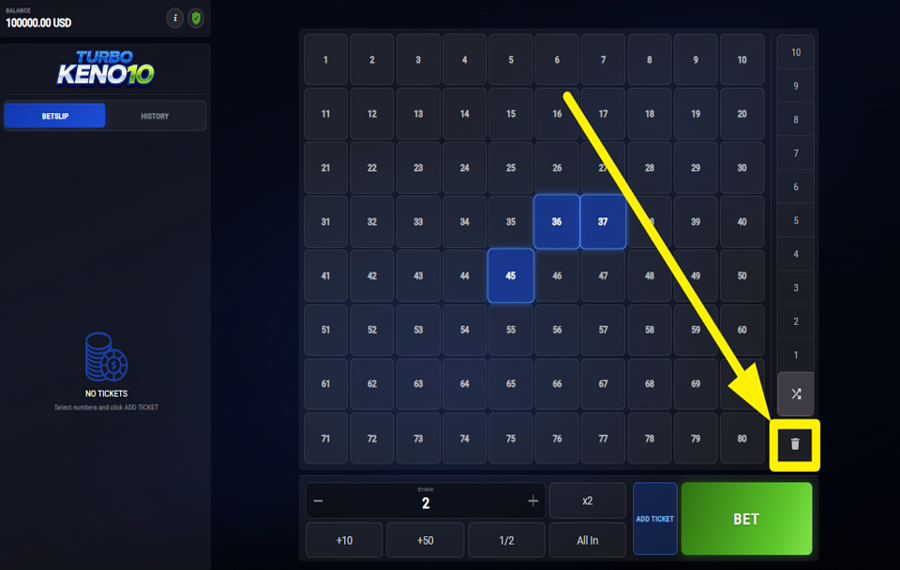
To remove every selected number at once, press the trash bin icon located on the right side of the screen beside the number grid. This instantly clears the active ticket and allows you to start building a new combination from scratch without changing your current stake settings.
3
PLAY THE GAME.
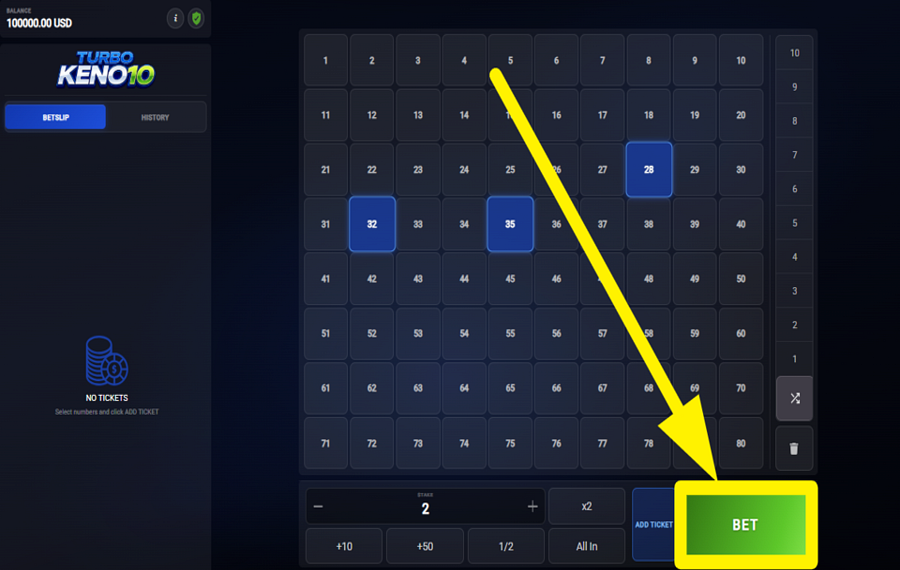
To launch the round, press the green “Bet” button in the lower-right corner of the interface. The game then performs a rapid Keno draw, randomly selecting 20 numbers from the full range of 1 to 80. Your payout depends on how many of your chosen numbers match the drawn results. Higher match counts produce larger multipliers, which are shown in the payout table inside the information panel.
4
ADD A TICKET.
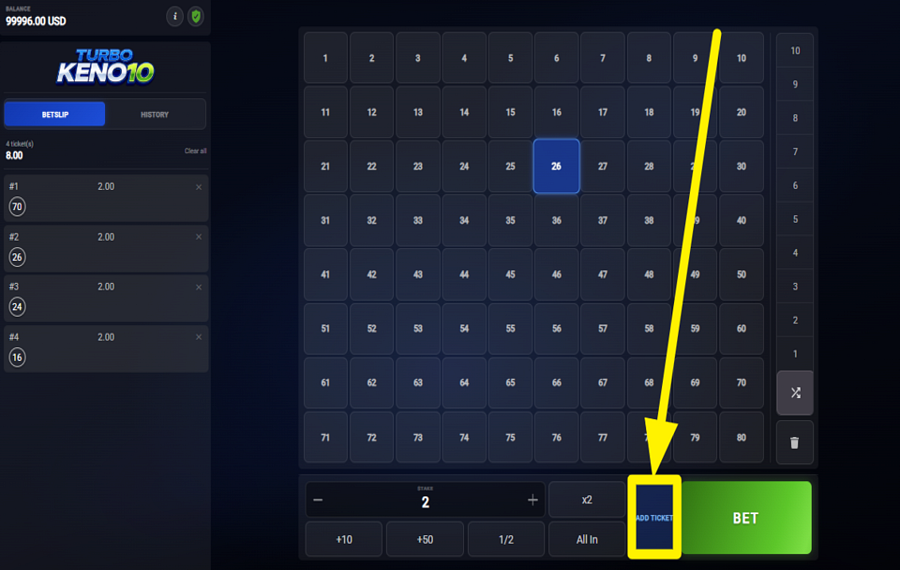
To create multiple betting combinations before starting the draw, tap the “Add Ticket” button positioned beside the main “Bet” button. Each added ticket stores a separate set of selected numbers and stake values, which allows you to participate in the same draw with several number combinations at once.
5
MAKE USE OF RANDOM SELECTION.
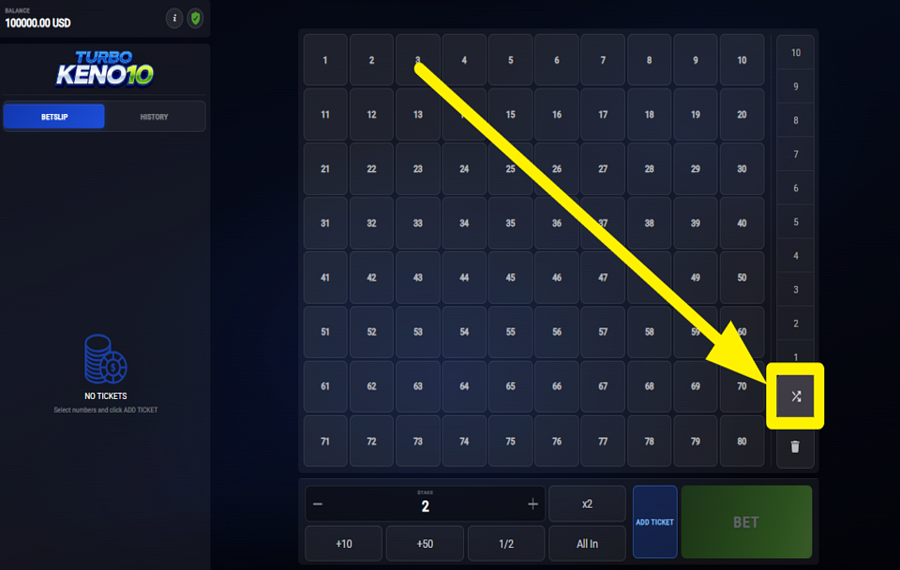
To let the game automatically generate your numbers, press the random-selection button on the right side of the screen above the trash-bin icon. The game instantly fills your ticket with randomly chosen numbers from the board.
6
REPEAT YOUR LAST BET.
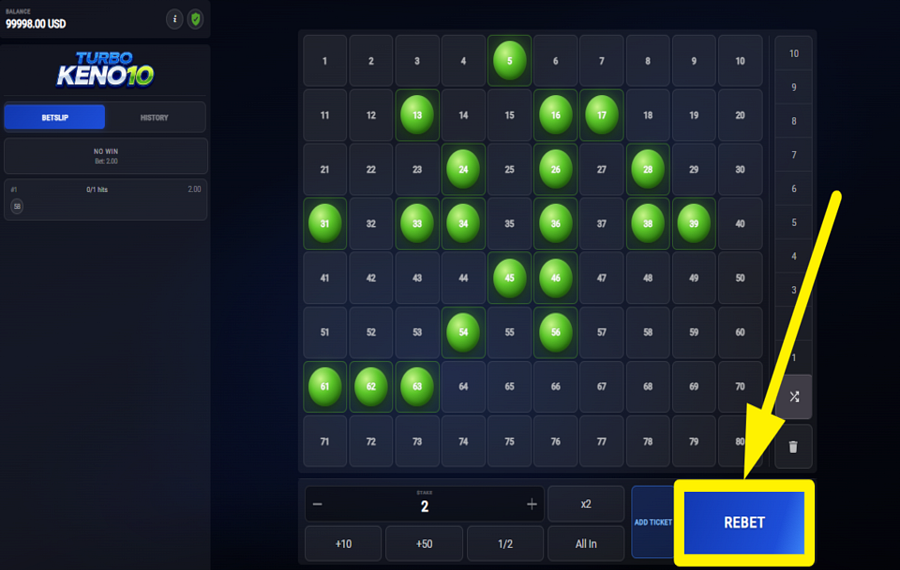
After a completed round, press the blue “Rebet” button that appears in the lower-right section of the interface to repeat your previous selection instantly. This feature reloads the same number selections and wager amounts from the earlier round.
Turbo Keno 10 Ratings & Reviews
Our community rated Turbo Keno 10 as Very Good with a score of 4.4 out of 5 based on 9 votes.




xawag87071Level 2Austria



pomono9459![account-cancel]() Suspended
Suspended
 Suspended



RuudneLevel 7



jessrmackLevel 7Canada


xapite1456![account-cancel]() Suspended
Suspended
Suspendedwolfdead![account-cancel]() Suspended
Suspended
SuspendedAriezuilenLevel 10




pingvinas![account-cancel]() Suspended
Suspended
SuspendeduztrewertzuLevel 8
Rate and Review Turbo Keno 10
When writing a Game Review, remember to share your personal experience in detail - whether it's positive or negative. For more tips on writing game reviews, check out our dedicated Help Page.
How to Write a Game ReviewTurbo Keno 10 Q&As
Got questions about Turbo Keno 10?
Ask a QuestionCompare Turbo Keno 10 to Other Games
+![Macaw Gaming Lucky 8]()

Macaw Gaming Lucky 8
RTP: 95%
+![Keno Bonus Number]()

Keno Bonus Number
RTP: 97%
+![Keno Party]()

Keno Party
RTP: 0%
+![Astriona Keno 8]()

Astriona Keno 8
RTP: 99.6%
+![CP Games Keno]()

CP Games Keno
RTP: 96%
RatingSoftwareYearRTP

Turbo Keno 10
Astriona
2026
99.6%



Show more![arrow_down]()


Other Games by Astriona









Rozi Vrinceanu
Casino Data Specialist
- Over 6 years of experience in the land-based casino industry;
- Deep understanding of player experience and casino operations;
- Updated and verified more than 300 online casino reviews;
- Known for precision, consistency, and a high standard of accuracy;
- Currently studying Economic Sciences at Titu Maiorescu University.

