


 Casinos
 Bonuses


 Back to Questions & Answers


 Community Expert
Hello Pumpy1234,
Thank you for your question.
It is very simple to add your payment method on Chipy.com, and we will provide you with a quick guide on how to do it:
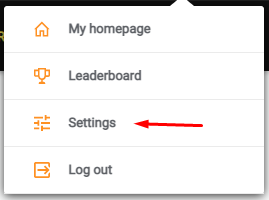
You will have to go to your settings, which are accessed by simply hovering over your name and clicking ‘’Settings’’
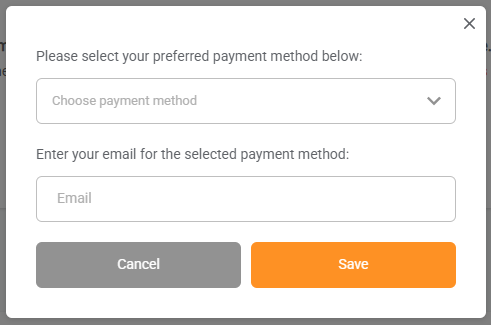
Scroll till you see the ‘’Payment Details’’ section on your profile, and click/tap ‘’Add Payment Method’’ and you will be greeted with a box where you have to choose your payment method. In your case, it will be Skrill, and enter the email address associated with it.
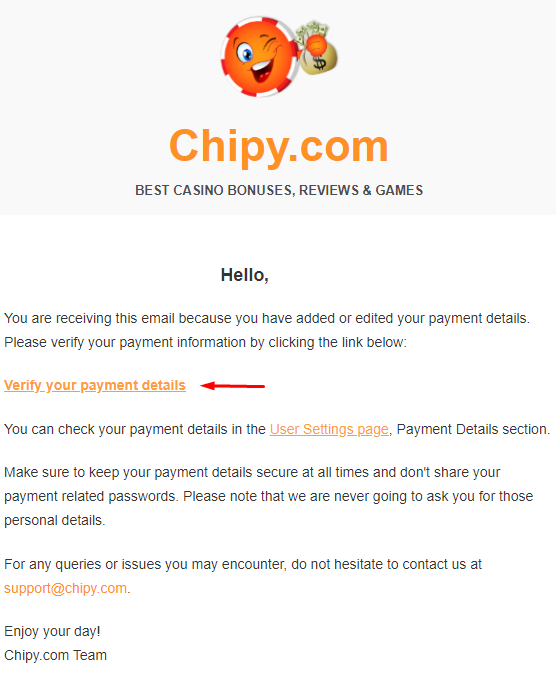
After you choose Skrill and enter your email address, you will have to verify it, which is very simple. You will receive an email from us and only need to click the link in it.
You can also check our Help Page guide, which has more information regarding how to set up your payment method.
If you have any questions or concerns, you can email us at support@chipy.com.
Hope this answered your question.
Cheers,
ClaudiuR



 Level 46
You can register a payment method other than PayPal, such as Skrill. In your Profile, select "Settings" then "Payment" to register your payment method. If you have a Skrill account, register the email address associated with it.



 Level 19United States
Hello,
Thanks for asking.
Under profile, select payments, then options, on mine, PayPal or Skrill is presented, which may vary for different countries.
If you don't have an account with any of the presented options, it should be fairly easy to start an account with one of them.
Hope this helps.
Best regards,
🪶🪶
Review your answer
Post your answer
Thank youfor submitting an answer.
Your answer has been added to our list of pending answers and will be shortly reviewed by our Quality Assurance Team. We will let you know when your answer has been published on Chipy.
Learn more about how Q&As work What are the best online casino payment methods?