Back to Help Center

How Do I Complete My Public Profile Page?

Matei D
Written byMatei D
body

Matei D

Community Specialist
  • Email icon
  • Over 1 year of experience in Customer Support
  • Managed and responded to more than 30,000 user-generated comments and reviews.
  • Bachelor's Degree in Economics from the Bucharest University of Economic Studies.
Vlad Mihalache
Edited byVlad Mihalache
body

Vlad Mihalache

Online Gambling and Crypto Casinos Specialist
  • Linkedin icon
  • Facebook icon
  • Email icon
  • Accomplished content strategist and editor with over 8 years of experience in the iGaming industry;
  • Certified Cryptocurrency Expert (CCE);
  • Specializes in blackjack strategies, slots, crypto casinos, and gambling addiction;
  • Bitcoin casino expert with extensive knowledge of crypto trading and blockchain gaming;
  • Online gambling expert with 7,000+ articles written and reviewed;
  • Strong advocate for responsible gambling with complex knowledge of the latest trends;
icon-calendarUpdated on Oct 10, 2025

How_to_complete_the_Public_Profile

Sharing your interests with the community has never been easier!

This step by step guide will help you quickly complete your Public Profile Page and earn 400 coins and new ways to interact with other Chipy members.

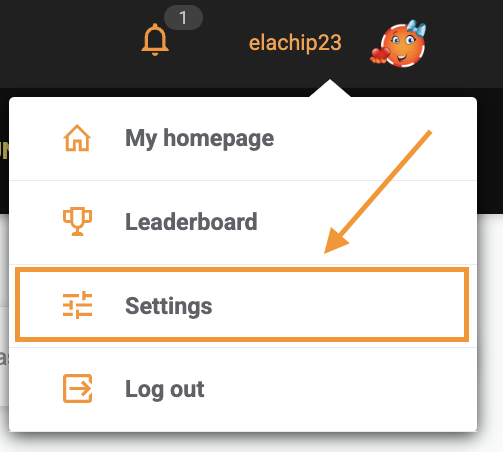
Step 1: Go to your Settings Page

Click on your avatar at the top of the page and access the Settings as shown in the screenshot below.
User_Settings_page

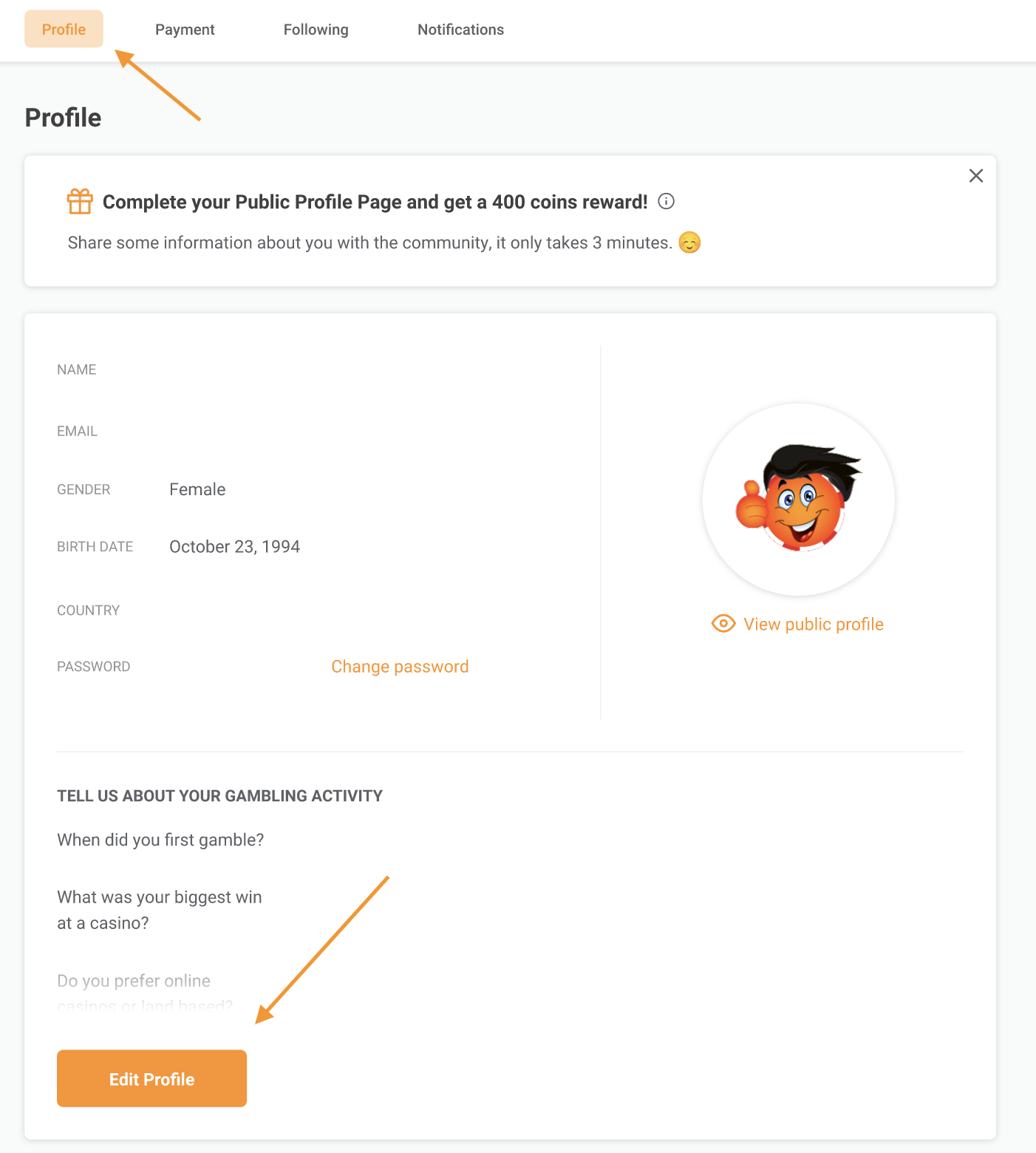
Step 2: Go to the “Profile” section and press “Edit details”

Once you arrive on the Settings page, the first thing you will notice is your Profile section. Then, just press "edit details" to add or edit your details.

User_profile_settings

Step 3: Complete the 11 questions in the form

A form will open with 11 questions, related to both gambling and some of your personal interests:

Questions Form Public Profile
While it is not mandatory to answer all the questions, keep in mind that only users that complete their profile will receive the 400 coins reward.

Remember

You can update the information at any time directly from your account.

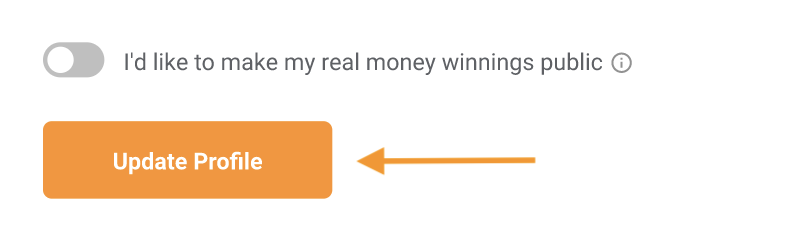
Step 4: Click on “Update Profile” to save your changes.

Chipy Update Profile Button

Now, our Quality Assurance Team will check the answers you provided and reward you.

Please note 

The verification process could take up to 1-3 business days.

The Public Profile Page will help you connect with other community members. If you have more questions, please also check the Public Profile FAQs Help Page.

Was this article helpful?

97% found this helpful
icon-check-greenThank you for voting
You have already voted
Matei D

Matei D

Community Specialist

  • Email icon

About Matei D

  • Over 1 year of experience in Customer Support
  • Managed and responded to more than 30,000 user-generated comments and reviews.
  • Bachelor's Degree in Economics from the Bucharest University of Economic Studies.
Read Full Bio
Vlad Mihalache

Vlad Mihalache

Online Gambling and Crypto Casinos Specialist

  • Linkedin icon
  • Facebook icon
  • Email icon

About Vlad Mihalache

  • Accomplished content strategist and editor with over 8 years of experience in the iGaming industry;
  • Certified Cryptocurrency Expert (CCE);
  • Specializes in blackjack strategies, slots, crypto casinos, and gambling addiction;
  • Bitcoin casino expert with extensive knowledge of crypto trading and blockchain gaming;
  • Online gambling expert with 7,000+ articles written and reviewed;
  • Strong advocate for responsible gambling with complex knowledge of the latest trends;
Read Full Bio

Report a problem

Couldn't find what you were looking for?

Contact our Support Team at support@chipy.com. We would be happy to help you.

Contact Us
icon-arrow-up