


 Casinos
 Bonuses


Chicken Plus


Chicken Plus Details


Times Played
 No
No
3D animation
No
Technology
HTML5
Play Chicken Plus Slot for Real Money




Load More Casinos (+10)
How to Play Chicken Plus Slot: Mastering the Basics
1
CHOOSE YOUR BET.
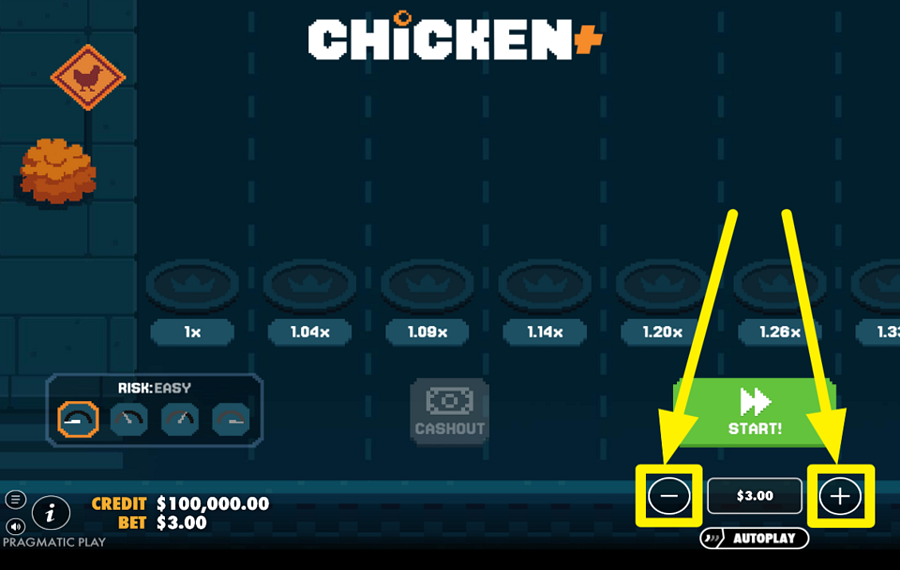
To set your wager, click the “-“ or the “+“ button located at the bottom right of the screen. Next, press the “-“ and “+“ buttons to adjust the stake amount. You can also fine-tune the amount, double it, halve it, reset it, or jump to the maximum allowed value.
2
SELECT A DIFFICULTY LEVEL.
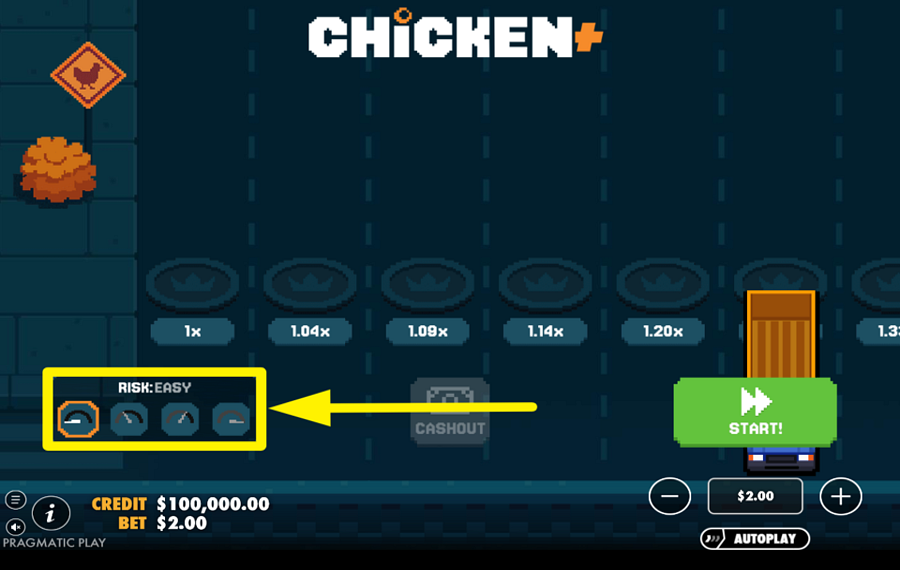
To control the risk level, use the difficulty selector found at the bottom left of the screen. This panel lets you switch between different modes, each represented by a small icon. Lower difficulty offers more lanes with smaller multipliers, while higher difficulty reduces the number of lanes but increases the potential multipliers significantly. Choose a mode before starting, as it determines both your chances of progressing and the size of possible rewards.
3
BEGIN THE ADVENTURE!
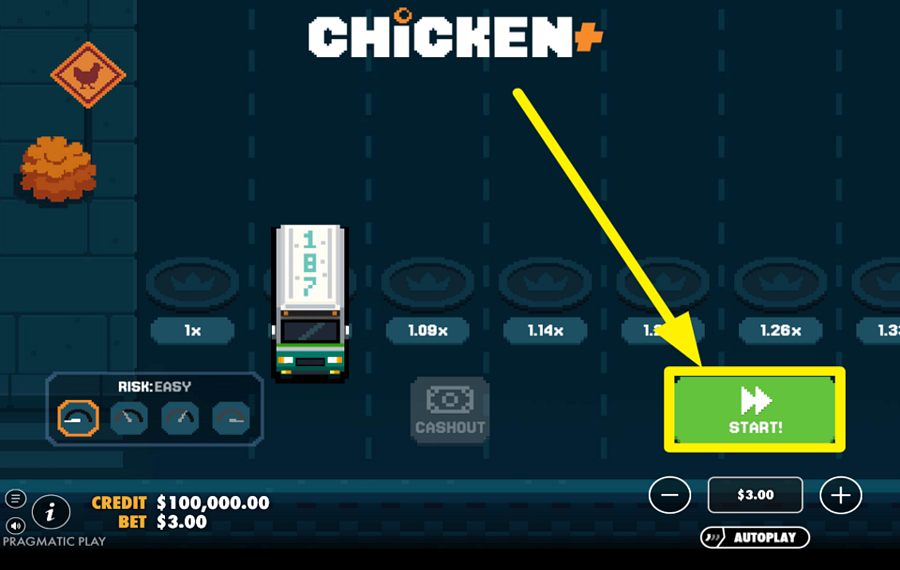
Press the large green “Start” button on the right side of the screen to begin a round. Once the round starts, your chicken will attempt to cross the road. Each lane of the road displays a multiplier, and every successful move increases your potential win. If the chicken fails to cross a lane, the round ends with no payout.
4
CASH OUT YOUR WINNINGS.
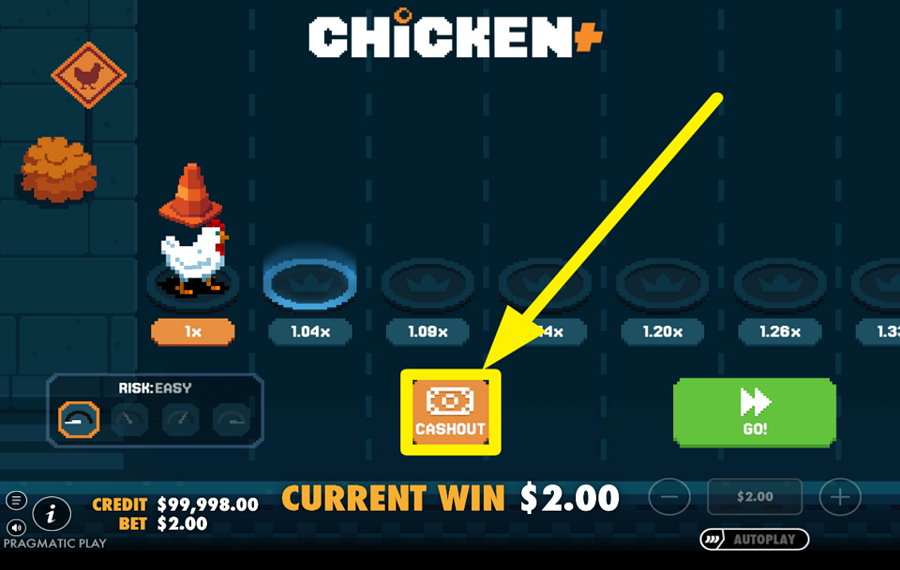
After each step, you can decide whether to continue forward for a higher multiplier or stop and secure your current winnings. Once the chicken crosses the first lane, the “Cashout” button appears in the center of the screen, and it stays there for as long as the chicken is alive. Press it at any time after a successful step to collect your current winnings, which are based on the multiplier of the last cleared lane. Choosing when to cash out is key, as pushing further increases rewards but also the risk of losing everything.
5
USE THE AUTOPLAY FEATURE.
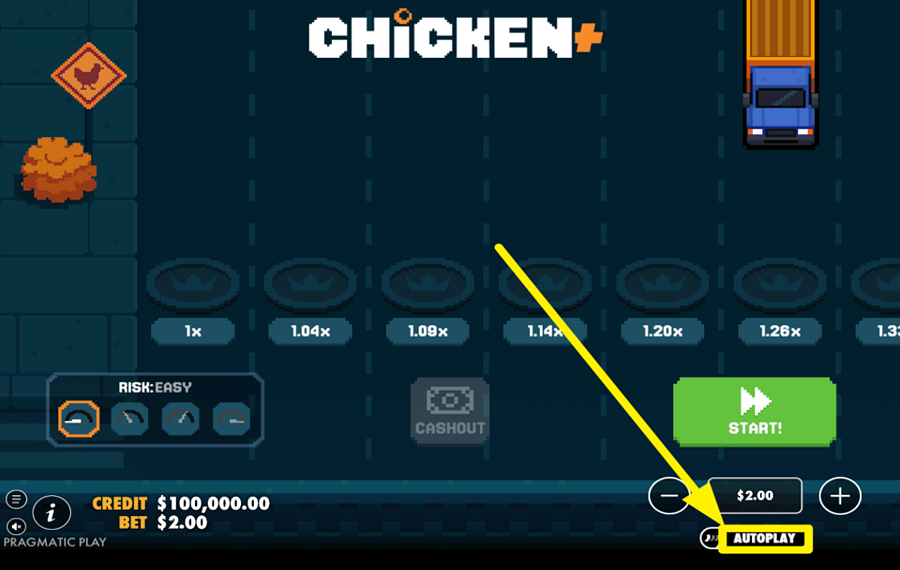
To automate your gameplay, press the “Autoplay” button located just below the ”bet” controls on the bottom right. This opens the ”Autoplay” settings window, where you can choose the number of rounds and set conditions such as stopping on profit or loss. You can also define how your “bet” changes after wins or losses.
6
ENABLE TURBO MODE.
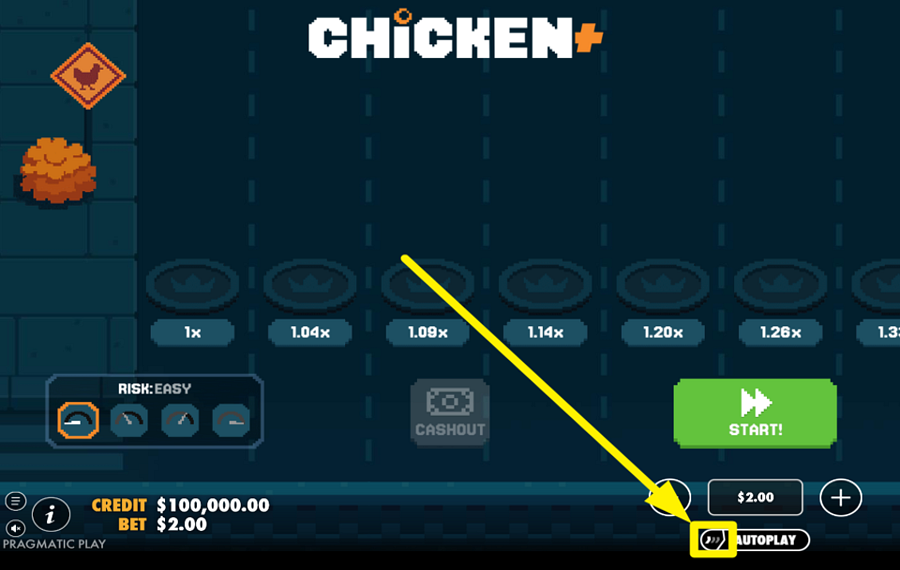
For faster spins, tap the small button inside the "Autoplay" button. Press it once to enable "Quick Spin" for a faster game experience, and twice to turn on "Turbo Spin" or the fastest mode. Press it a third time to restore default speed settings.
Chicken Plus Ratings & Reviews
Our community rated Chicken Plus as Very Good with a score of 4.3 out of 5 based on 12 votes.




Sydneyslots98Level 7Australia


navarro777Level 0Italy


Jordy369Level 6



Rozza13Level 12
Pavle29![account-cancel]() Suspended
Suspended
 Suspended
karolduda1212![account-cancel]() Suspended
Suspended
Suspended



wladyka![account-cancel]() Suspended
Suspended
Suspended

muszkawaldek![account-cancel]() Suspended
Suspended
SuspendedJmorjjjjjjjjj![account-cancel]() Suspended
Suspended
SuspendedAnjelic14Level 12New Zealand
uztrewertzu![account-cancel]() Suspended
Suspended
Suspended



pingvinasLevel 39
Rate and Review Chicken Plus
When writing a Game Review, remember to share your personal experience in detail - whether it's positive or negative. For more tips on writing game reviews, check out our dedicated Help Page.
How to Write a Game ReviewChicken Plus Q&As
Got questions about Chicken Plus?
Ask a QuestionCompare Chicken Plus to Other Games
+![Uncrossable Rush]()

Uncrossable Rush
RTP: 96%
+![Chick n Run]()

Chick n Run
RTP: 95%
+![Mancala Cheese Chase]()

Mancala Cheese Chase
RTP: 95%
+![Rooster Run 2]()

Rooster Run 2
RTP: 97%
+![Chicken Road 2 Bonus]()

Chicken Road 2 Bonus
RTP: 96.5%
+![Orbital Rush]()

Orbital Rush
RTP: 96%
+![Chicken Dash]()

Chicken Dash
RTP: 96.85%
+![Uncrossable Rush Eggster]()

Uncrossable Rush Eggster
RTP: 96%
+![Ginja Run]()

Ginja Run
RTP: Undisclosed
+![Chicken GOAL]()

Chicken GOAL
RTP: 96%
RatingSoftwareYearRTP




Show more![arrow_down]()


Other Games by Pragmatic Play
All 868 Pragmatic Play Games









Iulian Zalaru
Data Entry Team Leader
- Over 2 years of experience in the gambling industry.
- Researched and uploaded over 2.000 casino games to the website;
- Assessed the accuracy of more than 5.000 casino games;
- Coordinated and documented over 20,000 data updates across casino games, guides, and land-based casino information.
- Oversaw and maintained large-scale project tracking to ensure timely and accurate content delivery.
- Has a Bachelor's Degree in Psychology from Spiru Haret University.

