


 Casinos
 Bonuses


Penny Roulette


Penny Roulette Details


Times Played
 No
No
3D animation
No
Technology
HTML5
Play Penny Roulette Slot for Real Money




Load More Casinos (+10)
How to Play Penny Roulette Slot: Mastering the Basics
1
CHOOSE YOUR BET.
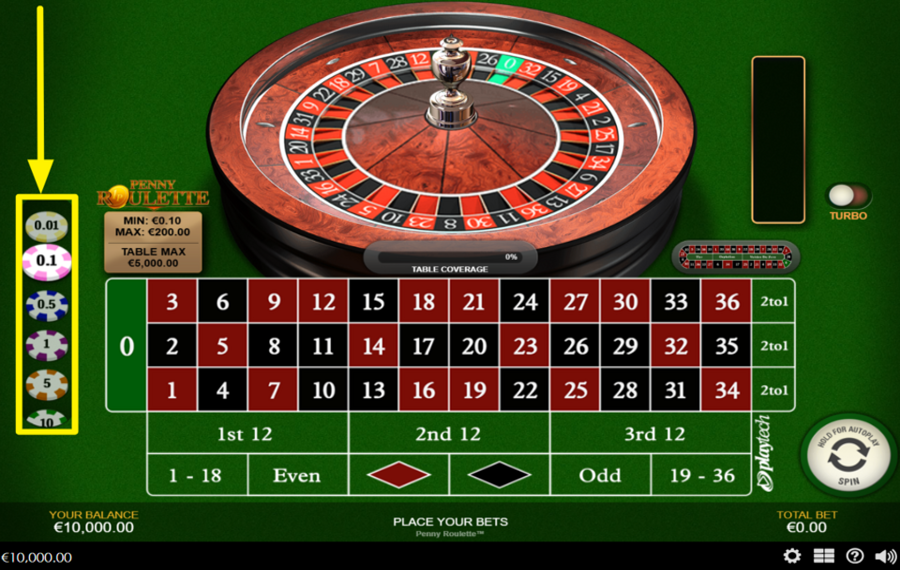
To select your stake, press a chip value from the vertical tray on the left side of the screen, then place it on any number or betting area on the table. You can bet on a single number for the highest payout, or cover multiple numbers and combinations, such as Red/Black, Even/Odd, 1–18/19–36, dozens, or columns. Each selected position is highlighted, and your "Total Bet" is updated at the bottom right.
2
UNDO OR CLEAR YOUR BET SELECTION.
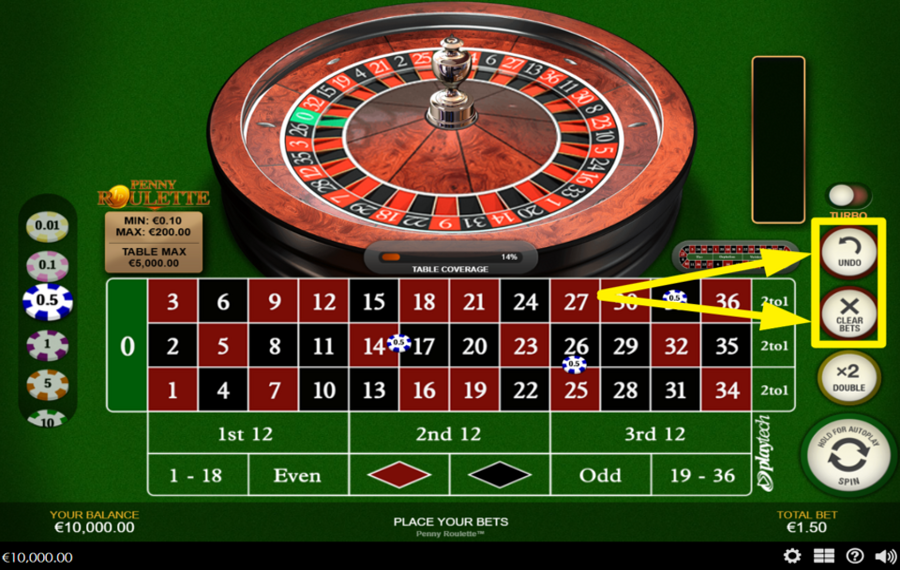
If you make a mistake, press the "Undo" button on the right-hand side of the screen to remove the most recently placed chip. To remove everything at once, press "Clear Bets" just below it.
3
DOUBLE THE TOTAL BET AMOUNT.
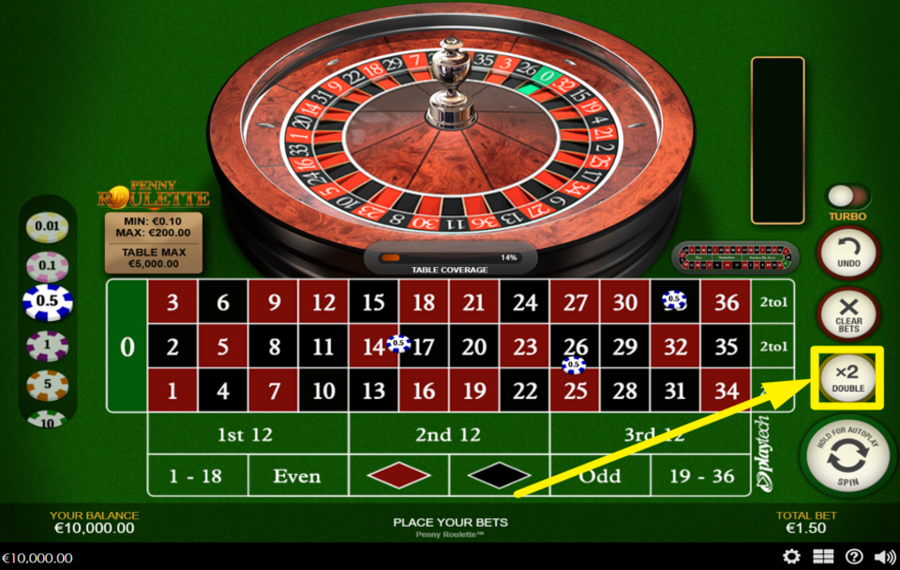
To double your current stake instantly, press the "x2" button located on the right side of the interface. This duplicates all chips already on the table while keeping them in the same positions, provided the table limits are not exceeded.
4
SPIN THE WHEEL!
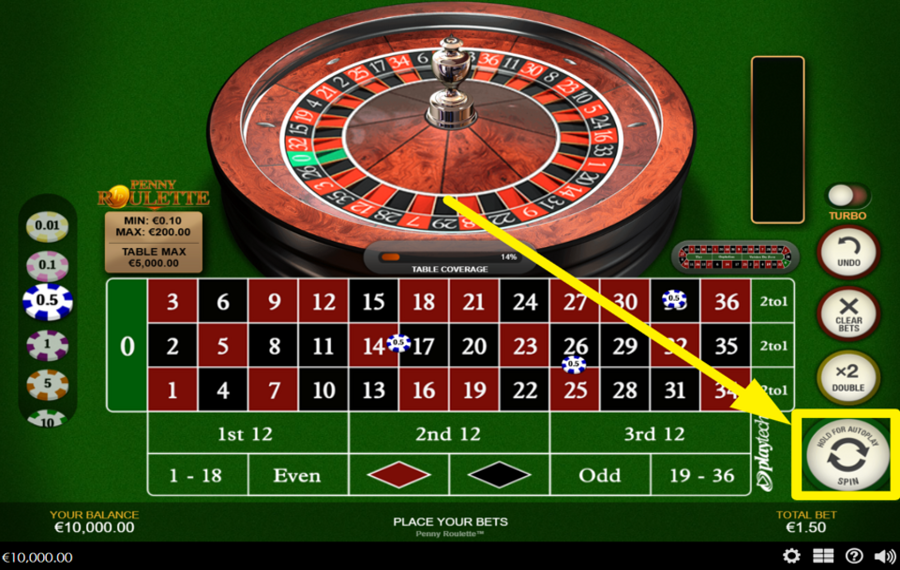
Once your "bets" are placed, press the large round "Spin" button at the bottom right. The roulette wheel above the table rotates in one direction while the ball travels in the opposite direction and finally drops into a numbered pocket. If the ball lands on a number covered by your chips, you receive the corresponding payout.
5
REPEAT OR DOUBLE YOUR LAST BET.
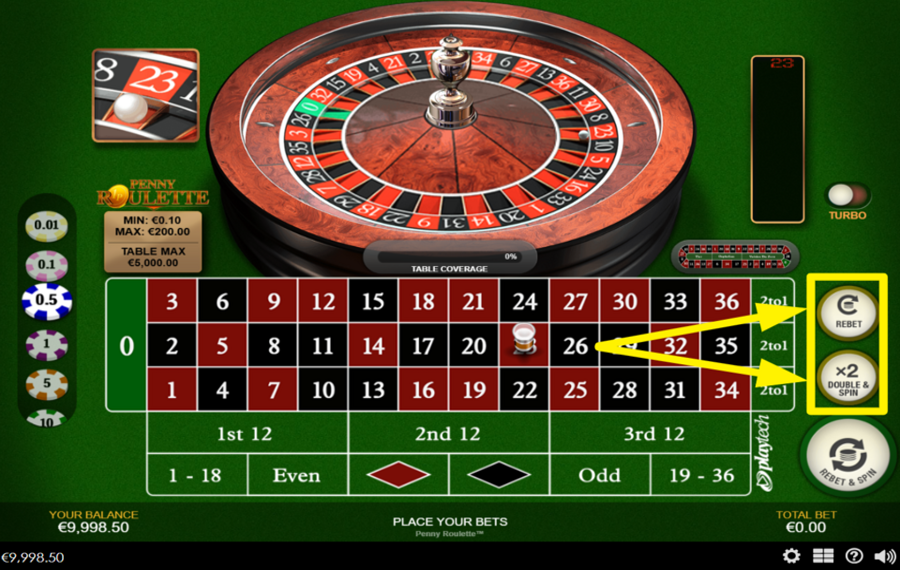
After a round finishes, two quick-action buttons appear on the right. Press "Rebet" to place the same "bets" from the previous round. Press "Double & Spin" to repeat those "bets," with their values doubled.
6
ENABLE AUTOPLAY.
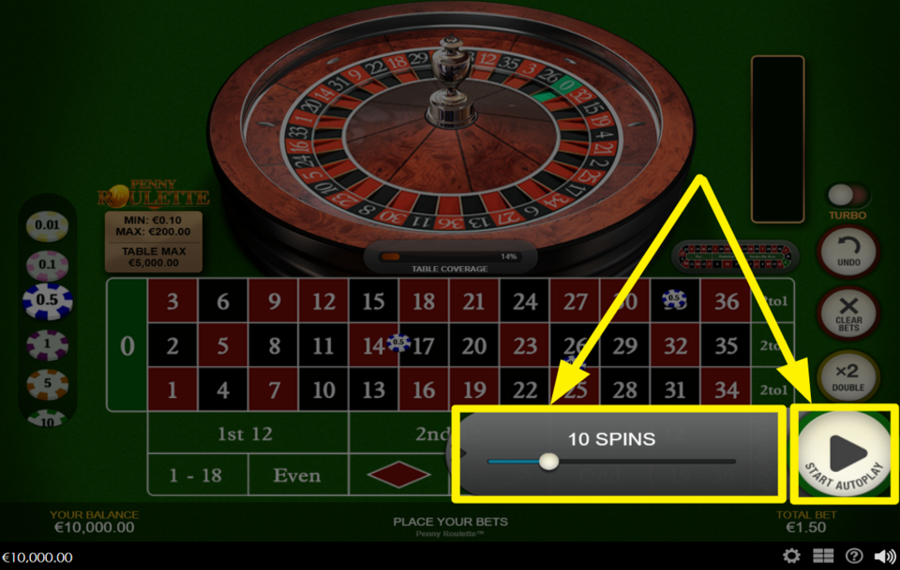
To run multiple spins automatically, place your "bets" first and then press and hold the "Spin" button to open the "Autoplay" slider. Drag this slider left or right to choose how many automatic rounds you want. Press "Start Autoplay" to begin.
7
UNLEASH TURBO CHARGE.
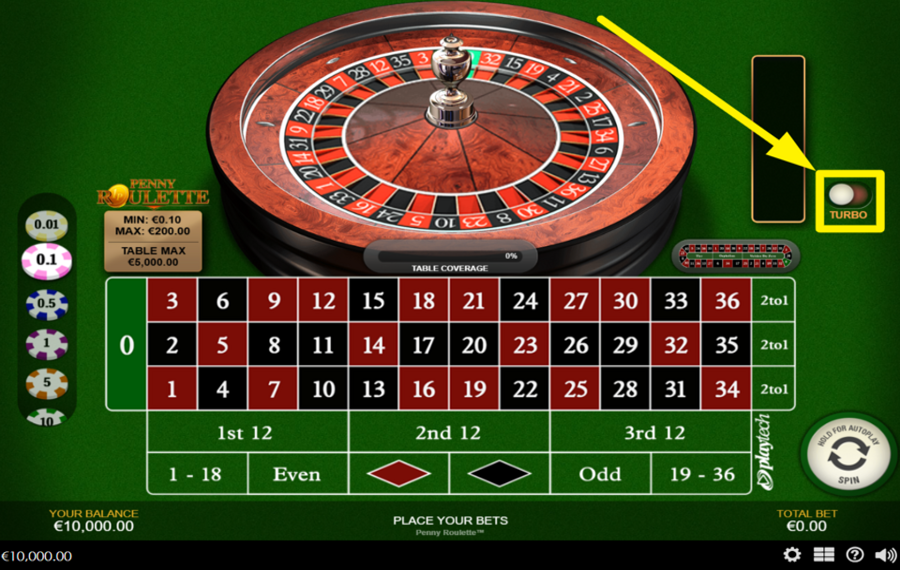
For faster gameplay, use the "Turbo" toggle switch on the right side of the wheel. When activated, the results are delivered more quickly because the game animations are shortened.
8
TURN ON NEIGHBORS BET.
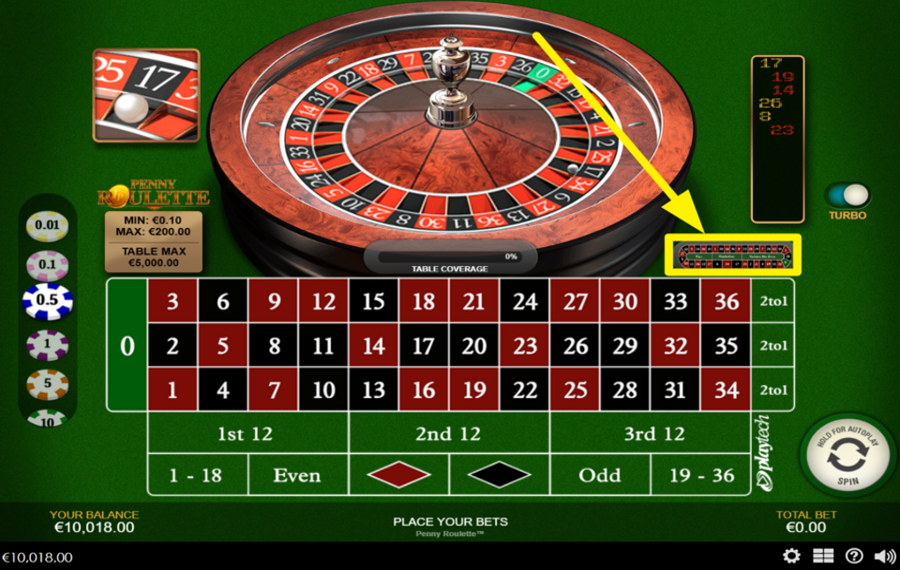
To place racetrack-style bets, switch to the "Neighbors" view by clicking the small racetrack icon to the right of the table. Select one of the buttons at the bottom (1 to 5) to decide how many numbers on each side of your chosen number will be included, then press a number on the racetrack. The game automatically spreads equal chips across that number and its adjacent wheel neighbors.
Penny Roulette Ratings & Reviews
Our community rated Penny Roulette as Average with a score of 3.5 out of 5 based on 4 votes.




jessrmackLevel 7Canada





rmahomedLevel 3South Africa




pingvinasLevel 39




Jraus1990![account-cancel]() Suspended
Suspended
 Suspended
Rate and Review Penny Roulette
When writing a Game Review, remember to share your personal experience in detail - whether it's positive or negative. For more tips on writing game reviews, check out our dedicated Help Page.
How to Write a Game ReviewPenny Roulette Q&As
Got questions about Penny Roulette?
Ask a QuestionCompare Penny Roulette to Other Games
+![Evolution VIP Roulette]()

Evolution VIP Roulette
RTP: Undisclosed
+![Mascot Gaming European Roulette]()

Mascot Gaming European Roulette
RTP: 97.3%
+![EGT Digital European Roulette]()

EGT Digital European Roulette
RTP: 97.3%
+![European Roulette Announced Bets]()

European Roulette Announced Bets
RTP: 97.3%
+![Who Wants To Be A Millionaire Roulette]()

Who Wants To Be A Millionaire Roulette
RTP: 96.63%
+![Blazing Roulette]()

Blazing Roulette
RTP: 97.3%
+![First Person Roulette]()

First Person Roulette
RTP: 97.3%
+![Platipus Gaming American Roulette]()

Platipus Gaming American Roulette
RTP: 94.47%
+![Royal Roulette 500X]()

Royal Roulette 500X
RTP: 97.3%
+![Lucky Ball Roulette Live]()

Lucky Ball Roulette Live
RTP: 97%
RatingSoftwareYearRTP



Show more![arrow_down]()


Other Games by Playtech
All 377 Playtech Games









Mihai Enculescu
Senior Game Expert
- Over 2 years of experience in the iGaming industry.
- Uploaded & maintained data for 3,000+ casino games.
- Strong grasp of casino game mechanics, especially slots.
- Reviewed and fact-checked over 3,500+ casino games.

