


 Casinos
 Bonuses


Combo Keno 10


Combo Keno 10 Details

Software
Pascal Gaming
Release date
Jun 23, 2023
Game type
Keno

Times Played
 No

3D animation
No
Technology
HTML5
Play Combo Keno 10 Slot for Real Money





Load More Casinos (+8)
How to Play Combo Keno 10 Slot: Mastering the Basics
1
ADJUST YOUR BET.
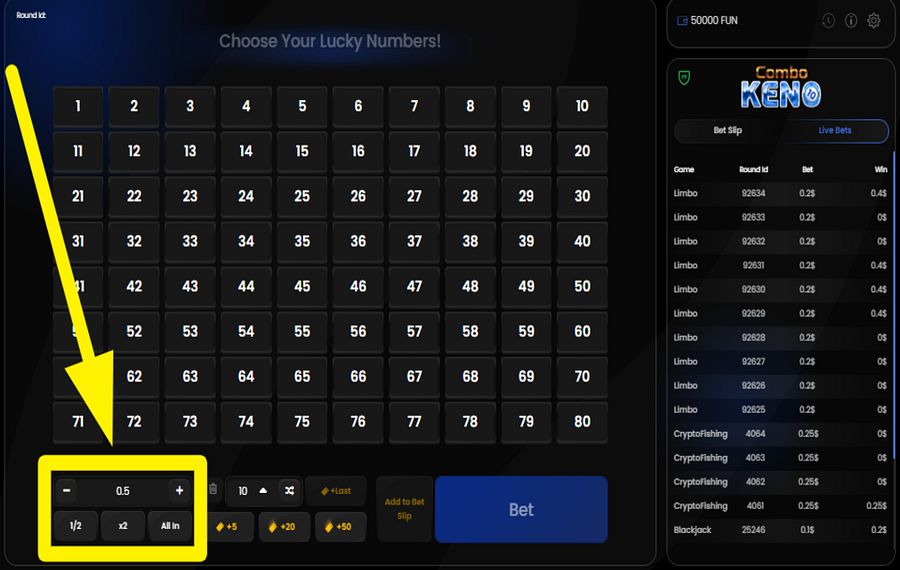
Adjust the "bet" amount by using the "+" and "-" buttons located at the bottom left of the screen. You can also select predefined "bet" options like "½" to halve your current stake amount, "2x" to double it, or "All In" if you want to wager your entire balance.
2
SELECT YOUR NUMBERS.

The objective is to choose numbers from the keno board and match them with the randomly drawn numbers. You can pick up to 10 numbers from a board displaying numbers 1 to 80. To select how many numbers you wish to play, tap the number displayed next to the wager adjustment area. Then, choose any number between 1 and 10 from the pop-up menu and make your selections on the board for the upcoming draw.
3
SELECT RANDOM NUMBERS.
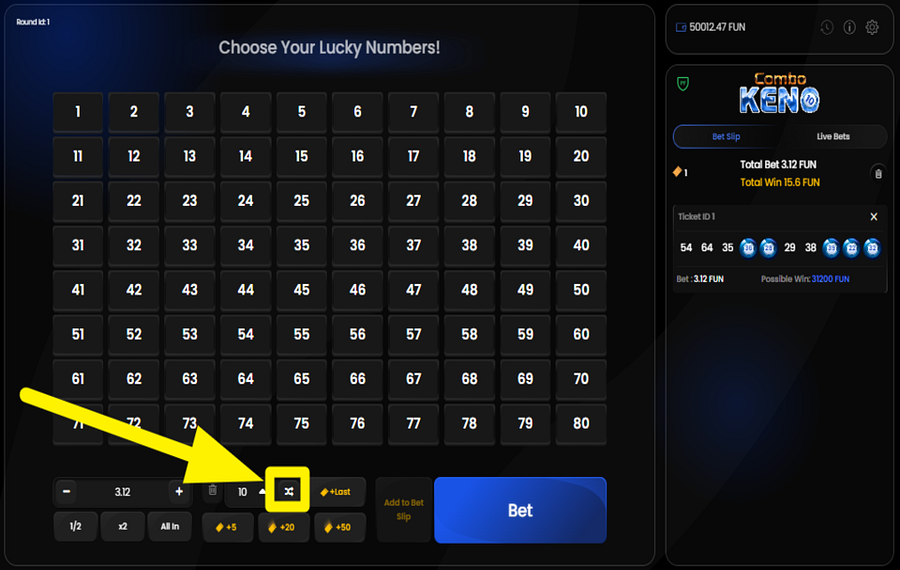
If you want to save time and leave your number selection to chance, you can use the "Random" option. To do this, tap the "shuffle" button at the bottom. This way, the system will randomly select numbers for you, based on the count you have chosen. For example, if you choose to have 5 numbers on the keno board and then tap the "shuffle" button, the game will pick 5 random numbers from the board.
4
PLACE YOUR STAKE.

Once you’ve set your wager and selected your numbers, click the large "Bet" button to confirm your wager.
5
REPEAT YOUR WAGER.
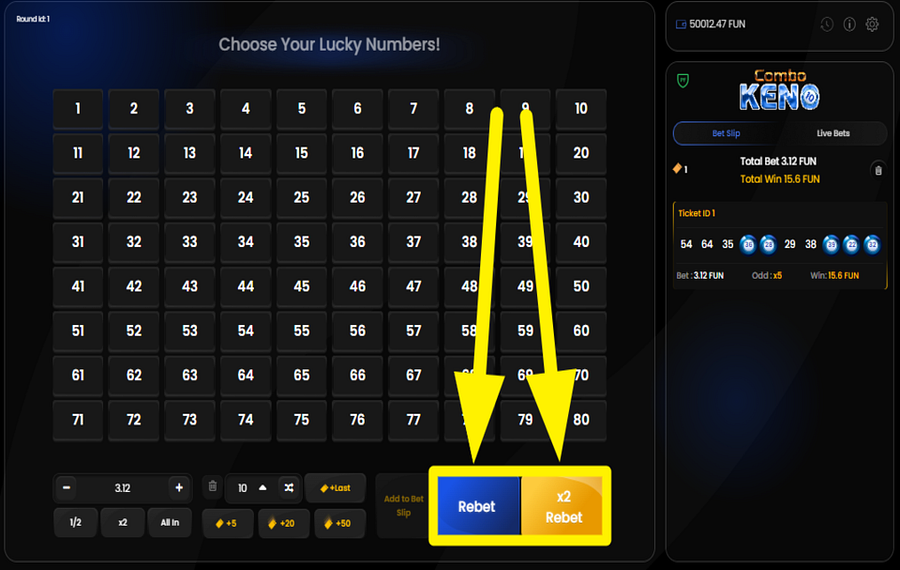
After a round ends, you can use the blue "Rebet" button to quickly place the same wager with the same numbers as in the previous round. Alternatively, you can choose the orange "x2 Rebet" button, which lets you repeat your previous "bet" but with the amount doubled.
6
ADD MULTIPLE TICKETS.
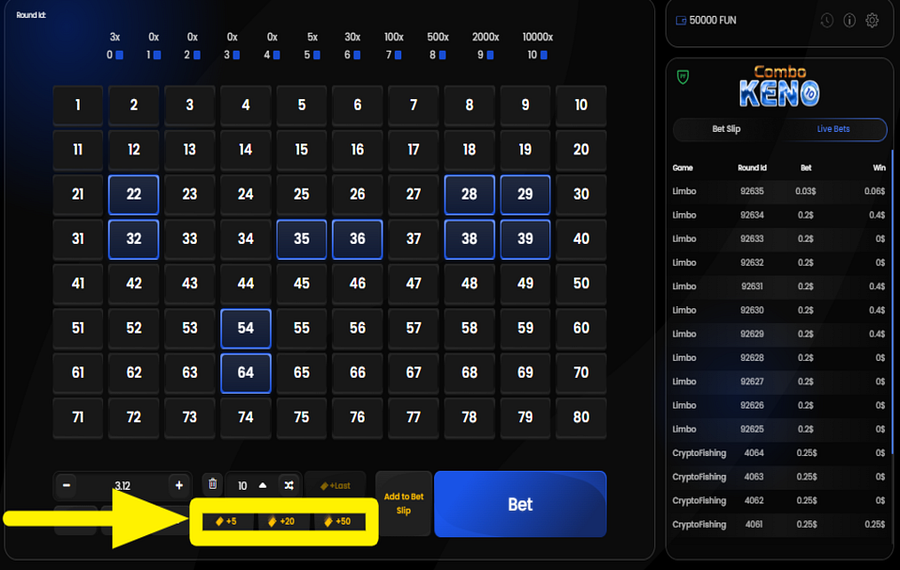
You can increase your chances of winning by placing multiple "tickets" in the same round. To do this, use the "Add Tickets" feature. By adding more tickets, you are able to choose several different sets of numbers to improve your odds of winning. Each additional ticket gives you another unique combination of numbers to participate in the same draw. Tap any of the buttons with different "ticket" numbers located at the bottom. You can have multiple "tickets" with different sets of numbers, each with its own "bet" amount.
7
CHANGE THE SPEED.
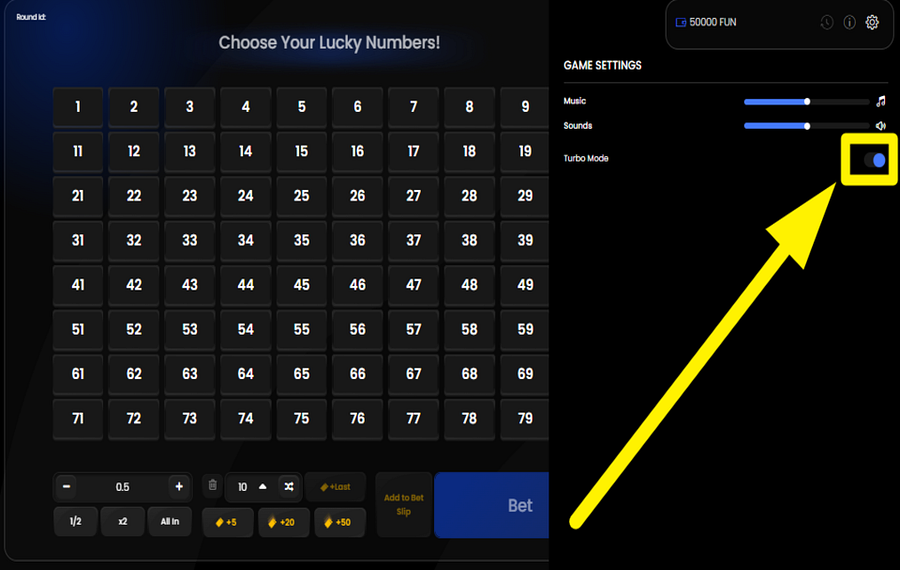
To accelerate the gameplay, tap the gear icon located at the top right corner of the game screen. After that, use the "Turbo" toggle switch to turn on speedier gameplay.
Combo Keno 10 Ratings & Reviews
Our community rated Combo Keno 10 as Very Good with a score of 4.2 out of 5 based on 42 votes.




uztrewertzu![account-cancel]() Suspended
 Suspended


kalu20011987Level 11Romania




Kayla13Level 8New Zealand

Patwes9![account-cancel]() Suspended
Suspended


Zouharhalllll![account-cancel]() Suspended
Suspended



paraya5473Level 2
jegaw11307![account-cancel]() Suspended
Suspended
nitepe1131![account-cancel]() Suspended
SuspendedAnna1337Level 7
14.04Level 8
Ninigoat![account-cancel]() Suspended
SuspendedzuzuroroLevel 4
nadrazni0000![account-cancel]() Suspended
SuspendedKosobrinLevel 6
Azmar1190iLevel 5Belgium
Show 20 more
Rate and Review Combo Keno 10
When writing a Game Review, remember to share your personal experience in detail - whether it's positive or negative. For more tips on writing game reviews, check out our dedicated Help Page.
How to Write a Game ReviewCombo Keno 10 Q&As
Got questions about Combo Keno 10?
Ask a QuestionCompare Combo Keno 10 to Other Games
+![BetConstruct Keno Live]()

BetConstruct Keno Live
RTP: 99.46%
+![Instant Keno]()

Instant Keno
RTP: 96%
+![Keno Super Chance]()

Keno Super Chance
RTP: 97%
+![Betgames TV Lucky 6]()

Betgames TV Lucky 6
RTP: 95%
+![Ultimate Keno]()

Ultimate Keno
RTP: Undisclosed
+![Urgent Games Keno]()

Urgent Games Keno
RTP: Undisclosed
+![Keno Star]()

Keno Star
RTP: 92.9%
+![Keno T]()

Keno T
RTP: 90.82%
+![Betgames TV Lucky 7]()

Betgames TV Lucky 7
RTP: 95%
+![Powerball Keno]()

Powerball Keno
RTP: Undisclosed
RatingSoftwareYearRTP

Combo Keno 10
Pascal Gaming
2023
97.54%


Show more![arrow_down]()


Other Games by Pascal Gaming








Load More Pascal Gaming Games

Mihai Enculescu
Senior Game Expert
- Over 2 years of experience in the iGaming industry.
- Uploaded & maintained data for 3,000+ casino games.
- Strong grasp of casino game mechanics, especially slots.
- Reviewed and fact-checked over 3,500+ casino games.

