 Level
Level 


 Casinos
 Bonuses


Roulette Double Win


Roulette Double Win Details


Times Played
 No
No
3D animation
No
Technology
HTML5
Play Roulette Double Win Slot for Real Money





Load More Casinos (+10)
How to Play Roulette Double Win Slot: Mastering the Basics
1
CHOOSE A BET VALUE.
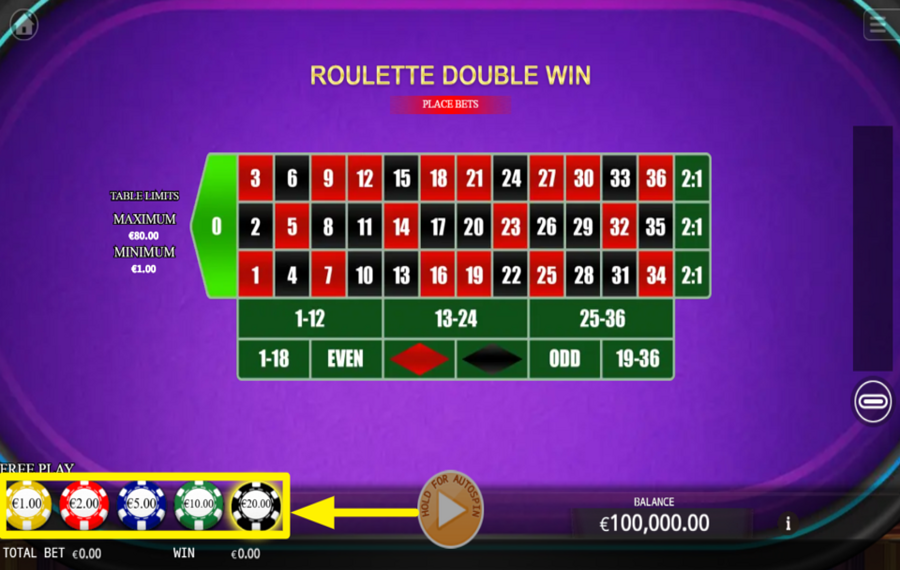
There's a row of colored chips placed along the bottom-left edge of the screen. Each chip shows a fixed amount such as €1.00, €2.00, €5.00, €10.00, or €20.00. Tap a chip once to select it. The selected chip becomes your active “bet value,” which you will place on the betting layout. You may switch between chips at any time before you start a round.
2
PLACE YOUR BETS.
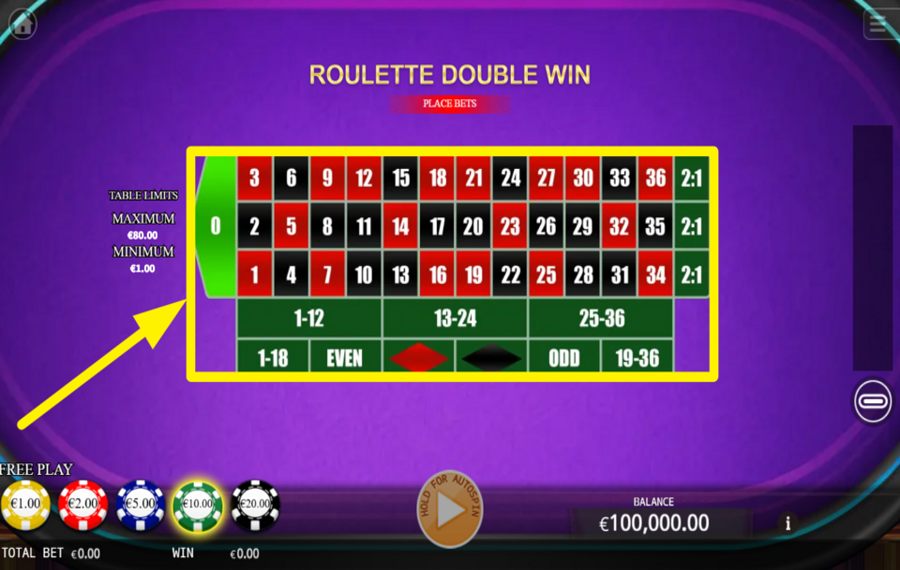
After choosing a chip, move your cursor or finger to any spot on the roulette betting layout in the center of the screen. Tap once to drop the chip onto a specific number, a group of numbers, or an outside bet such as Even, Odd, 1–12, Red, Black, or 19–36. You may place as many chips as you want, as long as you stay within the table limits shown on the left side of the screen (minimum €1.00, maximum €80.00 per spin). When you finish placing chips, the ”total bet” amount appears at the bottom bar.
3
UNDO OR CLEAR YOUR SELECTED BETS.
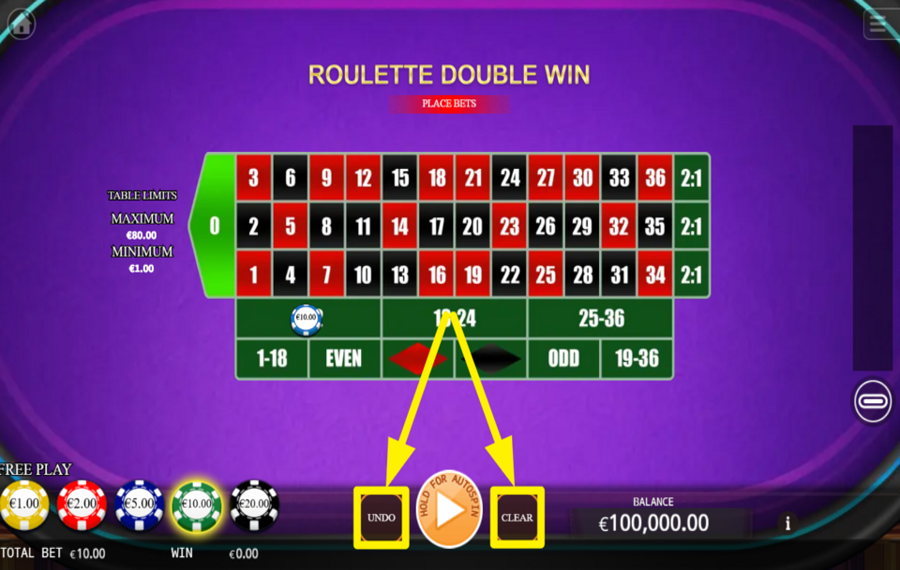
If you wish to take back a chip you just placed, press the “Undo” button located slightly left of the “Play“ button positioned at the centre-bottom of the screen. This removes your most recent chip placement without affecting the others. If you prefer to wipe the entire layout clean, press the “Clear” button. This resets the board so you can start placing chips again.
4
PLAY THE GAME.
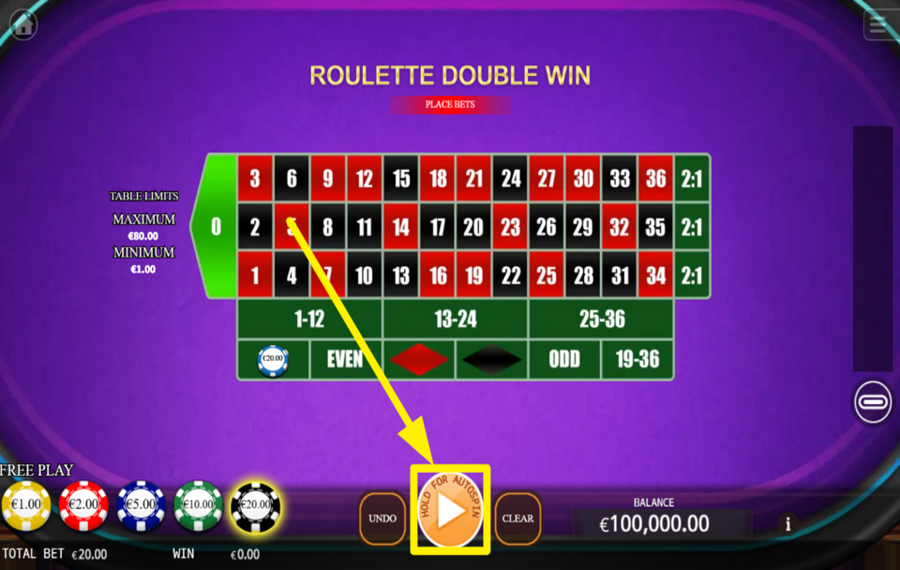
When your ”bets” are ready, tap the orange ”Play” button at the center-bottom of the screen. This releases the roulette ball and starts the round. You will see a wheel covering the entire screen when a new round begins. As the wheel spins, the ball lands on a random number from 0 to 36, and any winning ”bets” are paid automatically.
5
REPEAT OR DOUBLE YOUR LAST BETS.
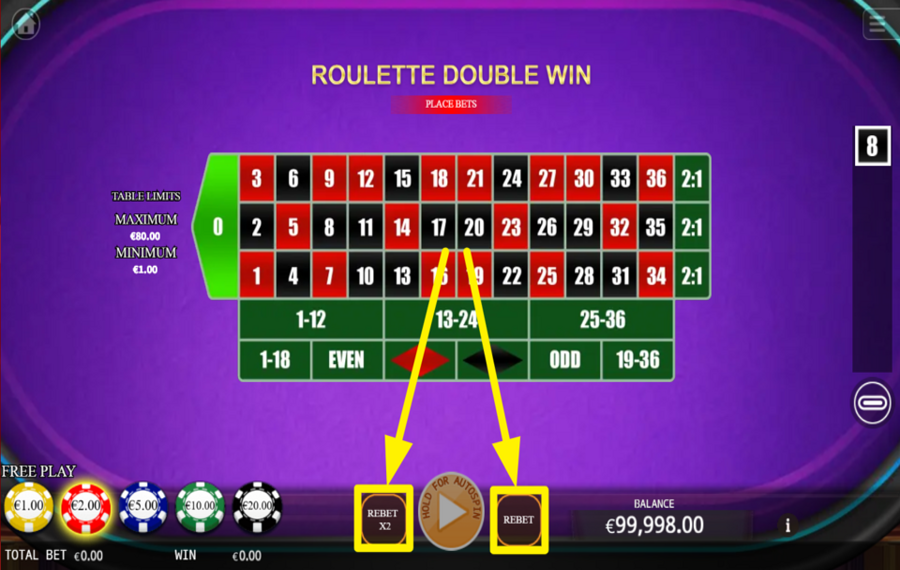
After a spin settles and the winning number is shown, two quick-play options appear near the center-bottom area. Pressing ”Rebet” instantly restores the same chip pattern you used in the previous round, allowing you to repeat the wager without placing anything manually. Pressing ”Rebet X2” keeps the same selection but doubles the ”Total Bet” amount.
6
ENABLE AUTOPLAY.
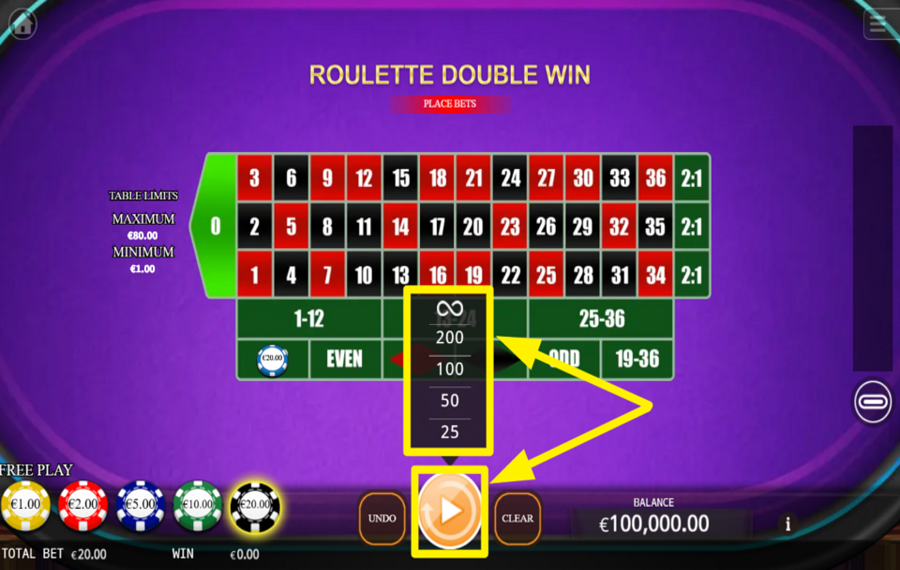
To spin automatically for a chosen number of rounds, press and hold the ”Play” button. A small menu pops up with preset options such as 25, 50, 100, 200, or continuous mode. Select the number of automatic rounds you want.
7
TURN ON NEIGHBOR BET.
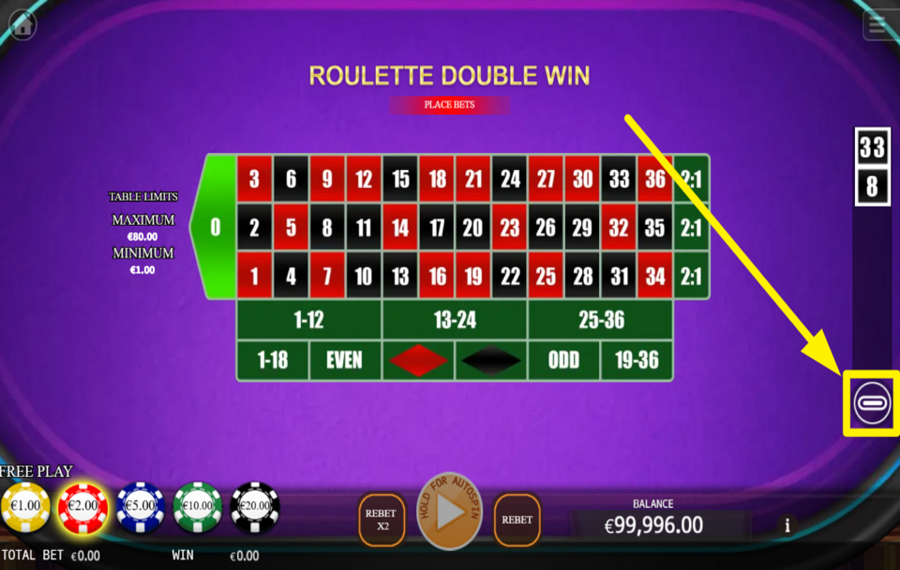
On the right side of the screen, you will find a dedicated ”Neighbor Bet” button. Tap it to open the neighbor-betting panel. This feature allows you to place a chip on a chosen number along with its immediate neighbors on the wheel.
Roulette Double Win Ratings & Reviews
Our community rated Roulette Double Win as Very Good with a score of 4.3 out of 5 based on 6 votes.




Patwes9![account-cancel]() Suspended
Suspended
 Suspended




Jrapee![account-cancel]() Suspended
Suspended
Suspended



pingvinas![account-cancel]() Suspended
Suspended
Suspended

Zouharhalllll![account-cancel]() Suspended
Suspended
Suspended
14.04Level 8
Televizorius![account-cancel]() Suspended
Suspended
SuspendedRate and Review Roulette Double Win
When writing a Game Review, remember to share your personal experience in detail - whether it's positive or negative. For more tips on writing game reviews, check out our dedicated Help Page.
How to Write a Game ReviewRoulette Double Win Q&As
Got questions about Roulette Double Win?
Ask a QuestionCompare Roulette Double Win to Other Games
+![First Person Roulette]()

First Person Roulette
RTP: 97.3%
+![Evolution VIP Roulette]()

Evolution VIP Roulette
RTP: 0%
+![Express Roulette Double Chance]()

Express Roulette Double Chance
RTP: 97.3%
+![Roulette X]()

Roulette X
RTP: 97.3%
+![Platipus Gaming American Roulette]()

Platipus Gaming American Roulette
RTP: 94.47%
+![Lucky Ball Roulette Live]()

Lucky Ball Roulette Live
RTP: 97%
+![Boost Roulette]()

Boost Roulette
RTP: 96%
+![Roulette Royale European]()

Roulette Royale European
RTP: 97.3%
+![Who Wants To Be A Millionaire Roulette]()

Who Wants To Be A Millionaire Roulette
RTP: 96.63%
+![Mascot Gaming European Roulette]()

Mascot Gaming European Roulette
RTP: 97.3%
RatingSoftwareYearRTP




Show more![arrow_down]()


Other Games by KA Gaming
All 548 KA Gaming Games









Mihai Enculescu
Senior Game Expert
- Over 2 years of experience in the iGaming industry.
- Uploaded & maintained data for 3,000+ casino games.
- Strong grasp of casino game mechanics, especially slots.
- Reviewed and fact-checked over 3,500+ casino games.

