


 Casinos
 Bonuses


Simple Mines


Simple Mines Details


Times Played
 No
No
3D animation
No
Technology
HTML5
Play Simple Mines Slot for Real Money




Load More Casinos (+10)
How to Play Simple Mines Slot: Mastering the Basics
1
PICK A BET AMOUNT.
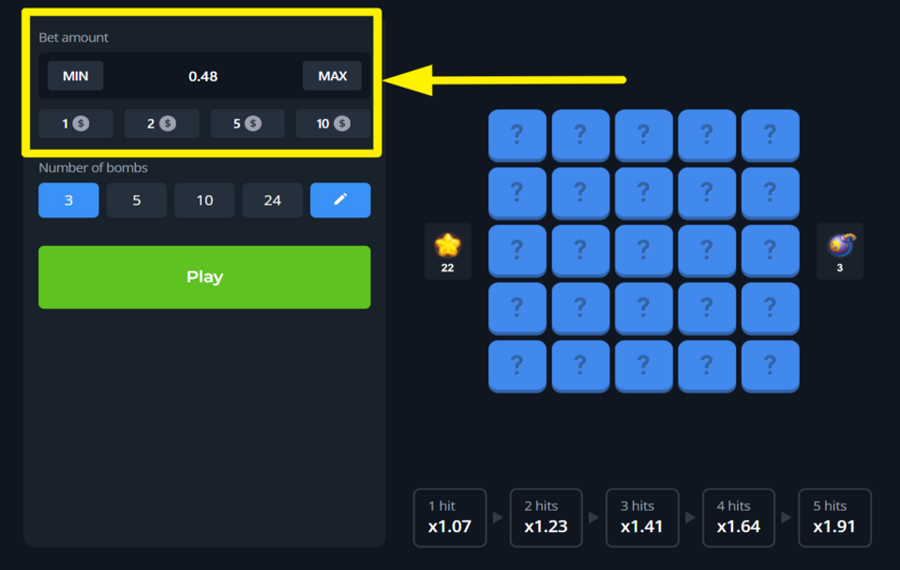
Use the buttons in the section marked "Bet Amount" on the left side of the screen to set how much you want to stake for the round. You can either tap one of the preset values or enter a custom amount manually. For the lowest and highest available amounts, hit “Min” or “Max” respectively.
2
SPECIFY THE NUMBER OF BOMBS.
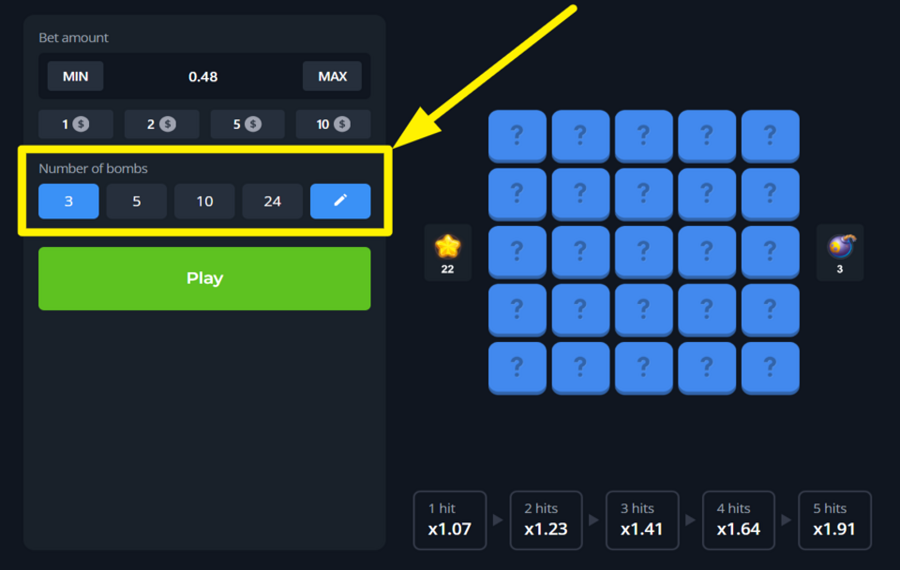
Just below the “Bet“ selection panel, you can find the “Number of Bombs“ section, which is essentially the risk level adjustment panel. Choose your level of risk by selecting how many bombs you want to scatter on the board. You can tap one of the default bomb counts—such as 3, 5, 10, or 24, or type a specific number (between 1 and 25) by tapping the pencil icon. The more bombs you choose, the fewer safe spots remain, but your reward multiplier grows faster with each correct pick.
3
BEGIN THE TREASURE HUNT!
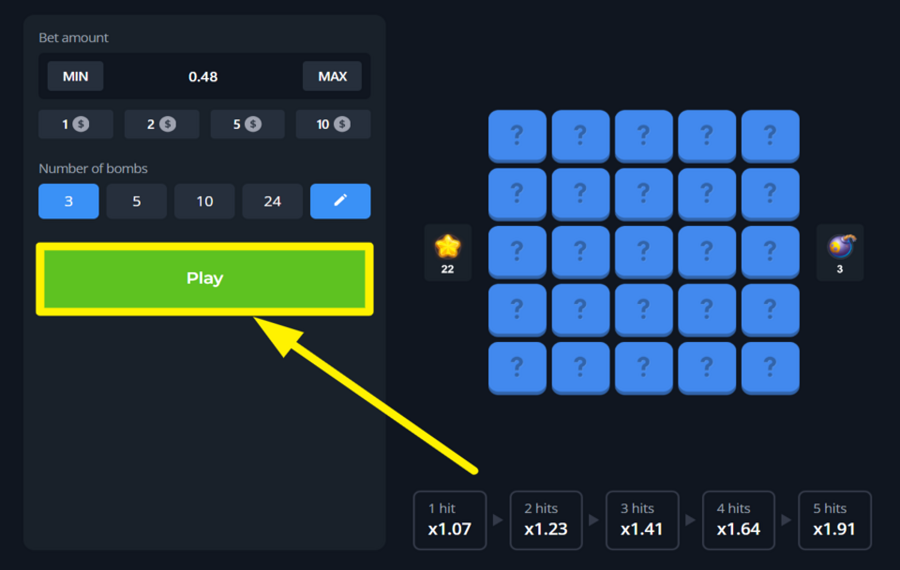
Press the green “Play” button to begin the round. This will activate the 5x5 tile grid. Tap any of the covered tiles to reveal what’s beneath. Each successful pick reveals a golden star and increases your multiplier, as shown at the bottom of the screen (e.g., x1.07 for 1 hit, x1.23 for 2 hits, and so on). Your objective is to uncover as many stars as possible without landing on a hidden bomb.
4
CASH OUT YOUR WINNINGS.
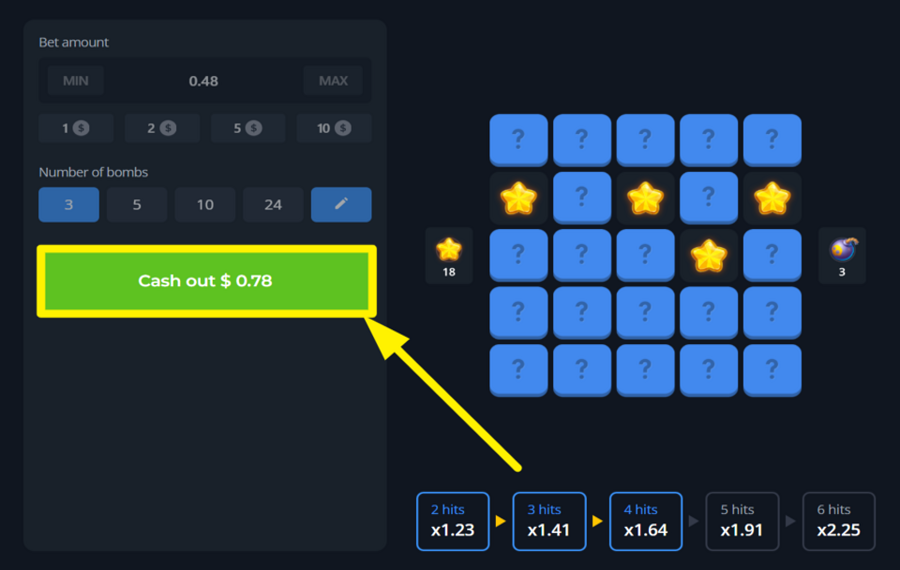
At any point during the round, you can lock in your winnings by clicking the green “Cash out” button on the left panel. This option appears after your first successful tile selection. If you’re feeling lucky, you can keep going to try for a higher multiplier. Remember, if you step on a bomb, your entire “bet“ and whatever amount you won is lost for that round.
Simple Mines Ratings & Reviews
Our community rated Simple Mines as Very Good with a score of 4.5 out of 5 based on 8 votes.




Alex_cheLevel 8




Jmoneycool1Level 8Canada


Ferji666Level 10

vxrxnx![account-cancel]() Suspended
Suspended
 Suspended


KPAULS960311Level 1
14.04Level 8
Televizorius![account-cancel]() Suspended
Suspended
SuspendedZouharhall![account-cancel]() Suspended
Suspended
SuspendedRate and Review Simple Mines
When writing a Game Review, remember to share your personal experience in detail - whether it's positive or negative. For more tips on writing game reviews, check out our dedicated Help Page.
How to Write a Game ReviewSimple Mines Q&As
Got questions about Simple Mines?
Ask a QuestionCompare Simple Mines to Other Games
+![Nerves of Steal]()

Nerves of Steal
RTP: 92%
+![Mummys Mines]()

Mummys Mines
RTP: Undisclosed
+![Lucky Mines]()
Lucky Mines
RTP: 96%
+![Spin2Win Santas Fortune]()

Spin2Win Santas Fortune
RTP: 96.5%
+![Book of Mines]()

Book of Mines
RTP: 95%
+![Jungle Crossword]()
Jungle Crossword
RTP: Undisclosed
+![Mummys Treasure]()

Mummys Treasure
RTP: 96%
+![FA CHAI Gaming Mines]()

FA CHAI Gaming Mines
RTP: 97%
+![FA CHAI Gaming Tower]()

FA CHAI Gaming Tower
RTP: 97%
RatingSoftwareYearRTP



Show more![arrow_down]()


Other Games by InOut Games
All 67 InOut Games Games









Mihai Enculescu
Senior Game Expert
- Over 2 years of experience in the iGaming industry.
- Uploaded & maintained data for 3,000+ casino games.
- Strong grasp of casino game mechanics, especially slots.
- Reviewed and fact-checked over 3,500+ casino games.

