


 Casinos
 Bonuses


Backcourt Blackjack


Backcourt Blackjack Details

Software
Golden Rock
Release date
Aug 06, 2024
Game type
Blackjack

Times Played
 No
No
3D animation
No
Technology
HTML5
Play Backcourt Blackjack Slot for Real Money





Load More Casinos (+8)
How to Play Backcourt Blackjack Slot: Mastering the Basics
1
SET YOUR BET AMOUNT.
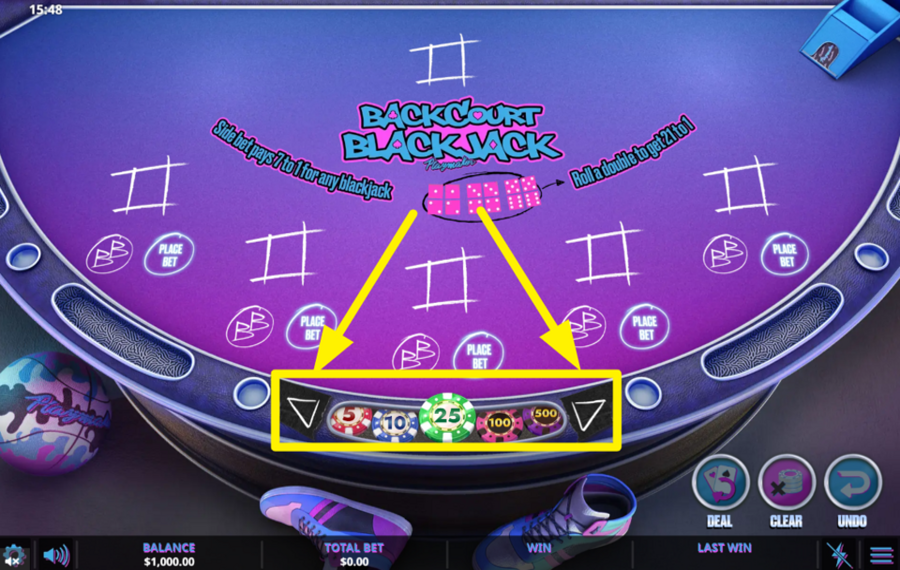
To set your wager, look at the row of colorful chips displayed along the lower center of the table. Tap or click on any chip value — such as 5, 10, 25, 100, or 500 — to select how much you wish to stake. Use the small arrow buttons on either side of the chip row to scroll through additional denominations
2
FIX ANY BETTING MISTAKES.
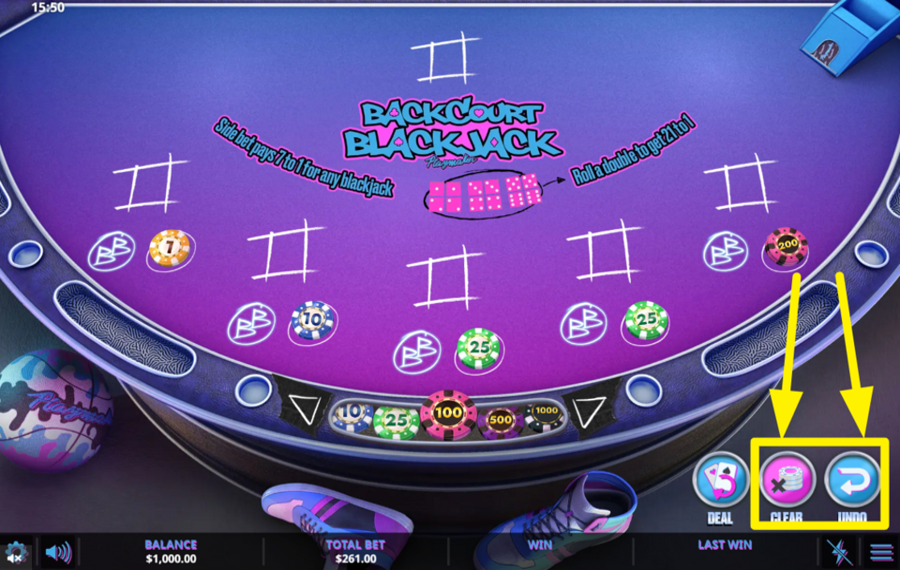
If you’ve made a mistake or simply want to start again, use the “Clear” or “Undo” buttons on the lower right of the table. “Clear” removes all chips from the betting area instantly, while “Undo” cancels the most recent chip placement one at a time.
3
PLACE YOUR CHIPS.
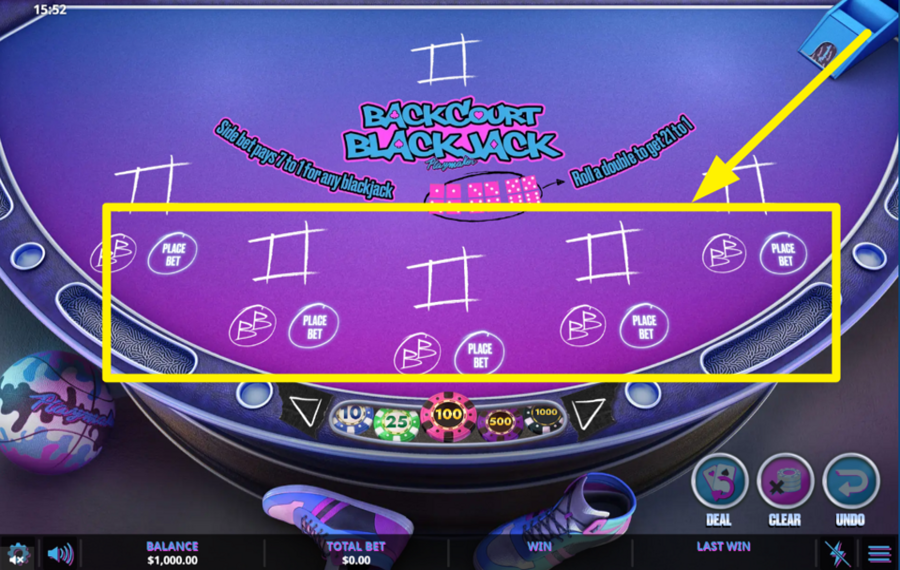
Once you’ve selected your chip values, click on any of the circular “Place Bet” spots located along the curved betting area in the center of the table. You can place a bet on one or more positions, depending on how many boxes you wish to play.
4
DEAL THE CARDS.
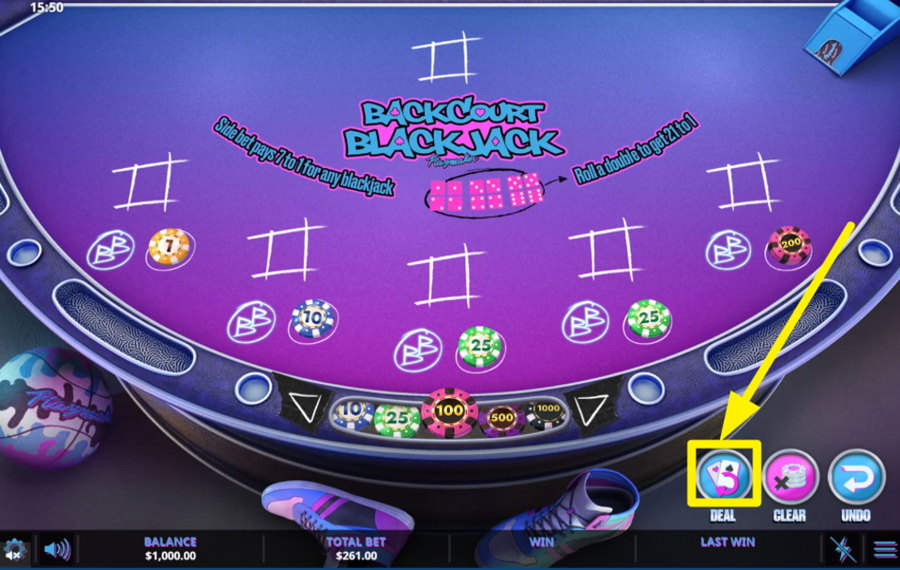
When you are ready, click the “Deal” button in the bottom right corner to begin the round. The cards are automatically dealt to you and the dealer. Each box receives two cards face-up, while the dealer’s hand shows one card face-up and one face-down.
5
DECIDE ON YOUR NEXT MOVE.
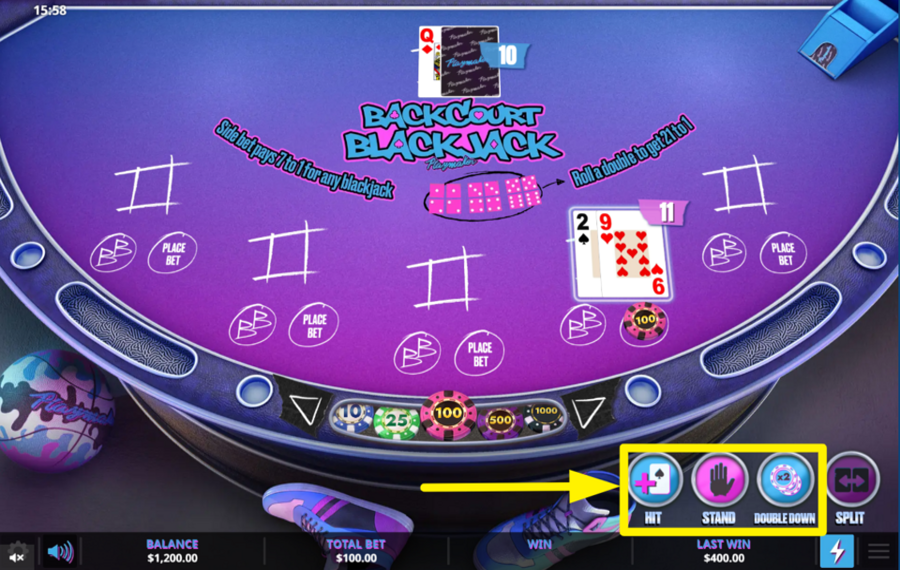
After the cards are dealt, you can choose from three main options displayed at the bottom right: “Hit,” “Stand,” or “Double Down.” Press “Hit” to draw another card and increase your hand total. Press “Stand” to end your turn and keep your current total. Choose “Double Down” to double your original bet and receive only one more card. Your goal is to reach a hand value as close to 21 as possible without exceeding it.
6
SPLIT PAIRS WHEN POSSIBLE.
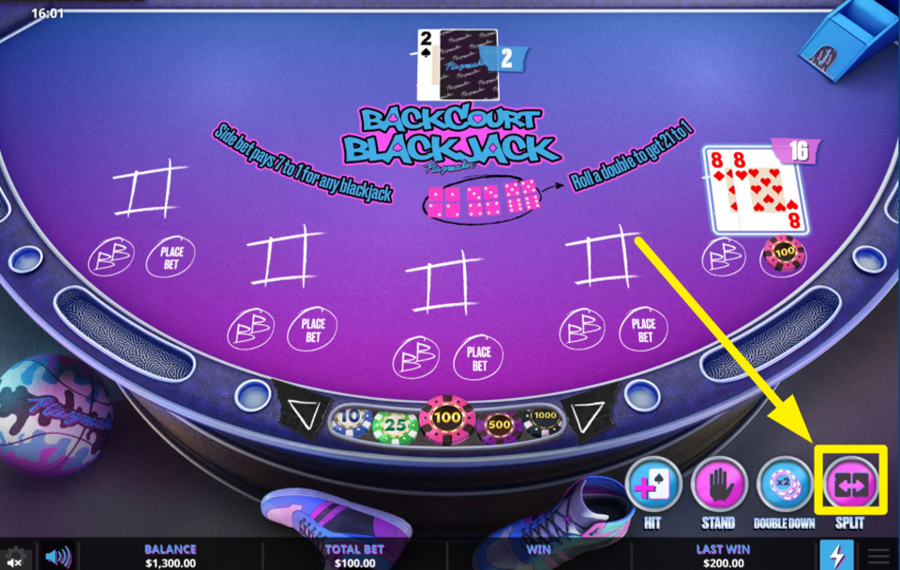
If your first two cards are a pair, such as two 8s, the “Split” button becomes active. Press it to divide your pair into two separate hands. A new chip, equal to your original ”bet,” is automatically added to the new hand. Each split hand is then played individually. However, only one split is allowed per round, and if you split Aces, only one additional card is dealt to each. If you choose not to split, continue playing your hand normally.
7
REPEAT OR RESET YOUR BET.
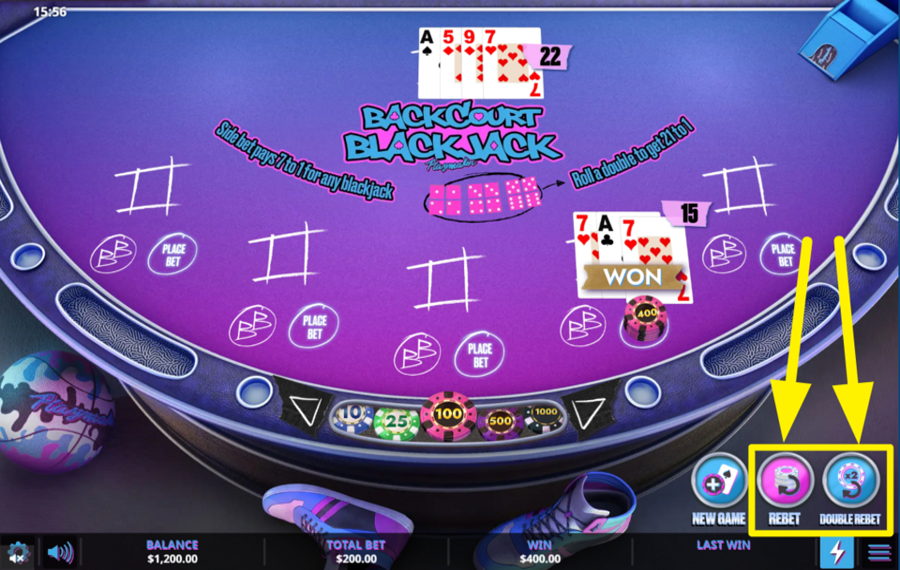
After the result is displayed, use the “Rebet” or “Double Rebet” buttons at the bottom right to play the same wager again. “Rebet” repeats your previous stake exactly, while “Double Rebet” places twice that amount. Alternatively, press “Clear” to remove all chips and start a fresh betting round.
8
CHANGE THE SPEED.
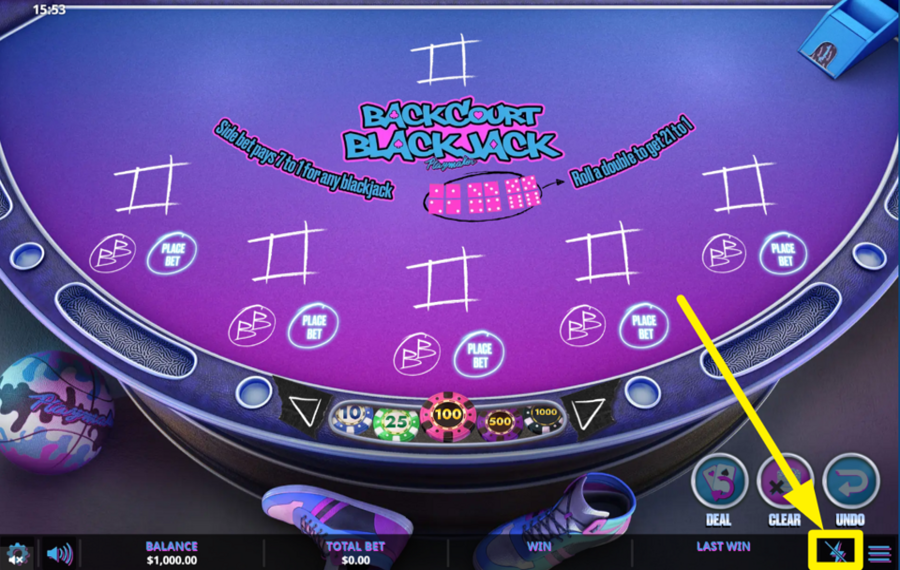
If you prefer a faster gameplay pace, toggle the “Turbo” mode by pressing the small lightning icon in the lower-right corner. When this mode is activated, card animations and dealer actions speed up considerably.
Backcourt Blackjack Ratings & Reviews
Our community rated Backcourt Blackjack as Very Good with a score of 4.1 out of 5 based on 27 votes.




vitekdojel![account-cancel]() Suspended
Suspended
 Suspended





Pawel1989Level 8Poland


Patwes9![account-cancel]() Suspended
Suspended
Suspended
14.04Level 8


Zouharhalllll![account-cancel]() Suspended
Suspended
Suspended

KPAULS960311Level 1
uztrewert![account-cancel]() Suspended
Suspended
SuspendedJeroMaatjeLevel 6


Francisco09![account-cancel]() Suspended
Suspended
SuspendedMikkkey![account-cancel]() Suspended
Suspended
SuspendedAdri2226![account-cancel]() Suspended
Suspended
Suspended


Bingo7408Level 10Bulgaria
muszkawaldek![account-cancel]() Suspended
Suspended
Suspended
SeymanLevel 9

agika66![account-cancel]() Suspended
Suspended
SuspendedShow 12 more
Rate and Review Backcourt Blackjack
When writing a Game Review, remember to share your personal experience in detail - whether it's positive or negative. For more tips on writing game reviews, check out our dedicated Help Page.
How to Write a Game ReviewBackcourt Blackjack Q&As
Got questions about Backcourt Blackjack?
Ask a QuestionCompare Backcourt Blackjack to Other Games
+![BetConstruct Blackjack D]()

BetConstruct Blackjack D
RTP: 96.3%
+![Multihand Blackjack VIP]()

Multihand Blackjack VIP
RTP: 99.51%
+![Multihand Blackjack]()
Multihand Blackjack
RTP: 99.33%
+![Multi Hand Classic Blackjack 6 Deck]()

Multi Hand Classic Blackjack 6 Deck
RTP: 99.44%
+![Premier Blackjack with Side Bets]()

Premier Blackjack with Side Bets
RTP: 99.57%
+![Premier Blackjack with Lucky Lucky]()

Premier Blackjack with Lucky Lucky
RTP: 99.57%
+![Classic Blackjack with Noble Diamonds]()

Classic Blackjack with Noble Diamonds
RTP: 99.44%
+![Blackjack Lucky 7s Xmas]()

Blackjack Lucky 7s Xmas
RTP: 99.7%
+![Arrows Edge Atlantic City Blackjack]()

Arrows Edge Atlantic City Blackjack
RTP: 99.33%
+![Diamond Blackjack]()

Diamond Blackjack
RTP: 99.65%
RatingSoftwareYearRTP

Backcourt Blackjack
Golden Rock
2024
Undisclosed



Show more![arrow_down]()


Other Games by Golden Rock






Load More Golden Rock Games

Mihai Enculescu
Senior Game Expert
- Over 2 years of experience in the iGaming industry.
- Uploaded & maintained data for 3,000+ casino games.
- Strong grasp of casino game mechanics, especially slots.
- Reviewed and fact-checked over 3,500+ casino games.

