


 Casinos
 Bonuses


EGT Digital European Roulette


EGT Digital European Roulette Details


Times Played
 No
No
3D animation
No
Technology
HTML5
Play EGT Digital European Roulette Slot for Real Money




Load More Casinos (+10)
How to Play EGT Digital European Roulette Slot: Mastering the Basics
1
SET YOUR BET.
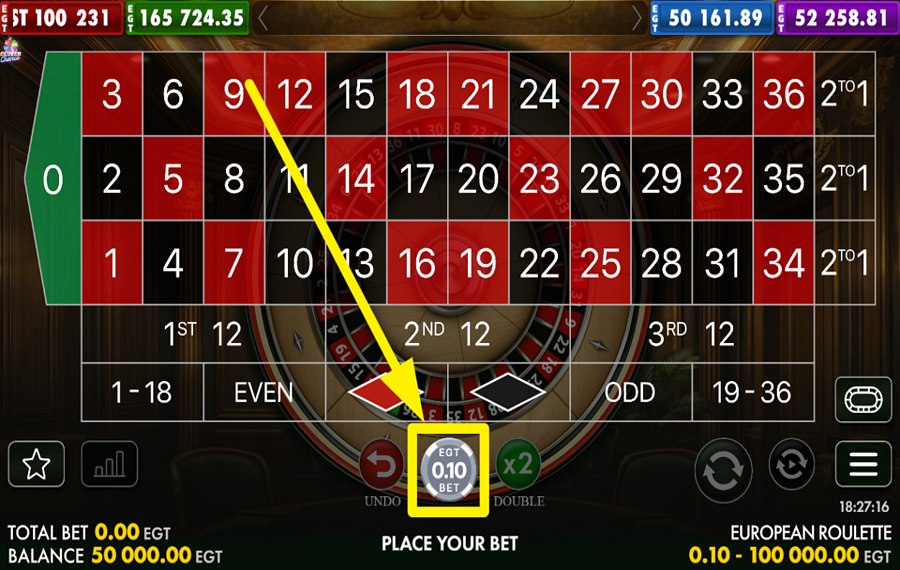
Click the casino chip at the bottom center to display the full range of chip values. Choose one, then place it directly on a number, along a dividing line, at an intersection, or inside an outside-bet field such as “Red,” “Black,” “Odd,” “Even,” “1–18,” “19–36,” or one of the three dozens. Your combined “bet” appears as “Total Bet” in the lower-left corner.
2
REVISE OR DOUBLE YOUR SELECTED WAGER.
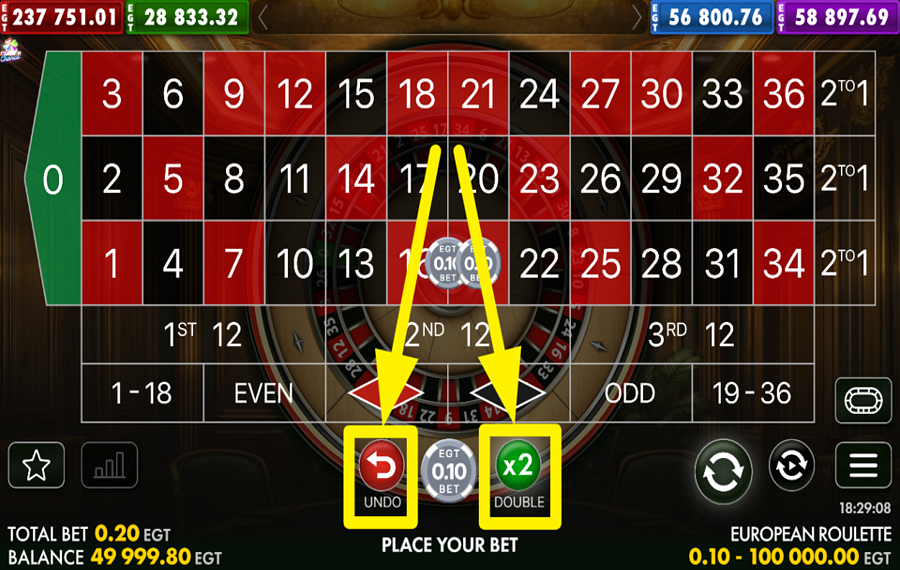
Click the red “Undo” button to the left of the selected chip when you want to take back your latest placement. Press it again to work backward through further selections. If you prefer to raise every chip already on the table, hit the green “×2 Double” button to the chip’s right. The “Total Bet” display updates to reflect the change.
3
IGNITE THE EXCITEMENT!
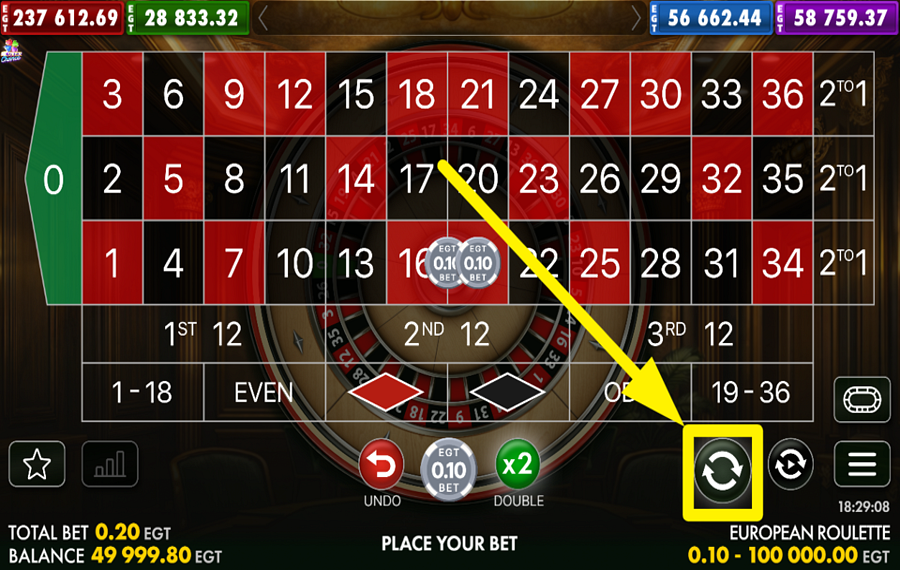
Start the round by clicking the large circular-arrow button near the bottom-right corner after arranging your chips. The full betting layout shrinks as you click it, while the wheel takes center stage and the ball begins moving. When it settles into one of the 37 pockets, the game checks that number against every selection you made and awards any matching payout.
4
REDO YOUR LAST BET SELECTION.
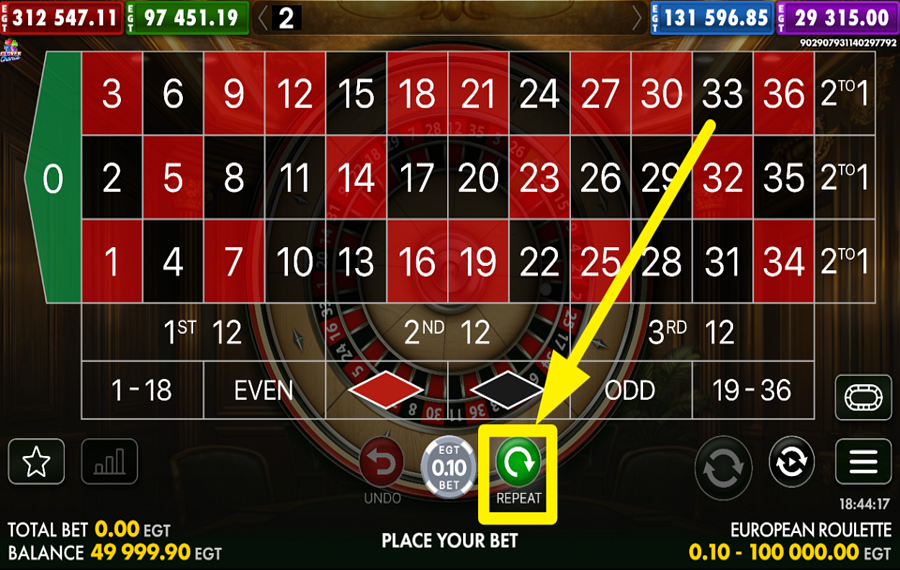
Restore your previous selections by pressing the green “Repeat” button that appears after the round finishes. The game will return the same chip values to their former positions. You can leave the restored “bet” unchanged, modify individual placements, or double it before playing the next round.
5
UTILIZE AUTOPLAY.
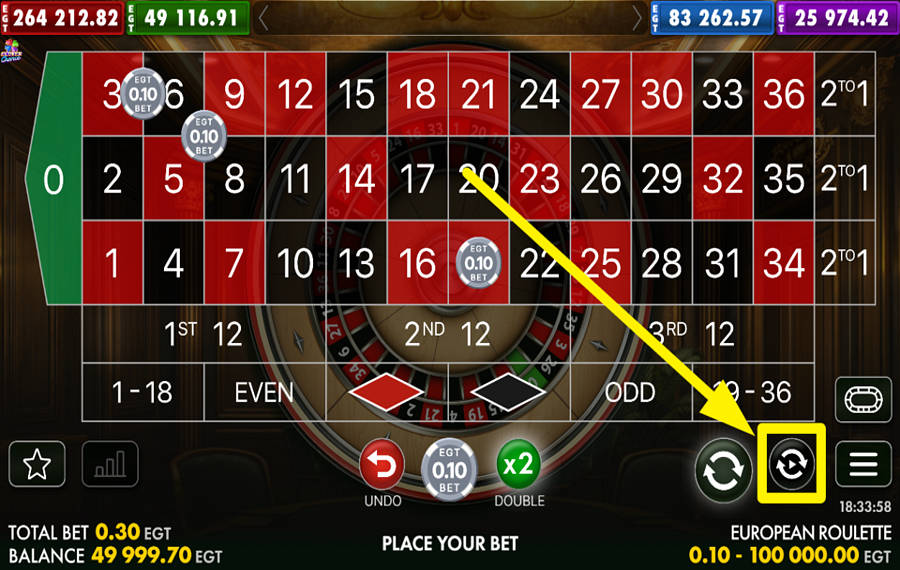
Open the “Autoplay Options” panel by tapping the smaller circular-arrow button positioned to the right of the main play button. Select 10, 20, 50, or 100 rounds, and add optional limits for “Max Loss”, “Balance,” or “Win” amount. Press “Start” to run the chosen number of rounds, or use “Reset” to clear the settings.
6
TRY THE RACETRACK.
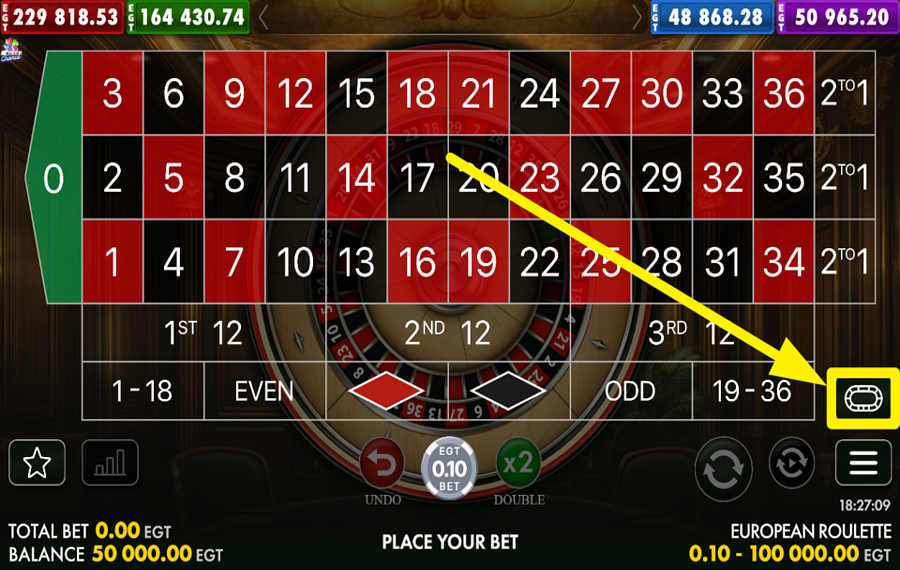
Switch to racetrack betting by selecting the oval racetrack icon on the right side of the table. This view arranges numbers in the same order as they appear around the roulette wheel, which makes it easier to cover neighboring pockets. You can also choose established combinations such as “Tiers,” “Orphelins,” “Voisins,” and “Zero,” each of which distributes chips across its corresponding wheel section.
7
SAVE OR EXPAND YOUR PICKS.
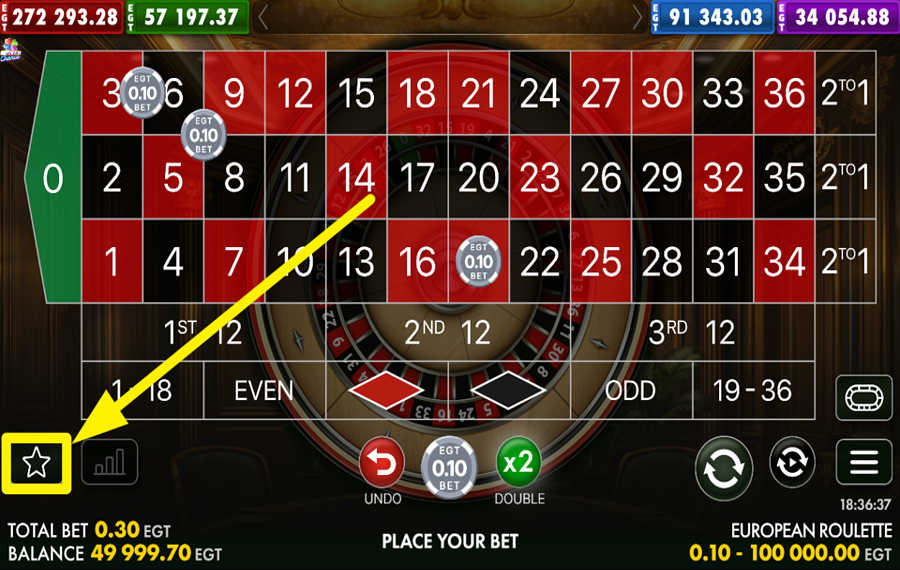
Click the star button in the bottom-left corner after building a “bet” to access the “Favorite Bets” panel. Save frequently used layouts under “Favorite” so you can call them up again without placing every chip manually. Use the “Extra” tab for additional saved betting arrangements or open “Straight Up” when you want to work with saved single-number selections.
EGT Digital European Roulette Ratings & Reviews
Our community rated EGT Digital European Roulette as Very Good with a score of 4.5 out of 5 based on 2 votes.




pingvinasLevel 39





LeihLevel 3Belarus
Rate and Review EGT Digital European Roulette
When writing a Game Review, remember to share your personal experience in detail - whether it's positive or negative. For more tips on writing game reviews, check out our dedicated Help Page.
How to Write a Game ReviewEGT Digital European Roulette Q&As
Got questions about EGT Digital European Roulette?
Ask a QuestionCompare EGT Digital European Roulette to Other Games
+![Evolution VIP Roulette]()

Evolution VIP Roulette
RTP: Undisclosed
+![Mascot Gaming European Roulette]()

Mascot Gaming European Roulette
RTP: 97.3%
+![European Roulette Announced Bets]()

European Roulette Announced Bets
RTP: 97.3%
+![Who Wants To Be A Millionaire Roulette]()

Who Wants To Be A Millionaire Roulette
RTP: 96.63%
+![Blazing Roulette]()

Blazing Roulette
RTP: 97.3%
+![First Person Roulette]()

First Person Roulette
RTP: 97.3%
+![Platipus Gaming American Roulette]()

Platipus Gaming American Roulette
RTP: 94.47%
+![Royal Roulette 500X]()

Royal Roulette 500X
RTP: 97.3%
+![Lucky Ball Roulette Live]()

Lucky Ball Roulette Live
RTP: 97%
+![Roulette X]()

Roulette X
RTP: 97.3%
RatingSoftwareYearRTP



Show more![arrow_down]()


Other Games by EGT Digital
All 150 EGT Digital Games









Mihai Enculescu
Senior Game Expert
- Over 2 years of experience in the iGaming industry.
- Uploaded & maintained data for 3,000+ casino games.
- Strong grasp of casino game mechanics, especially slots.
- Reviewed and fact-checked over 3,500+ casino games.

