


 Casinos
 Bonuses


Capymania Green

 coins
coins
 Play with chipy coins
Play with Chipy Coins
Our Play for Coins games offer a unique gaming experience.
- Here’s why:
- Casino-like vibes
- No boring demo credits, play with your Chipy balance
- Watch your winnings add up in real time
- Use Chipy coins for Shop items or Raffles tickets
Don't miss out on all the fun!


Capymania Green Details


Times Played
 No
No
3D animation
No
Technology
HTML5
Play Capymania Green Slot for Real Money




Load More Casinos (+10)
How to Play Capymania Green Slot: Mastering the Basics
1
BUY A SCRATCH CARD.
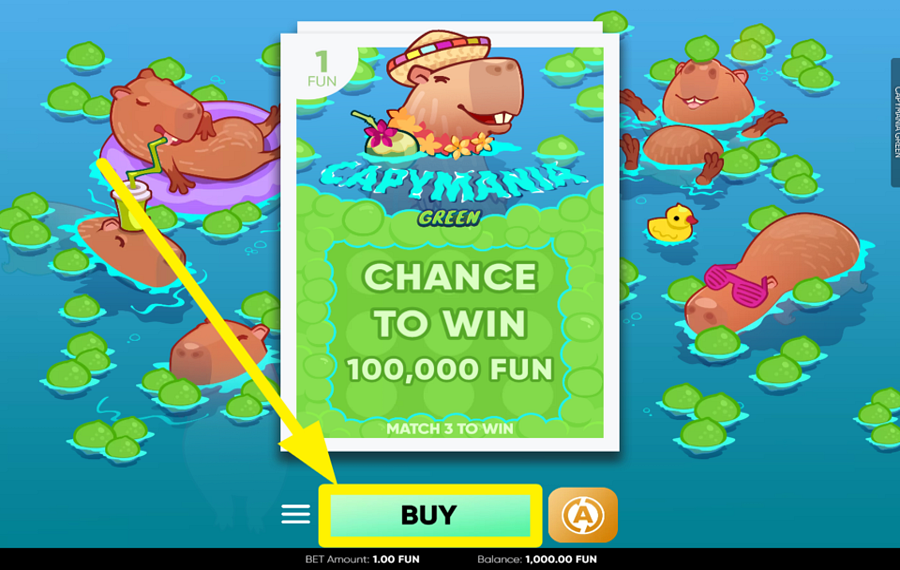
To begin a round, press the large green “Buy” button located beneath the scratch card, in the bottom center of the screen. Purchasing a card reveals a fresh 3×3 scratch field along with a golden coin. This coin is essentially your cursor. used to remove the protective coating. Each purchased card gives you a chance to uncover matching prize symbols hidden underneath the surface.
2
REVEAL THE HIDDEN SYMBOLS.
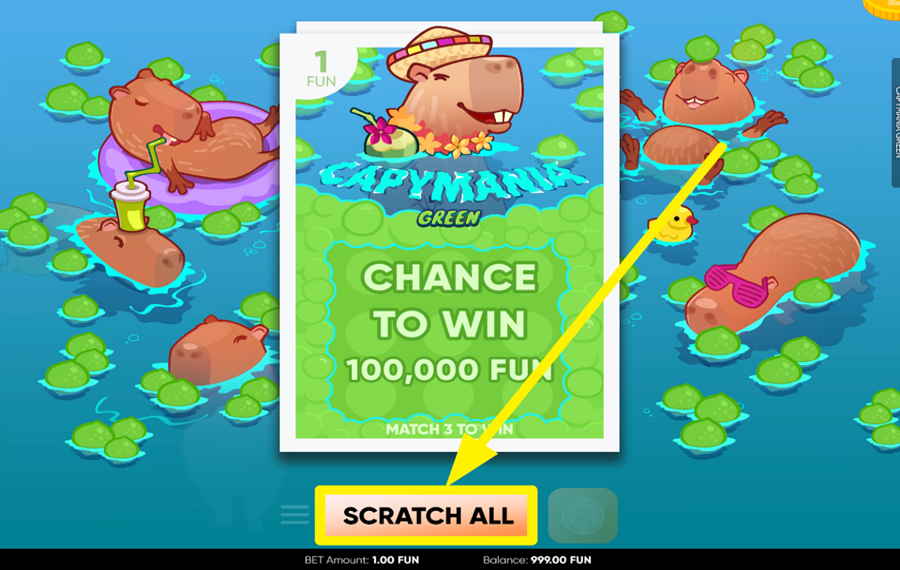
After buying a card, press the “Scratch All” button that appears at the bottom of the interface to instantly clear the entire protective layer from the card. Once uncovered, the game checks the field for matching symbol combinations. Landing 3 identical prize symbols awards the value attached to that symbol. You may also manually scratch the card by continuously dragging the cursor (the golden coin) or clicking across different sections of the ticket.
3
TURN ON AUTOMATIC SCRATCHING.
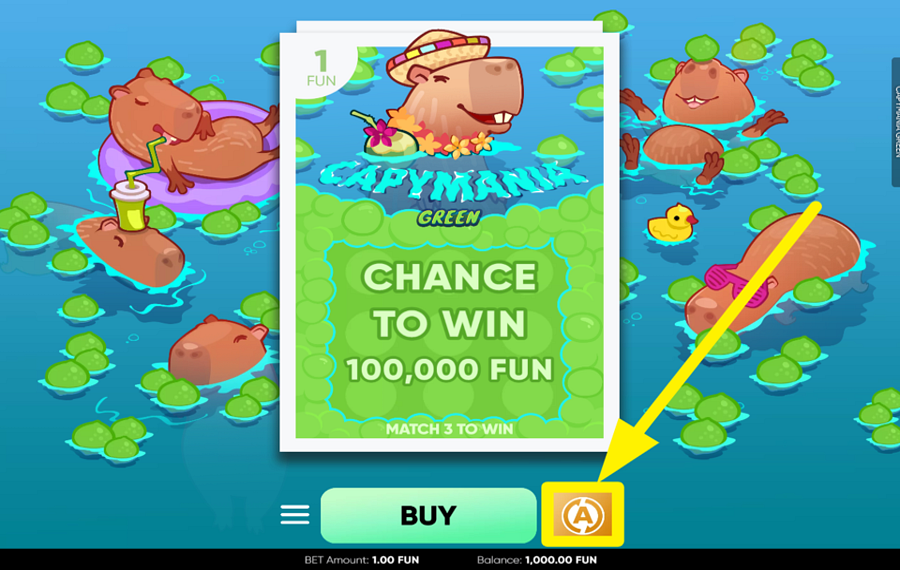
Tap the “A” icon positioned beside the ”Buy” button to open the ”Autoplay” settings window. Inside this panel, choose the number of automatic rounds from preset values such as 10, 25, 50, 75, 100, or 500. You may also configure optional “Win Limit” or “Loss Limit,” which are stop conditions. After the setup is complete, press the green “Start Autoplay” button to let the game purchase and scratch cards automatically.
Capymania Green Ratings & Reviews
Our community rated Capymania Green as Very Good with a score of 4.3 out of 5 based on 8 votes.




roulie07Level 7France


Sydneyslots98Level 7Australia


Adam080285Level 7United States




MichmashLevel 7

lazycoinLevel 11


Jmoneycool1Level 8Canada
agikamanusLevel 5Netherlands



pingvinasLevel 39
Rate and Review Capymania Green
When writing a Game Review, remember to share your personal experience in detail - whether it's positive or negative. For more tips on writing game reviews, check out our dedicated Help Page.
How to Write a Game ReviewCapymania Green Q&As
Got questions about Capymania Green?
Ask a QuestionCompare Capymania Green to Other Games
+![Triple Seven]()

Triple Seven
RTP: Undisclosed
+![Scratch Oil Mania]()

Scratch Oil Mania
RTP: 95.43%
+![Good Luck Duck]()

Good Luck Duck
RTP: Undisclosed
+![NeoGames Cash Farm]()

NeoGames Cash Farm
RTP: n/a
+![Scratch Big Foot]()

Scratch Big Foot
RTP: 90.86%
+![Sea and Sun]()

Sea and Sun
RTP: 93.51%
+![Scratch Match Deluxe]()

Scratch Match Deluxe
RTP: 95.82%
+![Lucky Number x20]()

Lucky Number x20
RTP: 69.13%
+![Scratch Dice]()

Scratch Dice
RTP: 97.2%
+![Money in the Bag]()

Money in the Bag
RTP: 93.02%
RatingSoftwareYearRTP



Show more![arrow_down]()


Other Games by BGaming
All 295 BGaming Games







Rozi Vrinceanu
Casino Data Specialist
- Over 6 years of experience in the land-based casino industry;
- Deep understanding of player experience and casino operations;
- Updated and verified more than 300 online casino reviews;
- Known for precision, consistency, and a high standard of accuracy;
- Currently studying Economic Sciences at Titu Maiorescu University.

