 Level
Level 


 Casinos
 Bonuses


Diamond Payout 10th Anniversary Edition

 Refresh
 Full Screen
 Report
Diamond Payout 10th Anniversary Edition Details

Software
NeoGames
Release date
Aug 01, 2024
Game type
Other

Times Played
 No
No
3D animation
No
Technology
HTML5
How to Play Diamond Payout 10th Anniversary Edition Slot: Mastering the Basics
1
ASSIGN A BET VALUE.
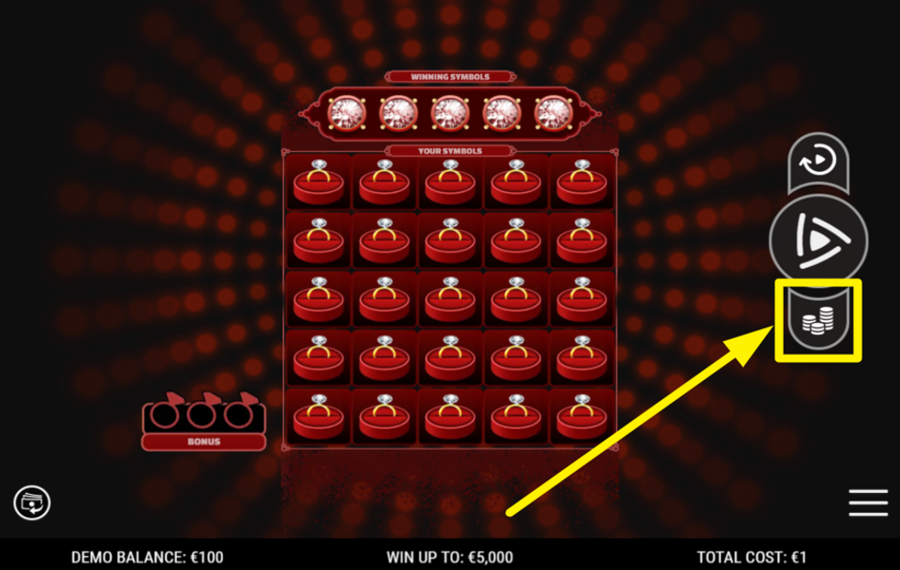
Tap on the icon resembling three coin stacks, positioned on the right-hand side of the game interface. This will launch the "Ticket Cost" menu. Within this menu, select your desired "bet" amount. Once you've finalized your choice, hit "Done" to save your selection and close the menu.
2
KICK OFF THE REEL ACTION!
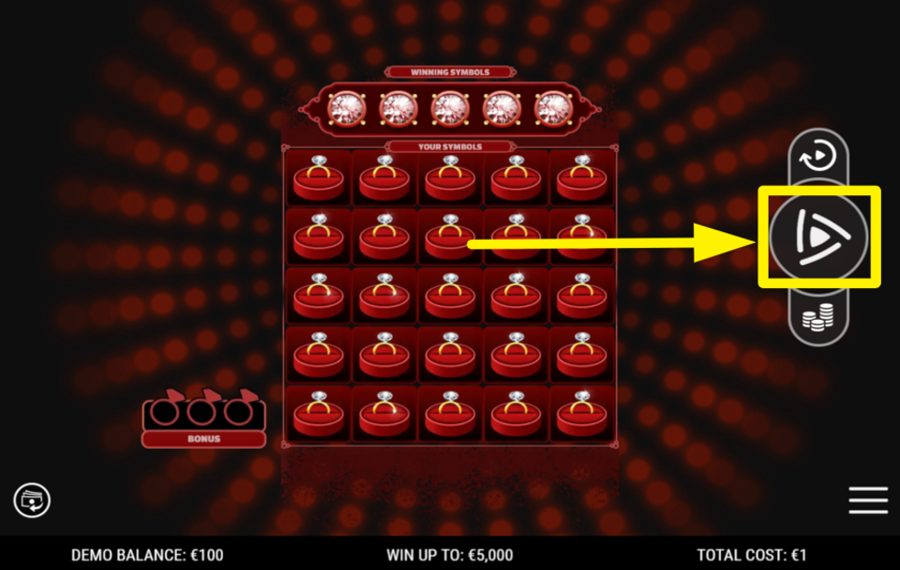
After setting your wager, press the "Spin" button, located on the right-hand side of the screen, to set the reels in motion.
3
ACTIVATE AUTOMATIC PLAY.
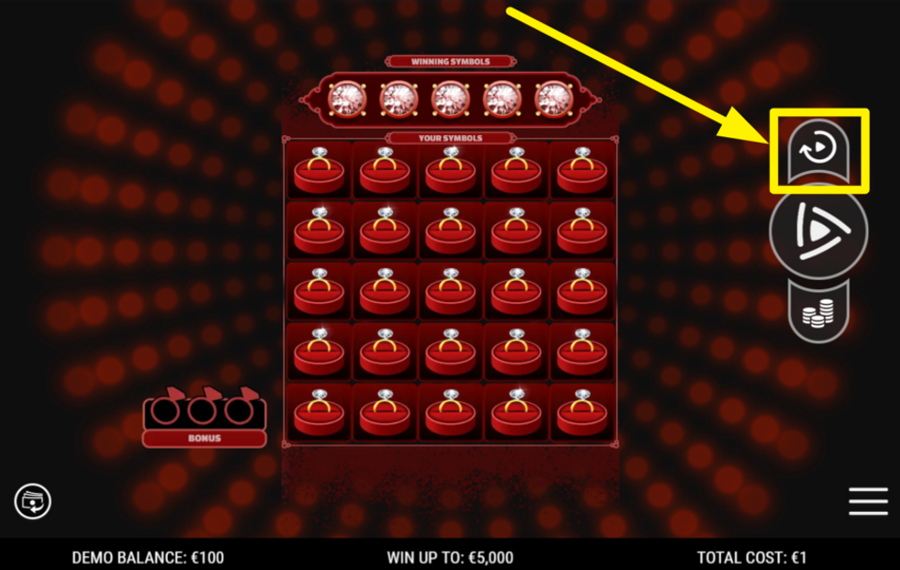
To initiate automatic spins, click the circular "Autoplay" icon found above the "Spin" button. This will bring up the "Autoplay" menu, where you can decide how many spins will run consecutively. Confirm by pressing "Start," and the reels will turn automatically for the specified number of spins.
Diamond Payout 10th Anniversary Edition Ratings & Reviews
Our community rated Diamond Payout 10th Anniversary Edition as Average with a score of 3.9 out of 5 based on 7 votes.
Rate and Review Diamond Payout 10th Anniversary Edition
When writing a Game Review, remember to share your personal experience in detail - whether it's positive or negative. For more tips on writing game reviews, check out our dedicated Help Page.
How to Write a Game ReviewDiamond Payout 10th Anniversary Edition Q&As
Got questions about Diamond Payout 10th Anniversary Edition?
Ask a QuestionCompare Diamond Payout 10th Anniversary Edition to Other Games
+![Queen of Riches Tap Cards]()

Queen of Riches Tap Cards
RTP: 92.42%
+![Jewels Dice Deluxe]()

Jewels Dice Deluxe
RTP: 0%
+![Queen of Diamonds]()
Queen of Diamonds
RTP: null%
+![Flexing Dragons]()

Flexing Dragons
RTP: 96.26%
+![Incan Adventure]()

Incan Adventure
RTP: 96.25%
+![SmartSoft Gaming Gem Stones]()

SmartSoft Gaming Gem Stones
RTP: 0%
+![Swoop]()

Swoop
RTP: 95%
+![Gold of Baboon]()

Gold of Baboon
RTP: 95%
+![Diamond Sky]()

Diamond Sky
RTP: 96%
+![Gem Vortex]()

Gem Vortex
RTP: 97.27%
RatingSoftwareYearRTP

Diamond Payout 10th Anniversary Edition
NeoGames
2024
Undisclosed



Show more![show more arrow down]()


Other Games by NeoGames








- Over 2 years of experience in the iGaming industry.
- Uploaded & maintained data for 3,000+ casino games.
- Strong grasp of casino game mechanics, especially slots.
- Reviewed and fact-checked over 3,500+ casino games.

