 Level
Level 


 Casinos
 Bonuses


Game Time Tec Jogo Do Bicho

 Refresh
 Full Screen
 Report
Game Time Tec Jogo Do Bicho Details

Software
Game Time Tec
Release date
Jul 06, 2024
Game type
Other

Times Played
 No
No
3D animation
No
Technology
HTML5
How to Play Game Time Tec Jogo Do Bicho Slot: Mastering the Basics
1
PICK A THEME.
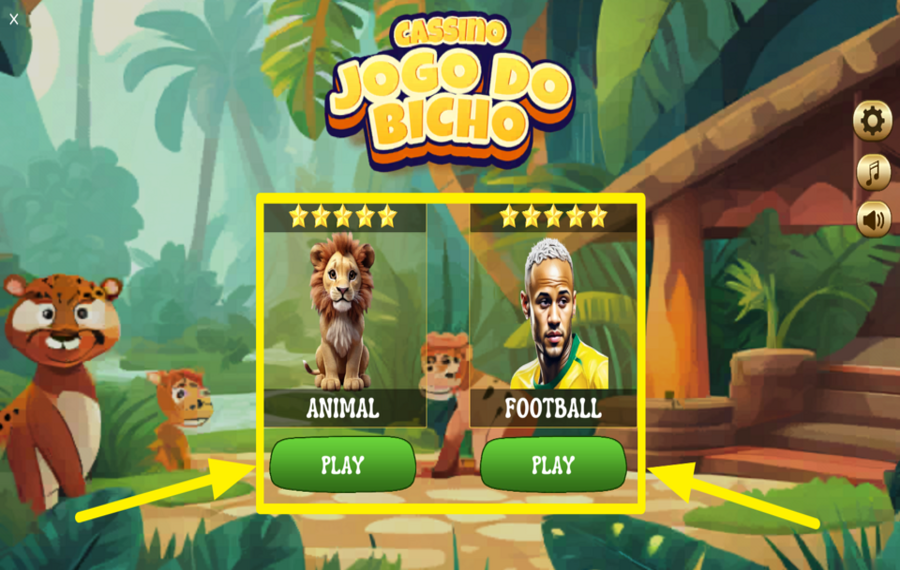
At the very beginning, you must pick a theme. You can either select “Animal“ or “Footbal“l by pressing the “Play“ button beneath the theme of your choice. If you wish to switch between themes later, in between rounds, open the menu at the top left corner and choose the other theme before starting the next round.
2
SET YOUR BET.
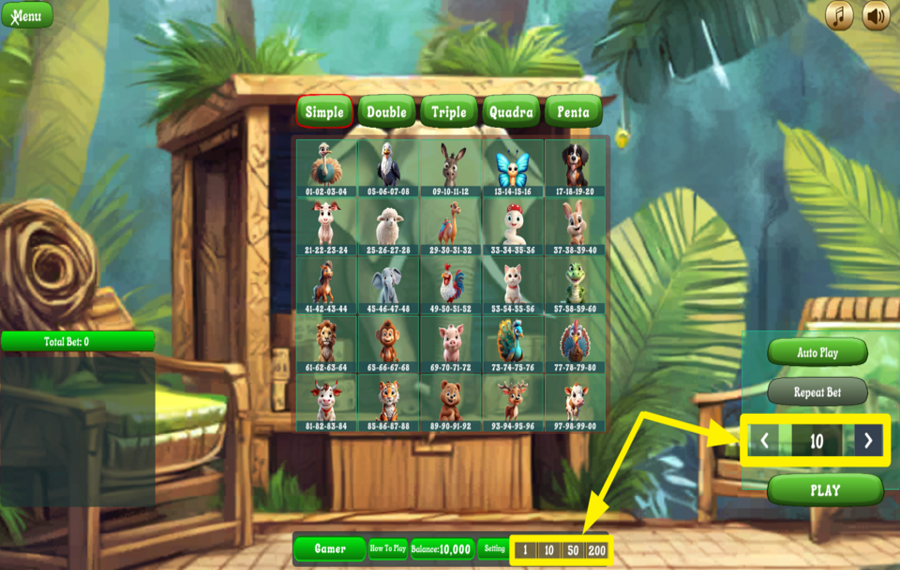
To set your “bet“ amount, look at the bottom of the screen. You can either press the “+” or “-” buttons here to raise or lower the amount, or directly pick one of the preset chip amounts such as 1, 10, 50, or 200.
3
CHOOSE THE NUMBER OF CHARACTERS.
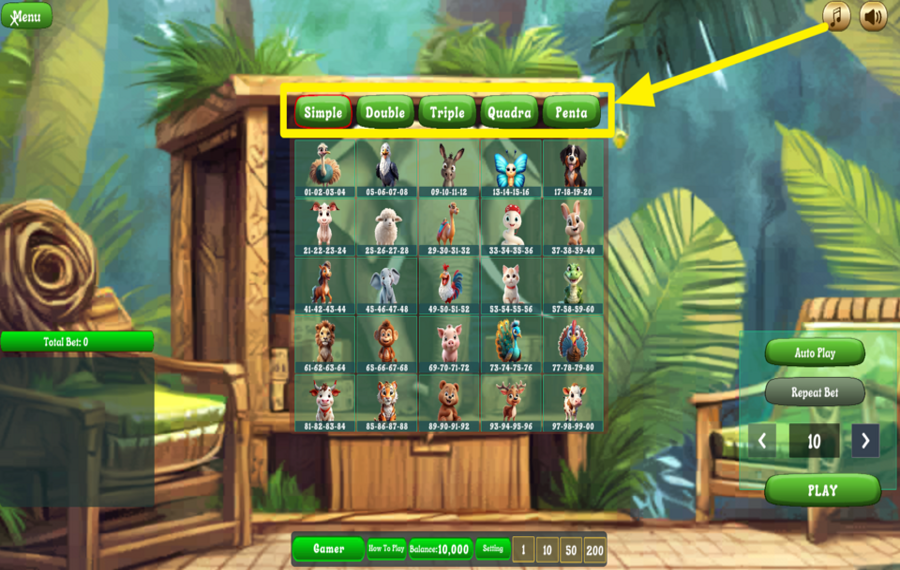
Above the grid in the middle of the game screen, you will see options like Simple (or Single), Double, Triple, Quadra, and Penta. These determine how many characters (animals or players, depending on the theme) you want to include in the next round. For example, Simple is one pick, Double is two picks, Triple is three picks, and so on. The payout multiplier increases with the difficulty of the combination you choose.
4
SELECT THE CHARACTERS.

Now select your animals or players directly on the grid. Each square corresponds to a specific character and number set. Click the images to pick and list them on the left panel.
5
PLAY THE GAME.
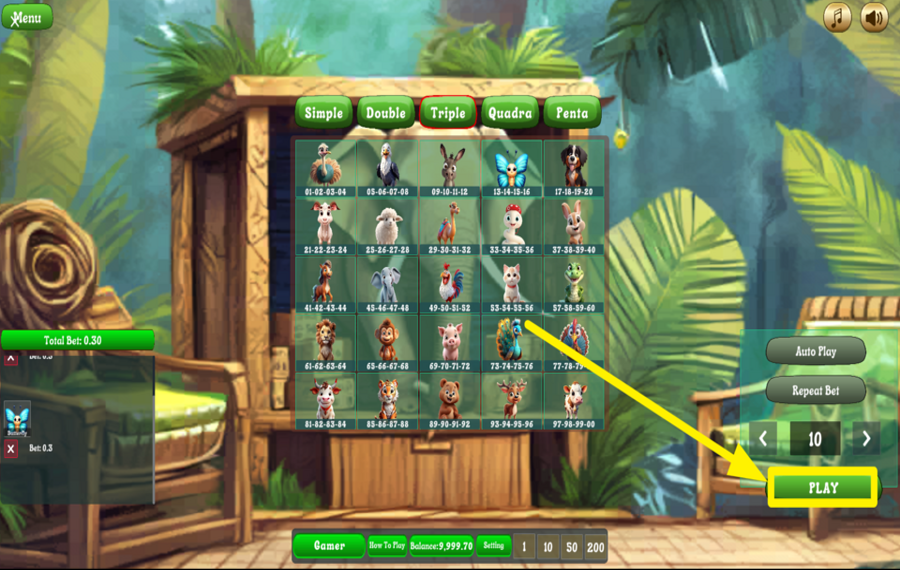
After making your selections, press the “Play“ button located on the right side of the screen. The draw begins, and winning numbers are revealed. If your chosen animals or players match the results according to the betting type you picked, you win a prize based on the payout rules.
6
GO WITH THE LAST BET.
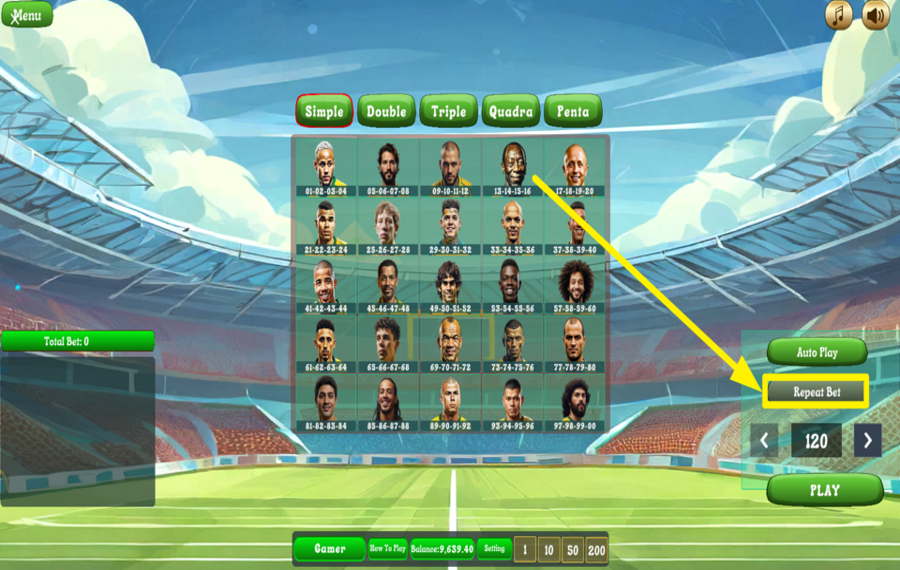
If you wish to play again with the same selections, you don’t need to choose everything manually. Press the “Repeat Bet“ button on the right panel, and your previously selected wager amount will be placed again instantly for the next round.
7
ENABLE AUTOPLAY.
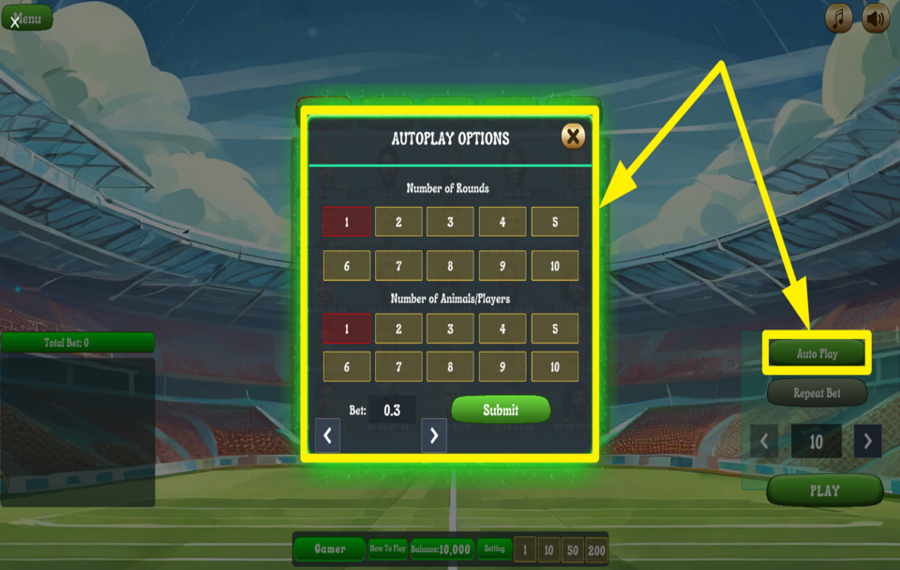
For a hands-free experience, press the “Auto Play“ button on the right side of the screen. This opens a settings window where you can decide how many rounds to run automatically, how many characters to pick per round, and confirm the stake amount. Once you press “Submit,“ the game continues for the set number of rounds without requiring manual input.
Game Time Tec Jogo Do Bicho Ratings & Reviews
Our community rated Game Time Tec Jogo Do Bicho as Very Good with a score of 4.7 out of 5 based on 3 votes.
Rate and Review Game Time Tec Jogo Do Bicho
When writing a Game Review, remember to share your personal experience in detail - whether it's positive or negative. For more tips on writing game reviews, check out our dedicated Help Page.
How to Write a Game ReviewGame Time Tec Jogo Do Bicho Q&As
Got questions about Game Time Tec Jogo Do Bicho?
Ask a QuestionCompare Game Time Tec Jogo Do Bicho to Other Games
+![Virtual Champions]()

Virtual Champions
RTP: 95.04%
+![Super Crazy Races]()
Super Crazy Races
RTP: 90.62%
+![Basketball Strike]()

Basketball Strike
RTP: 97.5%
+![Putter King]()

Putter King
RTP: 96%
+![Adrenaline Rush]()

Adrenaline Rush
RTP: 97%
+![Nord Legends FireWind Fortune]()

Nord Legends FireWind Fortune
RTP: 96.5%
+![Gridiron Gold]()

Gridiron Gold
RTP: 94.17%
+![Chickeno]()

Chickeno
RTP: 95%
+![Cricket Champion]()

Cricket Champion
RTP: 97.3%
+![Fortune Chef Panda]()

Fortune Chef Panda
RTP: 96%
RatingSoftwareYearRTP

Game Time Tec Jogo Do Bicho
Game Time Tec
2024
95%



Show more![show more arrow down]()


Other Games by Game Time Tec









- Over 2 years of experience in the iGaming industry.
- Uploaded & maintained data for 3,000+ casino games.
- Strong grasp of casino game mechanics, especially slots.
- Reviewed and fact-checked over 3,500+ casino games.

