


 Casinos
 Bonuses


Space XY

 coins
 Play with chipy coins
Play with Chipy Coins
Our Play for Coins games offer a unique gaming experience.
- Here’s why:
- Casino-like vibes
- No boring demo credits, play with your Chipy balance
- Watch your winnings add up in real time
- Use Chipy coins for Shop items or Raffles tickets
Don't miss out on all the fun!


Space XY Details


Times Played
 No

3D animation
No
Technology
HTML5
Play Space XY Slot for Real Money




Load More Casinos (+10)
How to Play Space XY Slot: Mastering the Basics
1
CHOOSE YOUR BET.
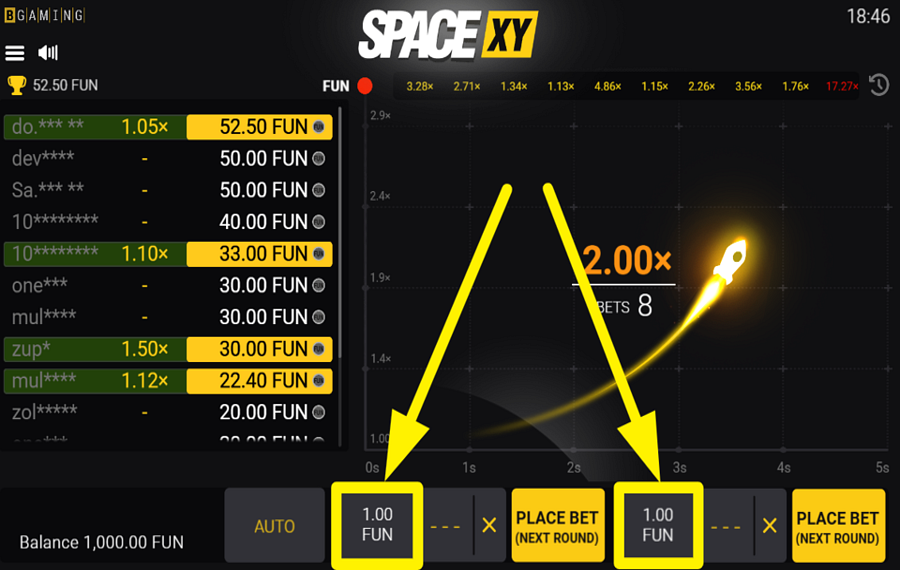
To set your wager, tap the rectangular box displaying the current “bet” value, positioned at the bottom of the screen. A vertical selection panel will slide open, showing multiple stake amounts. Press your preferred value to apply it. The game supports two separate betting panels side by side, which allows you to place two different wagers in the same round.
2
SET A TARGET MULTIPLIER.
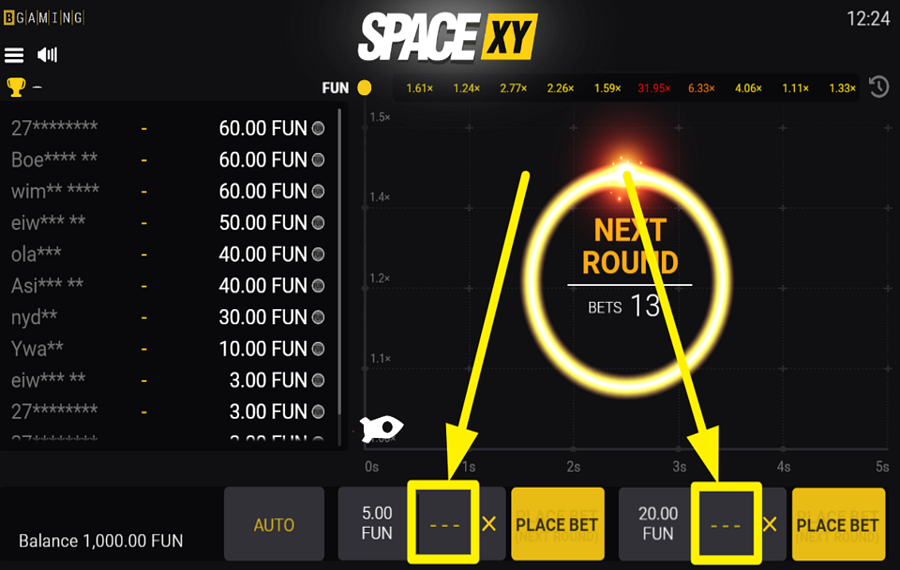
To define the moment your winnings would be potentially secured, press the three-dash field positioned beside the “bet“ amount box. This opens a vertical multiplier menu containing values such as 1.05x, 1.50x, 2.00x, and higher. Choose one of the listed multipliers to automatically collect winnings if the rocket reaches that value before disappearing. If no multiplier is selected, you will need to cash out manually during the round.
3
PLACE YOUR BET.
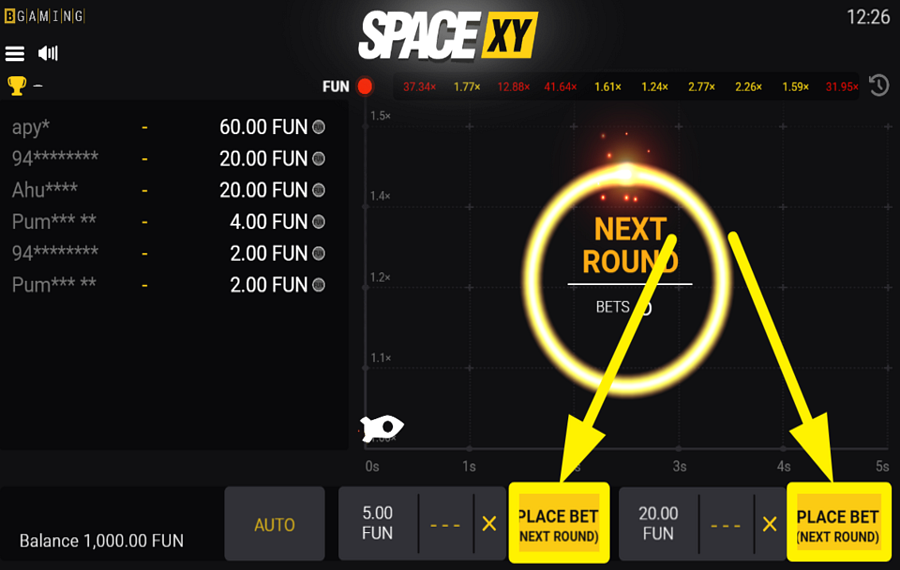
Press the yellow “Place Bet” button at the bottom of the screen to join the upcoming round. Before each launch, a short countdown appears in the center of the play area. Once the rocket takes off, the multiplier begins increasing continuously. “Bets“ placed during an active round are automatically queued for the next one instead of the current launch.
4
CASH OUT YOUR WINNINGS.
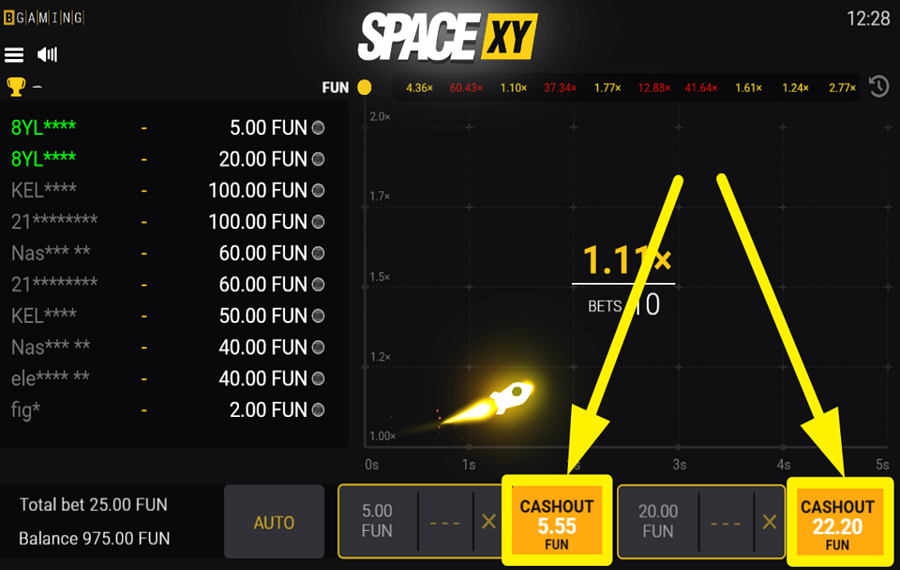
Watch the multiplier rise as the rocket flies across the screen. Before the rocket disappears, press the yellow “Cashout” button on your active betting panel to secure your winnings. Your payout is calculated using your original wager multiplied by the value shown at the exact moment you cash out. If the rocket vanishes before you press the button, you lose the round.
5
ACTIVATE AUTOPLAY.
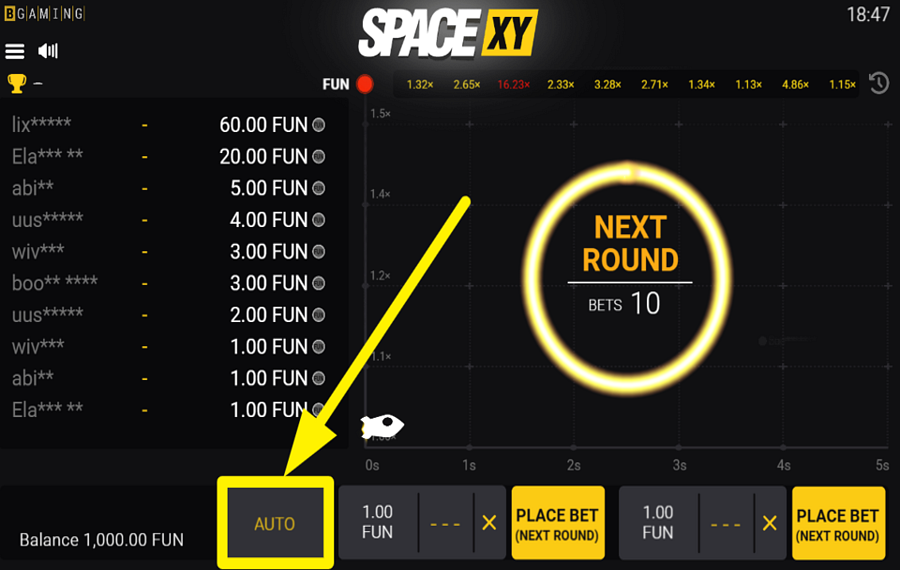
Press the “Auto” button located to the lower left of the main playing area to open the automatic play menu. A vertical panel will appear with several options, including fixed numbers of rounds and an unlimited setting. Select the desired number of automatic rounds to let the game place wagers repeatedly without manually pressing the “Place Bet” button each time. Your previously selected “bet“ values and multiplier settings remain active unless you change them.
Space XY Ratings & Reviews
Our community rated Space XY as Very Good with a score of 4 out of 5 based on 1 vote.




roulie07Level 8France


Rate and Review Space XY
When writing a Game Review, remember to share your personal experience in detail - whether it's positive or negative. For more tips on writing game reviews, check out our dedicated Help Page.
How to Write a Game ReviewSpace XY Q&As
Got questions about Space XY?
Ask a QuestionCompare Space XY to Other Games
+![Hyper Xplorer]()

Hyper Xplorer
RTP: 97%
+![Skyrocket]()

Skyrocket
RTP: Undisclosed
+![Avia Rush]()

Avia Rush
RTP: 96%
+![Spin Top]()

Spin Top
RTP: 96%
+![Pumped X]()

Pumped X
RTP: 96%
+![CricX]()

CricX
RTP: 97%
+![ChiX]()

ChiX
RTP: 97%
+![Jet X3]()

Jet X3
RTP: 97%
+![Rocket Race]()

Rocket Race
RTP: 90%
+![Meteoroid Crash Game]()

Meteoroid Crash Game
RTP: 97.06%
RatingSoftwareYearRTP




Show more![arrow_down]()


Other Games by BGaming
All 305 BGaming Games









Rozi Vrinceanu
Casino Data Specialist
- Over 6 years of experience in the land-based casino industry;
- Deep understanding of player experience and casino operations;
- Updated and verified more than 300 online casino reviews;
- Known for precision, consistency, and a high standard of accuracy;
- Currently studying Economic Sciences at Titu Maiorescu University.

