 Level
Level 


 Casinos
 Bonuses


Coin Miner 2


Coin Miner 2 Details

Software
Gaming Corps
Release date
May 18, 2023
Game type
Mines

Times Played
 No
No
3D animation
No
Technology
HTML5
Play Coin Miner 2 Slot for Real Money





Load More Casinos (+10)
How to Play Coin Miner 2 Slot: Mastering the Basics
1
PLACE YOUR BET.
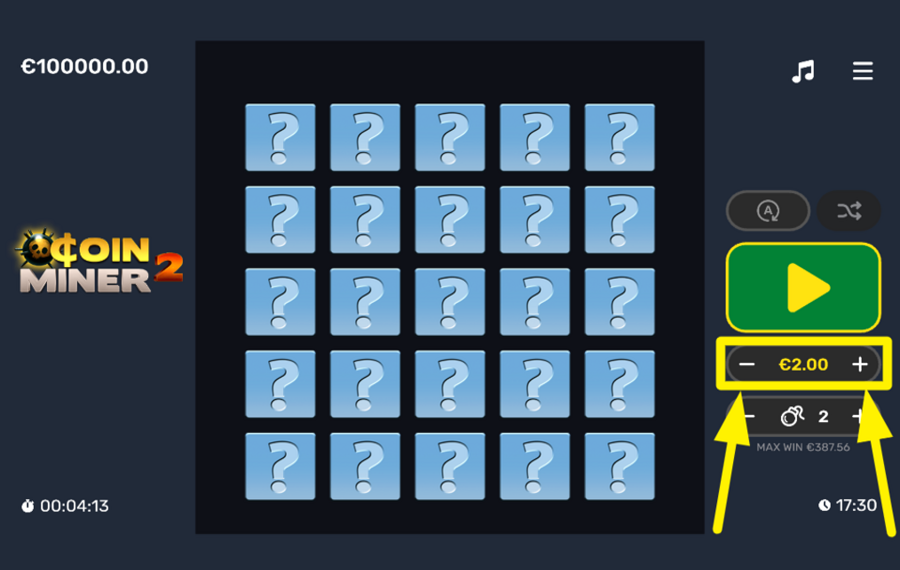
Look to the right side of the screen, where you will see the current bet value between the “–” and “+” buttons. Tap these buttons to decrease or increase the amount you wish to wager for the next round. Simply tap “–” to lower your ”bet” or “+” to raise it.
2
ADJUST NUMBER OF MINES.
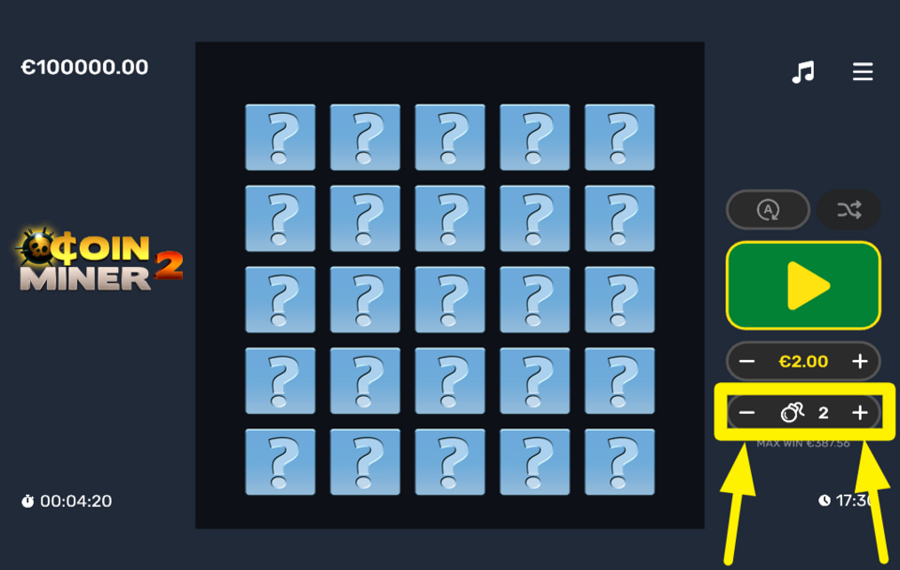
Directly beneath the ”bet” adjustment panel, you will find another set of “–” and “+” buttons. Tap these buttons to adjust the number of ”mines” on the grid. The more ”mines” you set, the higher the risk, but the potential payout increases as well. You can choose anywhere between 1 and 10 ”mines”.
3
PLAY THE GAME.
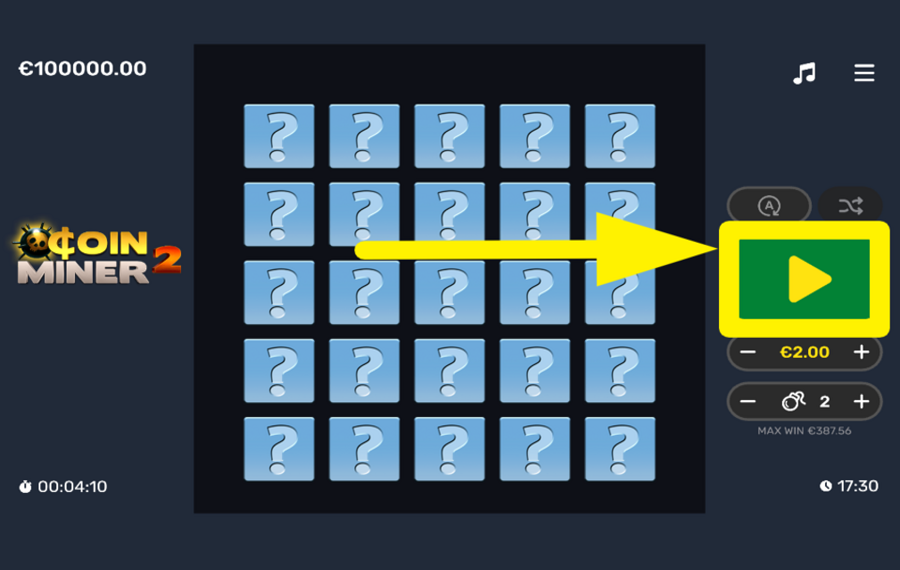
Once your ”bet” and number of ”mines” are set, start the game by pressing the large green "Play" button, located on the right side of the screen. When you press this button, a grid of unrevealed tiles will appear. Your goal is to uncover tiles that reveal coins, each of which increases your winnings. Be cautious, though: ”mines” hidden beneath the tiles might end the round and cause you to lose your bet.
4
TAKE OUT YOUR WINNINGS.
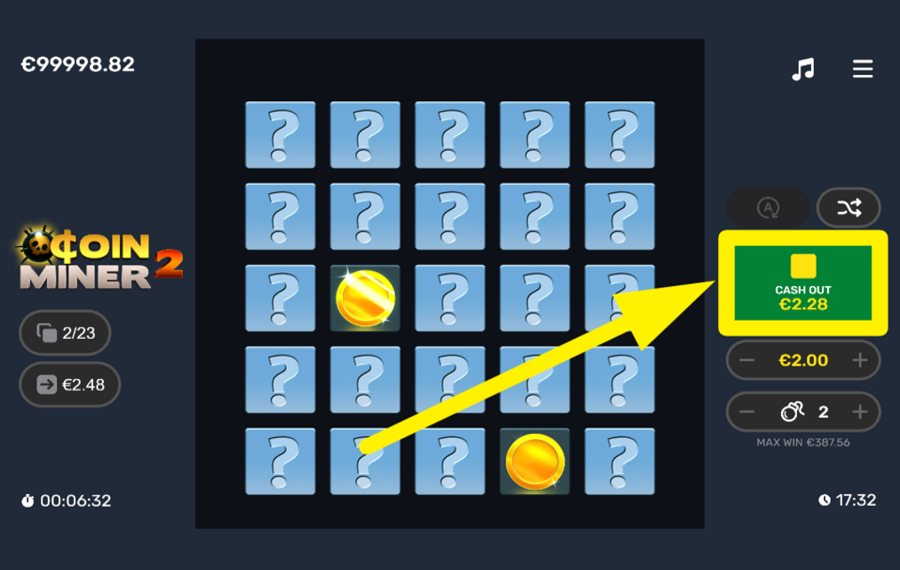
During the game, you will see a “Cash Out” button appearing on the right-hand side of the screen. This button will display your current winnings as you reveal more tiles. Press this button at any point to end the round and collect the money you've earned so far.
5
CHOOSE AUTOMATIC GAMEPLAY.
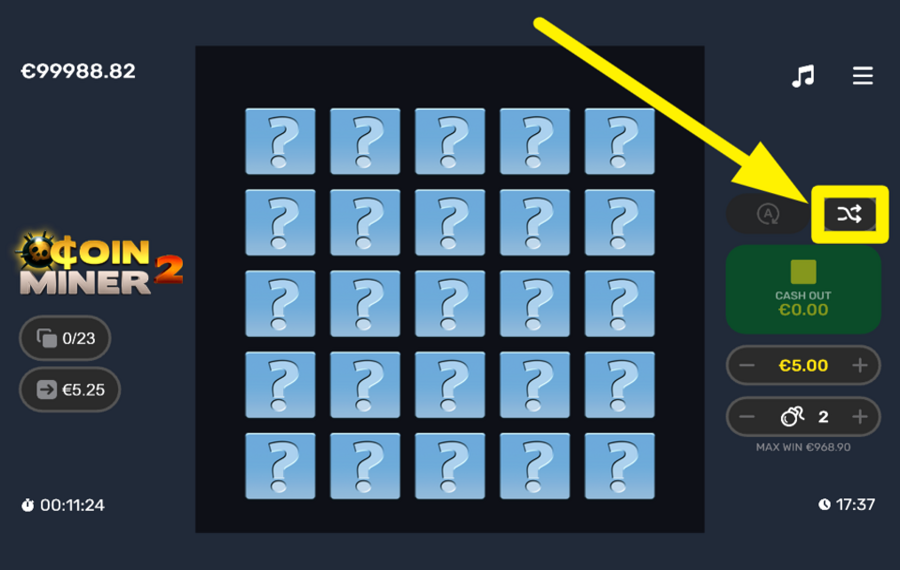
If you prefer hands-free gameplay, press the ”Autoplay” button or the letter ”A”, which is located just above the ”Play” button. Once pressed, an overlay menu will appear with options to configure the Autoplay settings. You can select the tiles and the number of rounds you wish to automate, as well as advanced settings like stopping if your balance decreases or increases by a certain amount. After adjusting the settings, hit the gray button with a checkmark to start the feature.
6
SELECT TILES RANDOMLY.
A special feature in Coin Miner 2 is the "Random Tile" button. It is located above the "Play" button and marked by intertwined arrows. If you’re unsure which tile to reveal next, press this button to let the game select a tile for you at random.
Coin Miner 2 Ratings & Reviews
Our community rated Coin Miner 2 as Very Good with a score of 4 out of 5 based on 31 votes.




Andi66Level 14Germany





PIEREK86Level 14Netherlands


MaciasssLevel 9Poland




verichipy![account-cancel]() Suspended
Suspended
 Suspended
Josh12![account-cancel]() Suspended
Suspended
Suspended


Skotlarok79Level 8
NESTOR93Level 8Mexico
Macias![account-cancel]() Suspended
Suspended
Suspendeddom.kozlrLevel 7


Raquelin40![account-cancel]() Suspended
Suspended
Suspended

Squidward75Level 16
icep0werLevel 4



Feefs4Level 20


mommadukes63Level 7
Mojoe3![account-cancel]() Suspended
Suspended
SuspendedShow 16 more
Rate and Review Coin Miner 2
When writing a Game Review, remember to share your personal experience in detail - whether it's positive or negative. For more tips on writing game reviews, check out our dedicated Help Page.
How to Write a Game ReviewCoin Miner 2 Q&As
Got questions about Coin Miner 2?
Ask a QuestionCompare Coin Miner 2 to Other Games
+![Turbo Games Mines]()

Turbo Games Mines
RTP: 95%
+![Bayraktar]()

Bayraktar
RTP: 95%
+![Bust and Win]()

Bust and Win
RTP: 95%
+![Jackpot Mines]()
Jackpot Mines
RTP: 97%
+![Im A Cat]()

Im A Cat
RTP: 95%
+![Gold Rush River Treasure]()

Gold Rush River Treasure
RTP: 94%
+![Vibra Mines]()

Vibra Mines
RTP: 95.92%
+![Gold Mine Hunter]()

Gold Mine Hunter
RTP: 0%
+![Hamsterpunk Mines]()

Hamsterpunk Mines
RTP: 95%
+![Mines Football]()

Mines Football
RTP: 97%
RatingSoftwareYearRTP
Coin Miner 2
Gaming Corps
2023
94.05%


Show more![arrow_down]()


Other Games by Gaming Corps









Patrik Turlea
Game Expert
- Over 1 year of experience in the gambling industry;
- Published & reviewed 4.000+ casino games, ensuring accuracy;
- Strong grasp of casino games & mechanics;
- Holds a Bachelor’s Degree from UCECOM Spiru Haret.

