 Level
Level 


 Casinos
 Bonuses


ChartX

 Refresh
 Full Screen
 Report
ChartX Details

Software
Pascal Gaming
Release date
Sep 11, 2025
Game type
Crash

Times Played
 No
No
3D animation
No
Technology
HTML5
Play ChartX Slot for Real Money




Load More Casinos (+2)
How to Play ChartX Slot: Mastering the Basics
1
CHOOSE A BET AMOUNT.
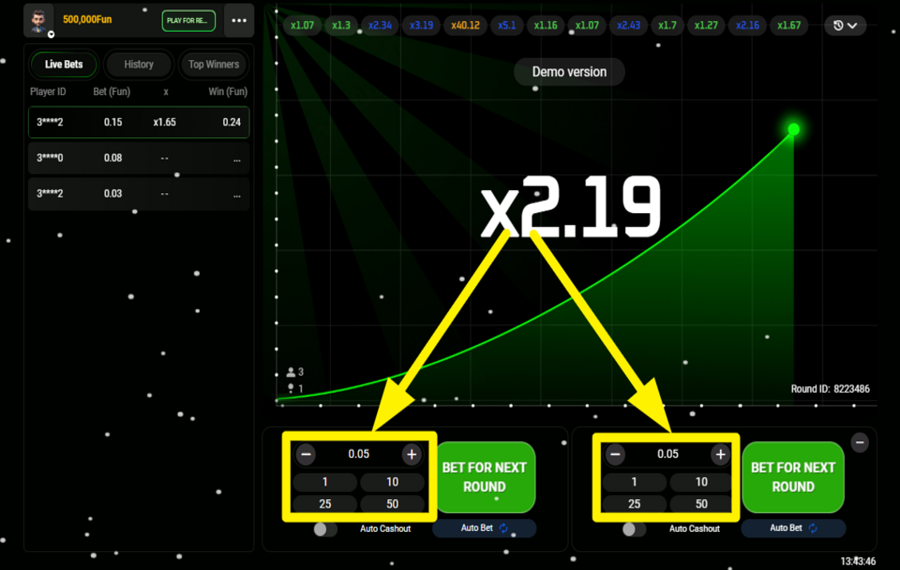
Locate the stake amount fields beneath the chart. Tap the “+“ and “-“ buttons or use the preset values (such as 1, 10, 25, or 50) to fine-tune how much you want to wager in the upcoming round. Since it is a multiplayer game, you can choose your “bet“ amount from either of the selection fields, and this applies to all the subsequent steps.
2
PLACE YOUR BET.
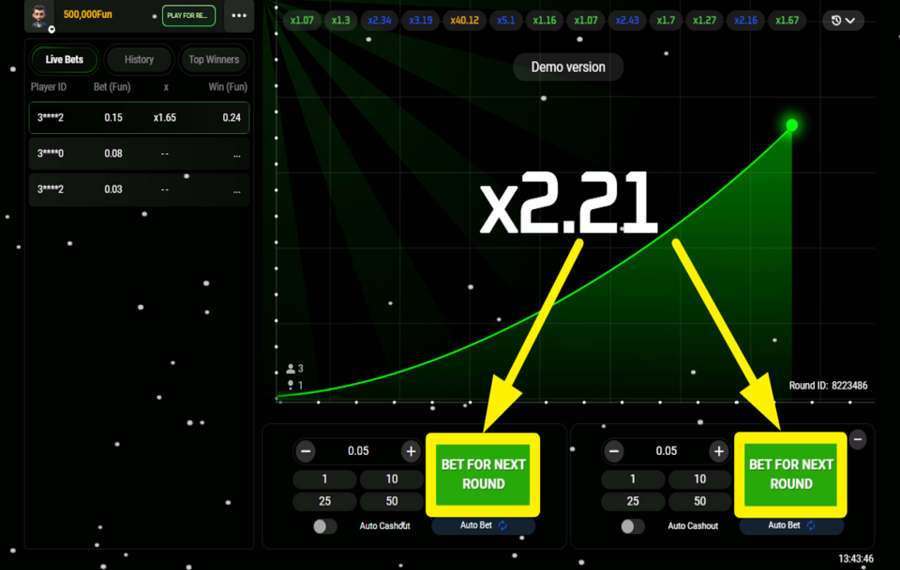
Once the stake is set, press the green “Bet For Next Round” button positioned below the chart. This confirms your entry into the next round. When the game starts, the chart begins climbing from x1.0, and your “bet” is now active as long as the multiplier keeps rising.
3
CASH OUT YOUR WINNINGS.
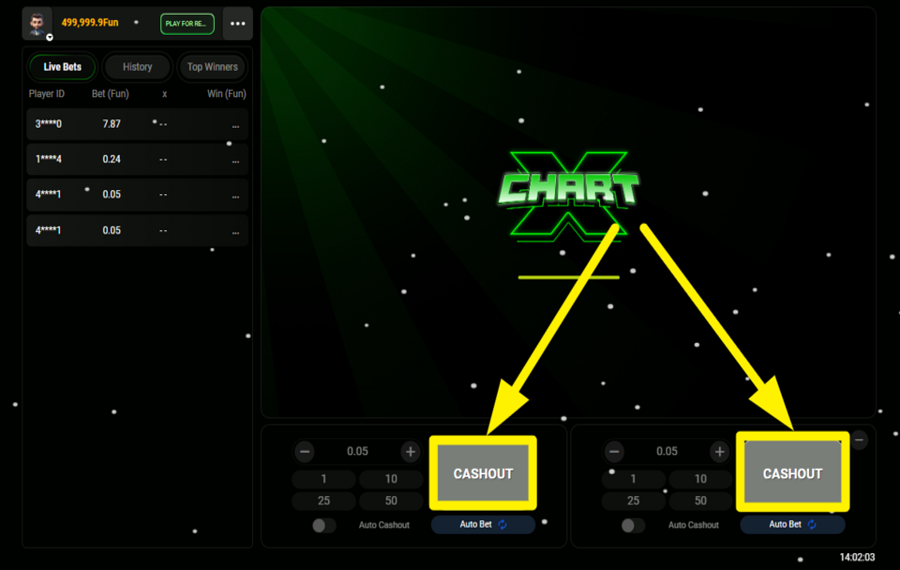
During an active round, keep an eye on the growing multiplier displayed at the center of the chart. Press the “Cashout” button as soon as you’re satisfied with the current value to lock in a win. Your payout is calculated by multiplying your “bet” by the multiplier shown at the moment you exit. If the chart stops before you cash out, the round ends, and the “bet” is lost.
4
ENABLE AUTOPLAY.
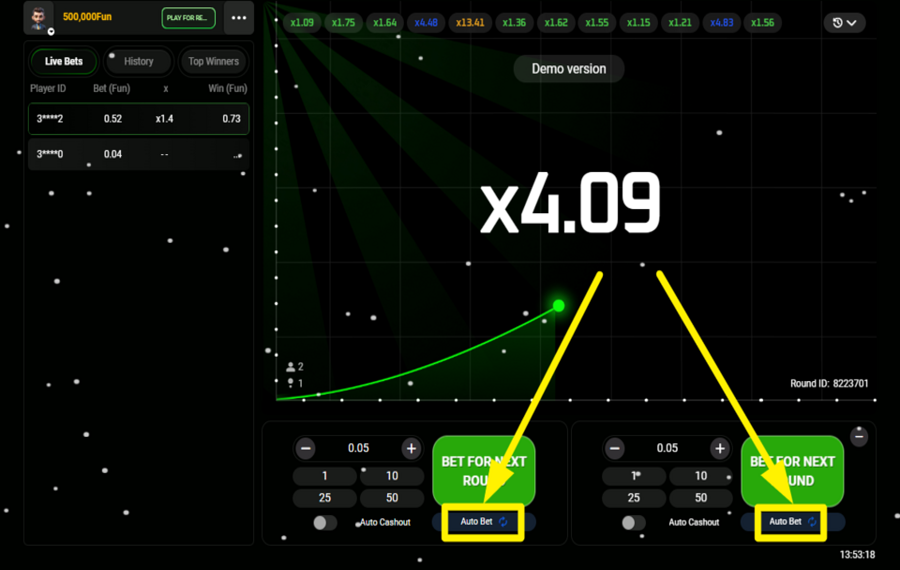
To automate consecutive rounds, tap the “Auto Bet” option located below the green “bet“ button. A panel opens where you select the number of rounds you want the system to run automatically. After choosing a round count and confirming with “Start,” the game places the same “bet” for each round without further input from you.
5
OPT FOR AUTO CASHOUT.
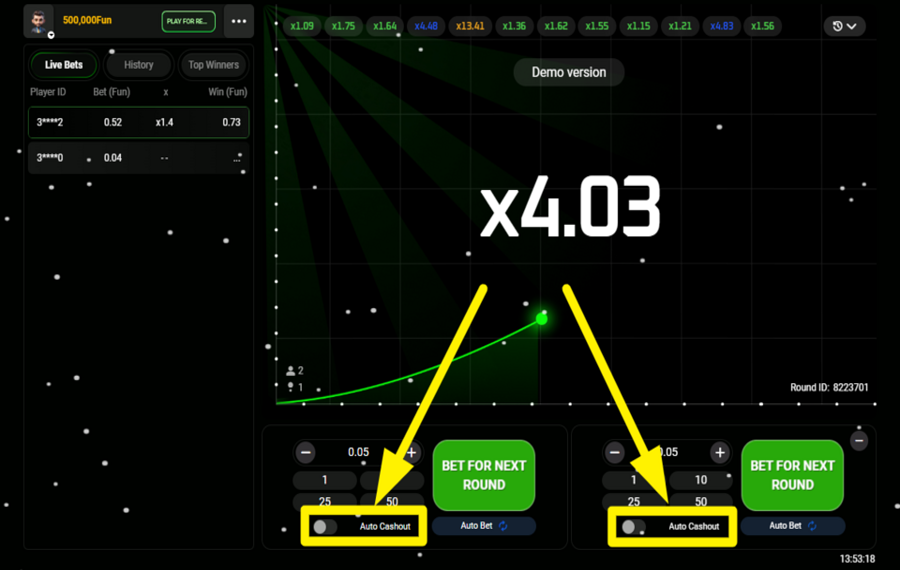
Enable “Auto Cashout” using the toggle beneath the bet controls to predefine an exit multiplier. Enter the multiplier value you want to cash out at, and once the round reaches that point, the system automatically triggers the “Cashout” for you.
ChartX Ratings & Reviews
Our community rated ChartX as Average with a score of 3.5 out of 5 based on 2 votes.




ggmanLevel 13





AriezuilenLevel 9
Rate and Review ChartX
When writing a Game Review, remember to share your personal experience in detail - whether it's positive or negative. For more tips on writing game reviews, check out our dedicated Help Page.
How to Write a Game ReviewChartX Q&As
Got questions about ChartX?
Ask a QuestionCompare ChartX to Other Games
+![High Striker]()

High Striker
RTP: 97%
+![Lucky Crumbling]()

Lucky Crumbling
RTP: 96%
+![Super Beto Crash]()

Super Beto Crash
RTP: 97%
+![High Flyer]()

High Flyer
RTP: 97%
+![Betman Crash]()

Betman Crash
RTP: 97%
RatingSoftwareYearRTP

ChartX
Pascal Gaming
2025
96%



Show more![arrow_down]()


Other Games by Pascal Gaming









- Over 2 years of experience in the iGaming industry.
- Uploaded & maintained data for 3,000+ casino games.
- Strong grasp of casino game mechanics, especially slots.
- Reviewed and fact-checked over 3,500+ casino games.

