


 Casinos
 Bonuses


Peeking Banker Bull Bull


Peeking Banker Bull Bull Details

Software
CQ9 Gaming
Release date
Nov 04, 2020
Game type
Table Games

Times Played
 No

3D animation
No
Technology
HTML5
Play Peeking Banker Bull Bull Slot for Real Money




Load More Casinos (+7)
How to Play Peeking Banker Bull Bull Slot: Mastering the Basics
1
ENTER A ROOM.
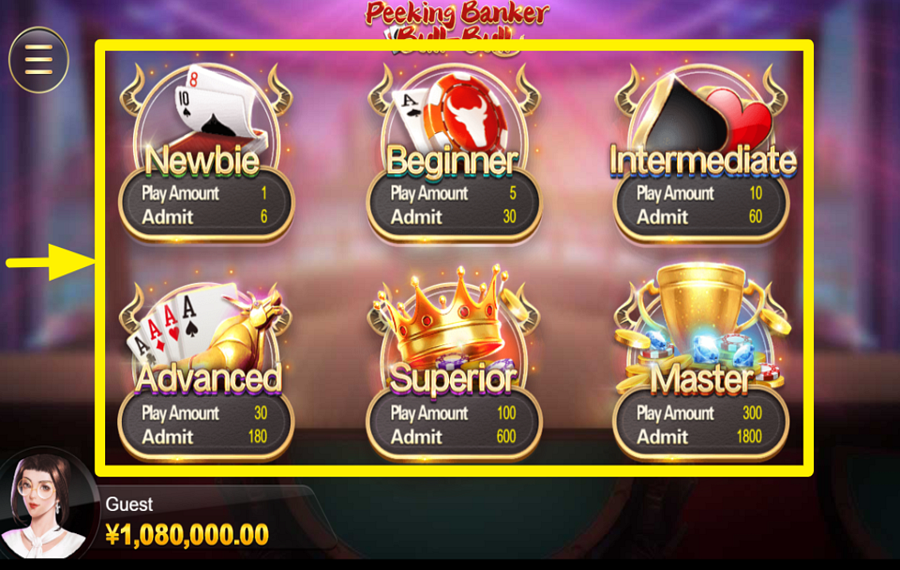
When the game launches, you will see six room options in the center of the screen: "Newbie," "Beginner," "Intermediate," "Advanced," "Superior," and "Master." Each room displays a "Play Amount" and an "Admit" requirement. Select the room that matches your balance and preferred stake level. The room's "Play Amount" acts as the base value for the round, so higher rooms generally involve larger wagers and bigger potential payouts.
2
CHOOSE A MULTIPLIER.
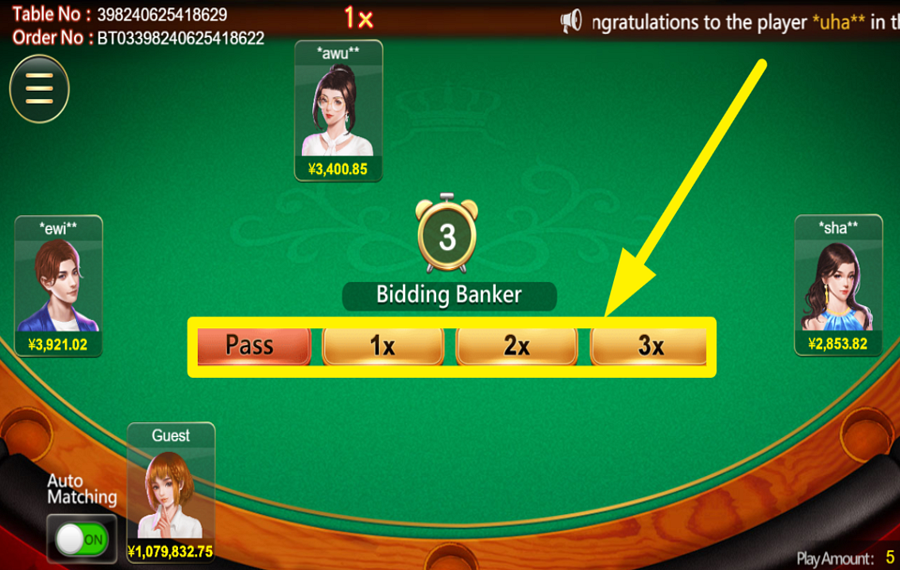
After entering a room, the game begins with a banker selection phase. A countdown timer appears in the middle of the table, along with several buttons near the bottom center of the screen. Tap "Pass" if you do not wish to compete for the banker position, or choose one of the available multipliers, such as "1x," "2x," or "3x." The highest selected multiplier determines the banker. If multiple players choose the same highest value, the game selects the banker according to its rules. Once the banker is decided, all players receive five face-down cards.
3
PEEK OR TURN OVER.

When your cards are dealt, two buttons appear on the right side of the table: "Peeking" and "Turn Over." Press "Turn Over" if you want to reveal your hand immediately. Alternatively, click "Peeking" to inspect your cards gradually before revealing them. The objective is to arrange and evaluate your five-card hand according to the Bull-Bull hand-ranking system. The game compares your final hand only against the banker rather than against the other players at the table.
4
INSPECT THE HIDDEN CARD.
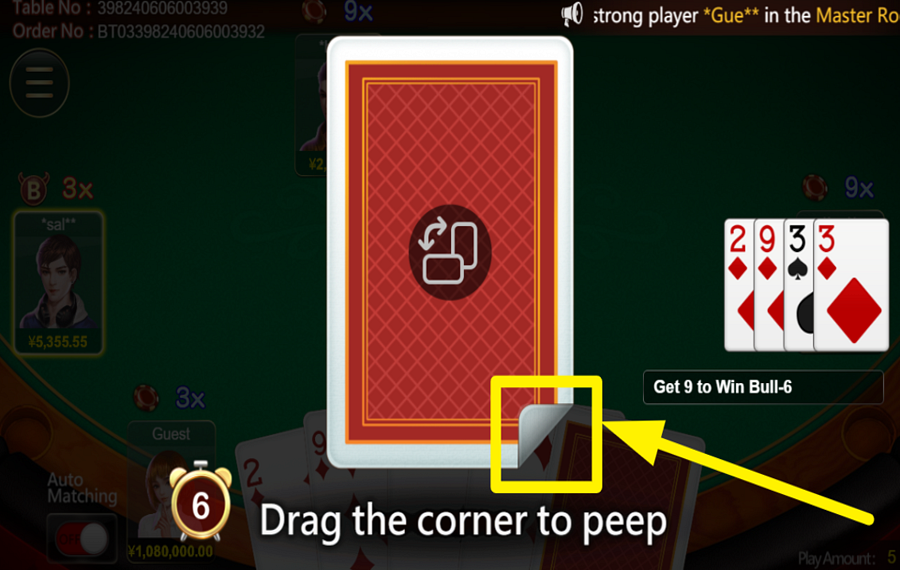
If you choose the "Peeking" option, a large card appears in the center of the screen. To inspect the hidden card, click and drag the folded corner shown at the bottom-right of the card. Repeat the process as instructed until you have viewed the necessary cards and determined the strength of your hand before revealing it to the table.
5
START A NEW ROUND.
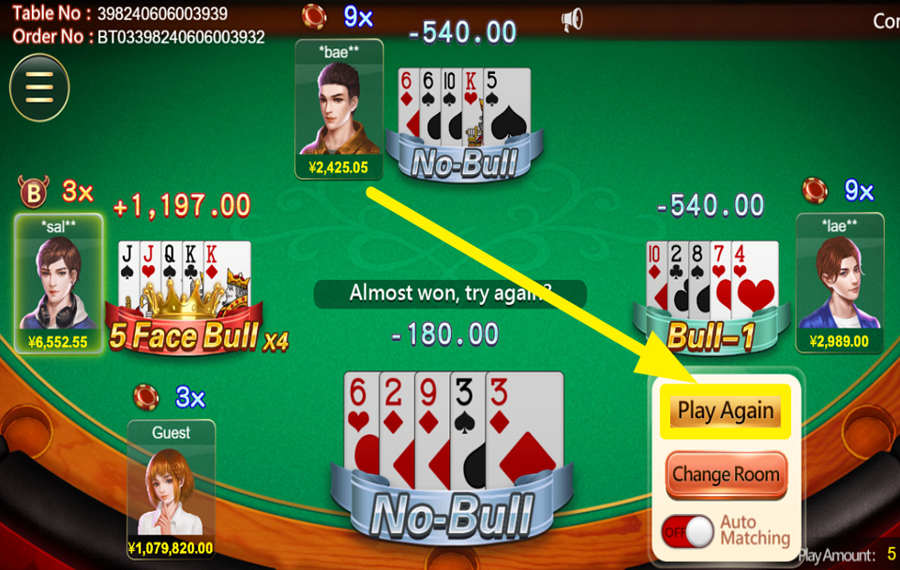
After all hands are revealed and the results are settled, a small menu appears on the right side of the screen. Press the "Play Again" button to remain at the current table and immediately join another round with the same room settings. If you would rather switch to a different stake level, click the "Change Room" button instead and return to the room selection screen to choose another table.
6
OPT FOR AUTO MATCHING.
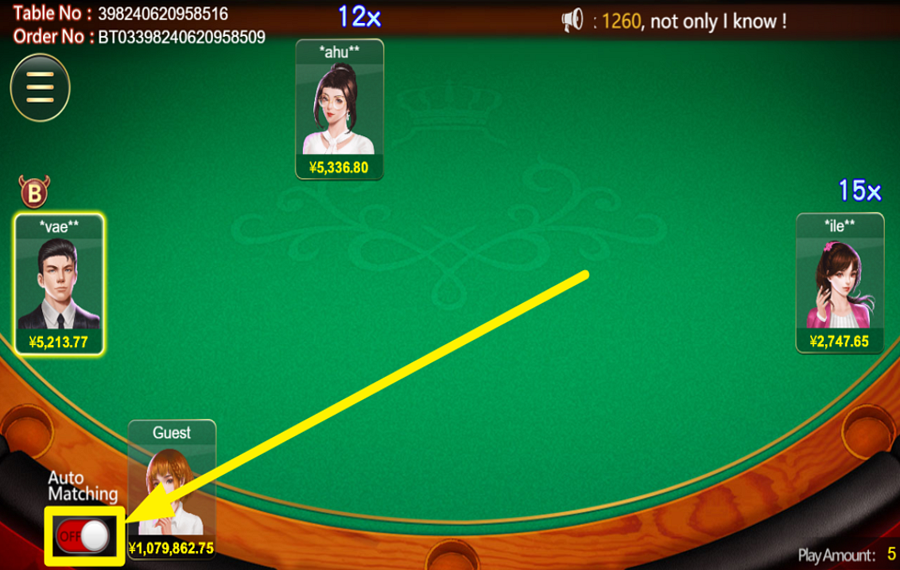
Locate the "Auto Matching" switch in the bottom-left corner of the table screen. Turn this switch on to have the game automatically place you into new rounds without requiring manual confirmation each time. Turn it off whenever you want to stop automatic table matching and decide manually whether to continue playing or move to a different room.
Peeking Banker Bull Bull Ratings & Reviews
Our community rated Peeking Banker Bull Bull as Very Good with a score of 4 out of 5 based on 1 vote.




pingvinasLevel 40


Rate and Review Peeking Banker Bull Bull
When writing a Game Review, remember to share your personal experience in detail - whether it's positive or negative. For more tips on writing game reviews, check out our dedicated Help Page.
How to Write a Game ReviewPeeking Banker Bull Bull Q&As
Got questions about Peeking Banker Bull Bull?
Ask a QuestionCompare Peeking Banker Bull Bull to Other Games
+![7 Up Down]()

7 Up Down
RTP: 97%
+![KA Gaming Pok Deng]()

KA Gaming Pok Deng
RTP: 96%
+![Classic Fish Prawn Crab]()

Classic Fish Prawn Crab
RTP: 97.22%
+![KA Gaming Dragon Tiger]()

KA Gaming Dragon Tiger
RTP: Undisclosed
+![Andar Bahar Extra]()

Andar Bahar Extra
RTP: 95.28%
+![Titan Dice]()

Titan Dice
RTP: 97.33%
+![RTG Andar Bahar]()

RTG Andar Bahar
RTP: Undisclosed
+![Under 7 Over 7]()

Under 7 Over 7
RTP: 96.2%
+![Vivo Gaming Andar Bahar]()

Vivo Gaming Andar Bahar
RTP: Undisclosed
+![Mille Due Mille]()

Mille Due Mille
RTP: 96.2%






Other Games by CQ9 Gaming





Load More CQ9 Gaming Games

Mihai Enculescu
Senior Game Expert
- Over 2 years of experience in the iGaming industry.
- Uploaded & maintained data for 3,000+ casino games.
- Strong grasp of casino game mechanics, especially slots.
- Reviewed and fact-checked over 3,500+ casino games.

